
Netvibes Personal Portals A Dummys Guide
Netvibes offers personal portal creation for dummies, providing a straightforward path to building your personalized online hub. This comprehensive guide dives into the world of Netvibes, demystifying its features and functionalities for beginners. We’ll explore the process from setup to customization, addressing common challenges and concerns. Whether you’re a complete novice or just looking to streamline your online experience, this guide will empower you to create a functional and personalized Netvibes portal.
This guide will walk you through the process, from initial setup to advanced customization and troubleshooting. We’ll break down each step into easily digestible parts, making the entire experience user-friendly. You’ll learn how to effectively integrate various feeds, news sources, and social media accounts into your portal. We’ll also provide practical examples, case studies, and comparisons to demonstrate the versatility and value of Netvibes.
Introduction to Netvibes Personal Portals
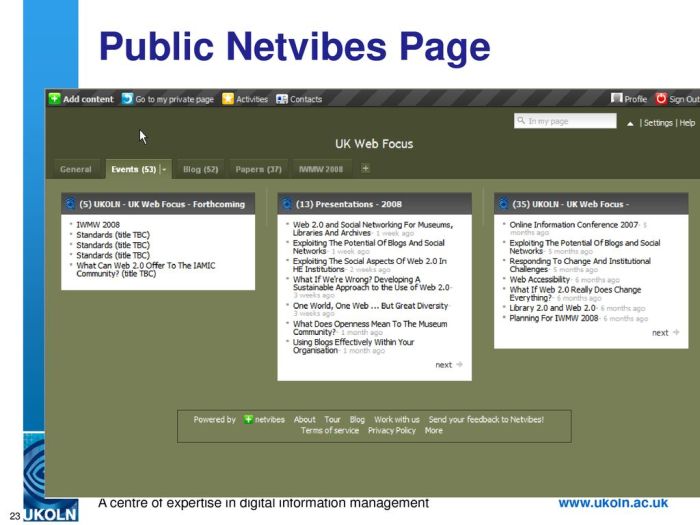
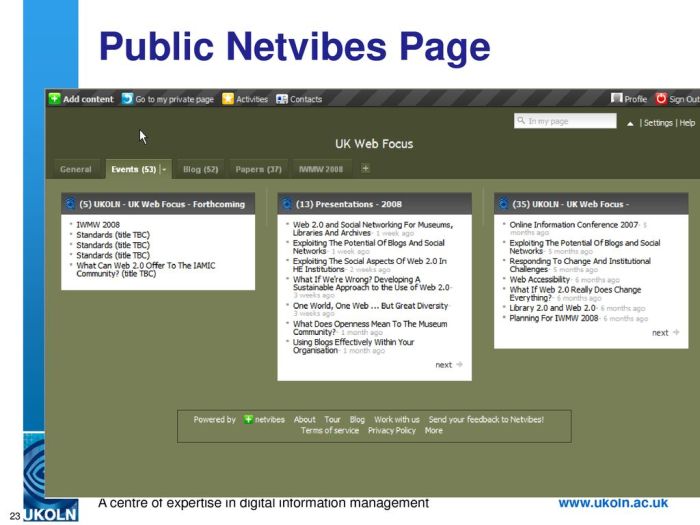
Netvibes was a popular online platform that allowed users to create personalized dashboards, known as personal portals. These portals served as a central hub for aggregating information from various sources, including news feeds, social media updates, and personal calendars. Think of it as a customizable homepage, but far more comprehensive and tailored to your individual needs. Netvibes facilitated the curation of important content into a single, user-friendly interface.Netvibes offered a highly customizable experience, allowing users to arrange and display information in a format that worked best for them.
This made it a powerful tool for managing multiple tasks and staying informed about diverse topics. Its core function was to create a personalized, accessible, and organized space for gathering and interacting with various online resources.
Target Audience
Netvibes aimed to cater to a wide range of users, including professionals, students, and anyone who wanted to streamline their online activities. The platform’s flexibility and customization options appealed to individuals seeking a consolidated view of their online world. The platform’s goal was to help users effectively manage information overload by providing a streamlined and personalized experience.
Core Features of Netvibes Personal Portals
Netvibes personal portals offered a unique blend of features. Its most significant advantage was the ability to aggregate content from diverse sources. This included RSS feeds, social media profiles, and even email accounts. Users could customize the appearance and layout of their portals, choosing widgets and displaying information in a manner that suited their needs. This highly customizable interface allowed users to tailor their portals to their specific workflow and interests.
A key feature was the integration of various services.
Comparison with Other Portal Creation Tools
| Netvibes | Other Portal Creation Tools |
|---|---|
| Highly customizable dashboard for aggregating information from diverse sources. | Often feature-limited or require more technical expertise to customize. |
| Easy-to-use interface for non-technical users. | Can have a steeper learning curve for some users. |
| Integrated various services like RSS feeds, social media, and email. | May lack seamless integration or have limitations in integrating multiple services. |
| Strong focus on visual organization and user control. | May have a less visually engaging or less customizable user experience. |
This table illustrates the key differences between Netvibes and other portal creation tools. Netvibes excelled in providing a user-friendly and visually appealing platform for aggregating information, while other tools may prioritize different aspects like specific functionalities or technical complexity.
Understanding the “Dummies” Perspective
Creating a personalized portal with Netvibes can be a powerful way to organize information and stay connected. However, the process can feel daunting for those new to the platform. This section focuses on common challenges and knowledge gaps beginners face, helping to tailor our Netvibes guide to meet their needs.The target audience for this Netvibes guide likely possesses a range of technical skills.
Some users might be completely new to web portals and widgets, while others may have some familiarity with similar tools but need a structured approach to Netvibes. The guide should assume a baseline of comfort with basic web navigation and the ability to copy and paste information.
Common Knowledge Gaps
A key challenge for beginners is grasping the concept of personalization. Users might struggle to visualize how individual widgets can be combined to create a unique and useful portal. They may also be unfamiliar with the range of available widgets and how to select the most appropriate ones for their needs. Often, users are unclear on the concept of “aggregating” information from different sources into a single view.
Typical Technical Skill Level
The target audience likely has a low to moderate technical skill level. They are comfortable using a web browser and interacting with simple websites. They are likely familiar with basic computer functions, but their experience with web applications and personalization tools may be limited. Advanced coding or programming knowledge is not expected.
User Concerns and Pain Points
A common concern for new users is the initial complexity of setting up the portal. They might be intimidated by the sheer number of options and customization possibilities. Another key concern is finding and integrating the right widgets to meet their specific needs. The process of adding and arranging widgets can be perceived as tedious. Troubleshooting problems with widget displays or functionality also represents a significant pain point.
Portal Creation Process Flowchart

This simple flowchart (though a visual representation is not possible here) illustrates the typical Netvibes portal creation process. It starts with choosing a template or starting with a blank slate. Next, the user selects and configures widgets, often following a process of adding, arranging, and customizing. Finally, the portal is saved and personalized to the user’s preferences.
This visual representation can greatly assist new users in understanding the general steps involved.
| Step | Action |
|---|---|
| 1 | Choose a template or start with a blank portal. |
| 2 | Select and configure widgets, including customizing their appearance and content. |
| 3 | Arrange widgets in the desired layout. |
| 4 | Save and personalize the portal. |
Step-by-Step Portal Creation Guide
Creating a personalized Netvibes portal is a straightforward process, perfect for anyone who wants a customized hub for their information. This guide will walk you through the initial setup, configuration, and integration of various content sources, ensuring you have a fully functional and organized portal in no time.This guide will detail the necessary steps to build your Netvibes portal.
We will explore the initial configuration, widget addition, content integration, and organization. You’ll be able to assemble a customized dashboard to meet your specific needs and interests.
Initial Setup and Configuration
The initial setup involves navigating to the Netvibes website and creating an account. Once logged in, you’ll be presented with a blank workspace. This blank canvas is where you’ll build your personalized portal. A crucial step is to select a theme or template to provide a visual starting point. Themes greatly influence the portal’s overall appearance.
Adding Widgets and Customizing Layout
Widgets are the building blocks of your Netvibes portal. They provide different functionalities, from displaying news feeds to showing social media updates. Adding widgets is straightforward; you can drag and drop them into your desired positions. Experiment with various arrangements until you find a layout that works best for your workflow. Customization extends beyond layout; you can adjust widget sizes, colors, and fonts to align with your preferences.
Integrating Feeds, News Sources, and Social Media
Adding feeds and news sources is vital to keeping your portal updated with the latest information. Netvibes supports a wide array of RSS feeds and news websites. You can also integrate social media accounts to display recent posts and updates from your chosen platforms. Simply enter the URL for the feed, news source, or social media account into the widget’s configuration settings.
The integration process is typically automatic, saving you time and effort.
Organizing and Categorizing Content
Organizing content is essential for a user-friendly portal. You can group widgets into sections or use folders to categorize different topics. This structure allows you to easily find specific information within your portal. Categorizing your widgets will enhance the usability of your personal portal, making it a valuable tool for quick access to various information sources.
| Widget | Functionality |
|---|---|
| News Feed | Displays headlines and summaries from various news sources. |
| Social Media Feed | Shows updates from specified social media accounts. |
| Calendar | Displays a calendar view for scheduling and reminders. |
| Weather | Provides current weather conditions for a specified location. |
| To-Do List | Allows you to create and manage tasks. |
| Stock Quotes | Displays real-time stock market data for chosen companies. |
| Clock | Shows the current time in various time zones. |
| Web Page | Displays a selected web page or a specific portion of a page. |
Customization and Advanced Features

Netvibes personal portals offer a high degree of customization, allowing you to tailor the platform to your specific needs and preferences. Beyond the basic setup, you can fine-tune the appearance, manage access, personalize notifications, and even create unique widgets. This flexibility transforms Netvibes from a simple news aggregator into a truly personal and efficient information hub.Beyond the initial setup, you can dive deeper into customization.
This involves not just changing colors or adding widgets, but also configuring advanced features that significantly enhance your Netvibes experience. Managing user permissions and notification settings is key to a secure and personalized portal. Adding custom widgets opens up an even wider range of possibilities.
Customizing Appearance and Theme
Netvibes allows for extensive customization of your portal’s look and feel. You can change colors, fonts, and backgrounds to match your personal style. Many pre-designed themes are available, allowing you to quickly apply a new look without starting from scratch. These themes often include specific color palettes and layout structures, providing visually appealing and consistent options.
Managing User Permissions and Access Controls
Securing your Netvibes portal is crucial. You can control who has access to different parts of your portal by setting user permissions. This granular control ensures only authorized individuals can view or modify specific content, widgets, or settings. This is particularly important for shared or collaborative portals. Restricting access to sensitive information prevents unauthorized access and maintains the integrity of your data.
Personalizing Notification Settings
Netvibes allows for personalized notification settings. You can customize the frequency, type, and delivery method of notifications. This lets you receive only the updates you find most important, minimizing distractions. You can select which feeds or widgets trigger alerts, ensuring you are informed when something crucial happens without being overwhelmed by unnecessary notifications. This feature allows you to tailor your portal to your workflow and focus.
Frequently Asked Questions about Customization
| Question | Answer |
|---|---|
| How do I change the theme of my portal? | Most themes are accessible within the portal’s customization settings. Look for a “Theme” or “Appearance” option. |
| Can I create my own theme? | While Netvibes offers pre-designed themes, creating your own involves advanced coding. |
| How can I restrict access to specific widgets? | User permissions within Netvibes control access to individual widgets. |
| How do I adjust notification frequencies for specific feeds? | The notification settings within each feed allow adjustments for frequency and delivery method. |
| What are the limits to creating custom widgets? | The specific functionality of custom widgets is limited by the underlying coding framework of Netvibes. However, they can significantly expand the portal’s capabilities. |
Creating Custom Widgets
Creating custom widgets allows for the integration of unique functionalities into your Netvibes portal. This is possible by leveraging the Netvibes API, enabling you to build tailored widgets to display specific data, integrate external services, or automate tasks. For instance, a custom widget could pull stock quotes, display weather forecasts, or manage project deadlines. While requiring technical expertise, custom widgets can enhance your portal’s efficiency and uniqueness.
Netvibes is great for building your own personalized online hub, even if you’re a complete newbie. It’s super user-friendly, which is a big plus. Speaking of user-friendly, did you know that a new NEC chipset can now handle HD, DVD, and Blu-ray formats? This new NEC chipset crosses the HD, DVD, and Blu-ray divide , which is a massive improvement for tech.
So, whether you’re organizing your favorite news sources or just want a custom online space, Netvibes is a surprisingly powerful tool for personal portal creation.
Maintaining and Troubleshooting
Maintaining a Netvibes portal requires regular updates and vigilance to ensure optimal performance. A well-maintained portal remains a valuable tool for information aggregation and personalized workflows. This section addresses strategies for upkeep, potential issues, and troubleshooting steps to keep your portal running smoothly.Troubleshooting involves identifying and resolving problems that may arise with your Netvibes portal. Proactive maintenance prevents major disruptions, while effective troubleshooting minimizes downtime and keeps your personalized information accessible.
Updating Your Netvibes Portal
Regularly updating your Netvibes portal is crucial for security and functionality. Updates often include bug fixes, performance improvements, and new features. Netvibes releases updates periodically, and these should be installed as they become available. This ensures your portal’s compatibility with the latest technologies and addresses any potential security vulnerabilities. Verify the update compatibility with your current portal configuration to avoid unforeseen issues.
Potential Issues and Solutions
Several issues might arise when using a Netvibes portal. Understanding common problems and their solutions is essential for effective maintenance. This includes handling problems like widgets not displaying, broken links, or login issues.
Common Troubleshooting Steps
This section provides a step-by-step guide for troubleshooting common issues.
| Issue | Possible Cause | Solution |
|---|---|---|
| Widgets not displaying | Incorrect widget configuration, outdated widgets, or insufficient permissions. | Verify widget URLs, update widgets, or check user permissions. If the problem persists, try refreshing the page or contacting Netvibes support. |
| Broken links | Incorrect link formatting, outdated external resources, or missing files. | Review the link structure, ensure external resources are still available, and verify the file paths. |
| Login issues | Incorrect username/password, temporary server issues, or security restrictions. | Double-check credentials. If the problem persists, try clearing browser cache/cookies or contacting Netvibes support. |
| Slow performance | Too many widgets, heavy widgets, or network congestion. | Reduce the number of widgets, choose lightweight widgets, or optimize your network connection. |
Backing Up and Restoring Your Portal
Backing up your Netvibes portal ensures data safety in case of accidental deletion or system failure. A backup copy allows you to restore your portal to its previous state. Netvibes doesn’t offer a direct export/import feature for entire portals. Instead, users must manually save their widget configurations and settings to recover their data.
Netvibes is great for creating personalized online hubs, perfect for anyone new to this. Think of it like a customizable dashboard, but instead of just displaying the latest news, you can tailor it to your specific needs. While we’re on the topic of digital time capsules, Yahoo is making headlines with its ambitious project to create the world’s largest time capsule, yahoo creating worlds biggest time capsule , which is a pretty cool project.
This kind of innovation mirrors the flexibility you get when building a Netvibes portal – it’s a personalized digital space for you to control and organize your information.
Optimizing Portal Performance
Optimizing Netvibes portal performance involves minimizing resource usage and maximizing responsiveness. This involves careful selection of widgets, their configuration, and efficient data management. A well-optimized portal ensures smooth navigation and reduces loading times.
Real-World Examples and Case Studies
Netvibes personal portals, far from being a niche tool, have found practical applications across various industries. From streamlining project management in small businesses to centralizing information for large corporations, the adaptable nature of Netvibes makes it a valuable asset. These real-world implementations showcase the diverse ways individuals and teams leverage Netvibes to enhance productivity and communication.By exploring successful implementations and use cases, we gain insights into the potential benefits and how Netvibes can be tailored to specific needs.
These case studies offer practical examples, demonstrating how different organizations have leveraged Netvibes to optimize workflows and achieve their goals.
Netvibes is great for creating your own personalized online hubs, even if you’re a complete newbie. Thinking about how much faster your daily tasks could be with a streamlined digital workspace? Well, AMD’s new high-speed low-power chipsets are a game changer, promising a more responsive experience for such personal portals. This means Netvibes can now be even more effective at helping you organize your online life.
Successful Implementations in Various Fields
Netvibes portals have demonstrated their versatility in various industries. Organizations from diverse sectors, including education, healthcare, and marketing, have found value in its customizable features. These successful implementations highlight the tool’s potential to adapt to specific needs and enhance operational efficiency.
- Education Sector: A university used a Netvibes portal to consolidate student resources, including course materials, announcements, and important deadlines. This streamlined communication improved student engagement and reduced administrative burden. Key takeaway: Centralized information improves efficiency and communication for students.
- Healthcare: A hospital implemented a Netvibes portal for staff to access patient information, schedules, and critical updates in real-time. This improved response times to emergencies and facilitated seamless communication between departments. Key takeaway: Real-time access to critical information improves patient care and reduces response times.
- Marketing Agency: A marketing agency utilized Netvibes to consolidate client information, project updates, and marketing campaign progress. This improved team collaboration and project management, leading to better client satisfaction. Key takeaway: Streamlined project management and communication leads to better client service and satisfaction.
Portal Layout Examples
Netvibes portals can be customized to accommodate various information structures. These examples illustrate different ways to organize content and data for optimal user experience.
- Project Management Layout: A portal for a project management team might include a dynamic dashboard with project timelines, task progress indicators, and communication channels. This visual representation ensures a clear overview of project status. A table could display tasks, assigned personnel, and deadlines. This allows for rapid assessment of progress.
- Visual Example (text-based):
   Project: Alpha
   Timeline: 2024-03-15 to 2024-04-15
Task Assigned Deadline Status Design Mockups John Smith 2024-03-20 In Progress Develop Frontend Jane Doe 2024-03-25 Pending - Sales Tracking Layout: A sales team’s Netvibes portal could incorporate a graphical representation of sales targets, regional performance, and key account information. Visual charts could track sales progress over time, allowing for a clear understanding of trends and opportunities. A table might list leads, contacts, and their corresponding stages in the sales funnel. This enables targeted follow-up.
- Visual Example (text-based):
Sales Region: East Coast Target: $100,000Sales Progress Chart: (Image depicting a line graph illustrating sales progress.)
Lead Name Contact Stage Acme Corp John Doe Prospecting
Future of Netvibes Personal Portals: Netvibes Offers Personal Portal Creation For Dummies
Netvibes, once a popular personal portal platform, faces a future shaped by evolving user preferences and emerging technologies. Its ability to adapt and integrate with modern tools will determine its continued relevance. This section explores potential future directions, emerging trends, and Netvibes’ integration with current tech. We’ll also examine how Netvibes might compete with newer players in the personal portal space.The future of Netvibes depends on its ability to innovate and cater to the evolving needs of its user base.
Personalization, integration, and user experience are key areas for consideration. Netvibes must evolve beyond its current form to stay competitive.
Potential Future Directions and Updates
Netvibes could enhance its personalization capabilities by allowing users to create highly customized dashboards that are more visually appealing and easier to navigate. This includes incorporating drag-and-drop functionality and more advanced widget options. Improvements in widget compatibility with newer platforms and applications will be crucial.
Emerging Trends in Personal Portal Creation
Several trends are shaping the personal portal landscape. The increasing use of AI-powered tools for information aggregation and personalized recommendations will be a critical component. The rise of no-code/low-code platforms for creating custom solutions also presents an opportunity for Netvibes to adapt. Further, the demand for seamless integration with existing workspaces and productivity tools, like project management and communication platforms, is growing.
This trend suggests a need for more comprehensive integrations.
Netvibes Integration with Modern Technology and User Preferences, Netvibes offers personal portal creation for dummies
Netvibes should prioritize user-friendly interfaces. Intuitive design, accessibility features, and responsive design across various devices are crucial for attracting and retaining users. The platform should focus on providing secure data handling and privacy controls. Supporting the latest web technologies (such as WebAssembly) to enhance performance and user experience is essential.
Suggestions for Future Developments and Features
To enhance the user experience, Netvibes could integrate with popular social media platforms and productivity applications. This would allow for a centralized dashboard that provides a unified view of various aspects of a user’s life. Developing an API to allow third-party developers to create custom widgets and extensions would foster a vibrant community around the platform. Real-time updates and notifications would keep users informed and engaged.
Comparison with Emerging Competitors
| Feature | Netvibes | Example Competitor 1 (e.g., Personal Dashboard App) | Example Competitor 2 (e.g., Customizable News Aggregator) |
|---|---|---|---|
| Customization Options | Potentially strong, but needs modernization | Strong emphasis on visual customization | Strong focus on news filtering and organization |
| Integration with Productivity Tools | Limited integration, needs improvement | Good integration with popular apps | Limited, primarily focused on news |
| AI-Powered Features | Could be integrated to improve personalization | Potentially strong AI-driven features | Limited, mostly relies on search and filtering |
| Pricing Model | Needs clarification on future plans | Subscription-based model | Freemium model with premium features |
Netvibes must address its weaknesses compared to emerging competitors in the personal portal space, like improving its integration with modern productivity tools, adding AI-powered features for enhanced personalization, and clarifying its pricing model.
Closure
In conclusion, Netvibes provides a powerful and customizable platform for creating a personalized online workspace. This guide, designed specifically for beginners, walks you through every step, from initial setup to advanced customization. By following these steps, you can build a Netvibes portal tailored to your specific needs, ensuring you have a central hub for all your information. Whether you’re a student, professional, or simply someone seeking a more organized approach to online information, this guide is your key to harnessing the full potential of Netvibes.
