Google Earth Engine Integrates Gemini AI With New Ask Feature to Accelerate Geospatial Analysis

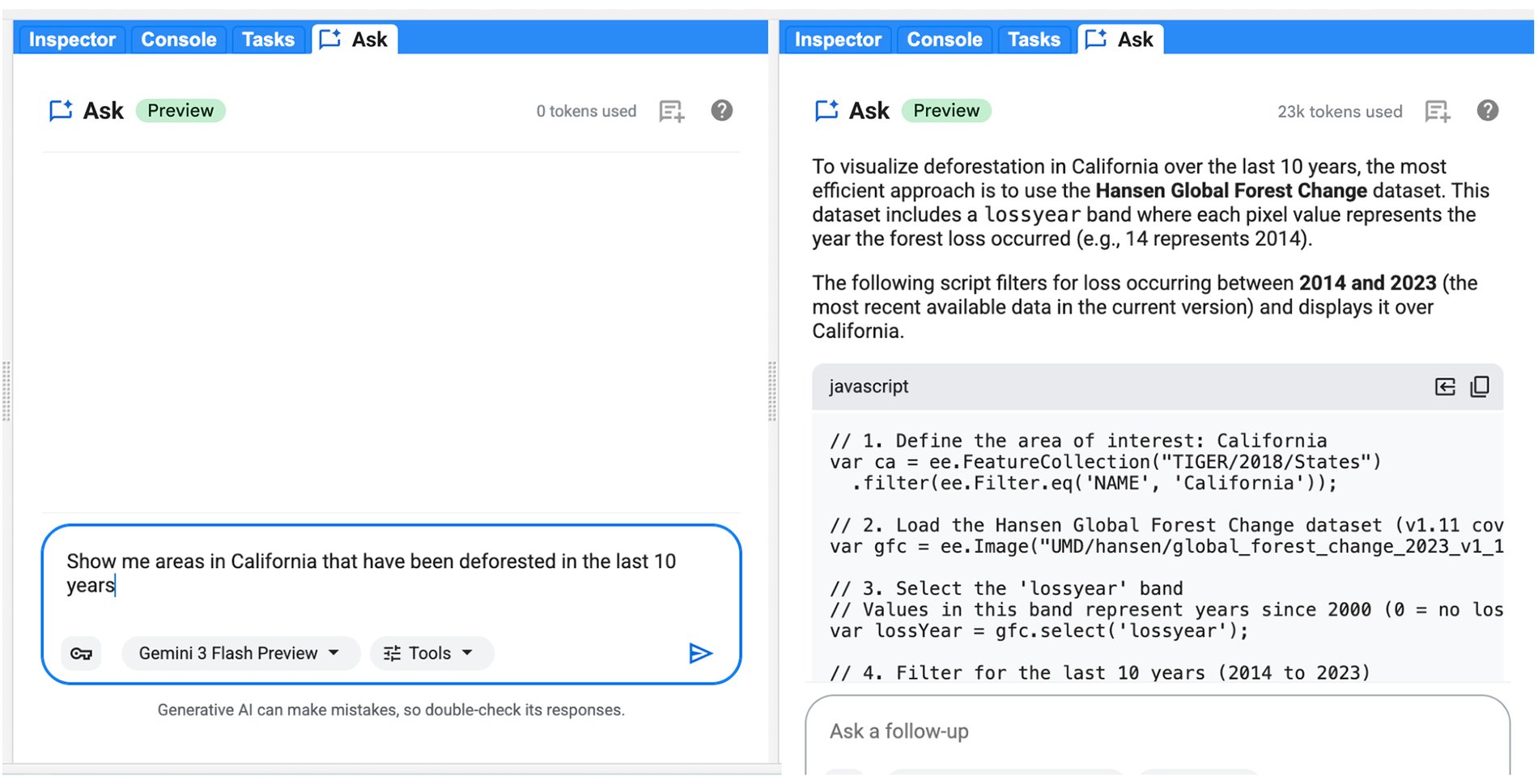
The intersection of artificial intelligence and environmental science reached a new milestone as Google announced the rollout of Ask, an advanced context-aware AI assistant integrated directly into the Google Earth Engine Code Editor. Part of the broader Google Earth AI ecosystem, the new feature leverages Gemini capabilities to transform natural language prompts into executable geospatial code, streamline debugging, and optimize complex data processing pipelines. Designed for environmental scientists, geospatial analysts, agricultural researchers, and urban planners, the tool seeks to eliminate the steep learning curve traditionally associated with querying petabytes of planetary-scale satellite imagery.
Background Context of the Integration
For over a decade, Google Earth Engine has served as a cornerstone platform for monitoring planetary health. By housing multi-petabyte catalogs of satellite imagery and geospatial datasets—ranging from decades of Landsat and Sentinel observations to climate and weather models—the platform enables researchers to track global forest cover changes, monitor water resources, and evaluate agricultural yields at unprecedented scales.
However, unlocking the full potential of these vast datasets has historically required specialized programming skills. Users had to manually master the Google Earth Engine application programming interface (API), memorize syntax rules, search through extensive documentation, and resolve intricate memory management or syntax errors. These technical hurdles frequently interrupted analytical workflows, slowing down the translation of raw satellite data into actionable environmental insights.
The introduction of Ask addresses these friction points by bridging the gap between natural human language and complex geospatial logic. Operating directly within the browser-based Code Editor via a dedicated side panel, the tool allows users to input their own Gemini API keys, bringing customized, intelligent assistance straight into their active workspaces.
Core Capabilities and Technical Workflow
The defining characteristic of Ask is its contextual awareness. Unlike generic chatbots that require users to manually paste snippets of code or upload dataset definitions, the integrated Gemini capabilities automatically understand the structure of the user’s workspace, active scripts, and referenced datasets. This deep contextual understanding allows the AI to provide hyper-relevant guidance without redundant explanations.
Furthermore, the feature introduces seamless code integration. When Ask generates or modifies code, users no longer need to manually copy and paste text. Instead, an integrated side-by-side diff view displays proposed modifications, allowing developers to review changes and merge them directly into their scripts with a single click.

To maximize productivity, the new tool is engineered to support four primary workflows within the geospatial development cycle:
-
Natural Language Code Generation: Users can articulate their analytical goals in plain English. For example, a researcher can prompt the system to load Sentinel-2 imagery for a specific geographic boundary and year, apply automated cloud-masking algorithms, calculate the Normalized Difference Vegetation Index (NDVI), and render a median composite visualization on the map. The system immediately outputs the corresponding JavaScript code for review and insertion.
-
Automated Code Explanation: When inheriting legacy scripts or adapting community-shared codebases, analysts often encounter unfamiliar logic. By simply asking the system to explain a script, users receive a comprehensive, step-by-step breakdown of the underlying algorithms and Earth Engine API functions being utilized.
-
One-Click Troubleshooting and Debugging: Syntax errors and runtime failures are an inevitable part of software development. Google Earth Engine has integrated a dedicated Troubleshoot button directly into the Console error messages. Clicking this button automatically populates the Ask panel with the exact error context, prompting the AI to diagnose the root cause and suggest targeted corrections.
-
Query Optimization: Geospatial computations often suffer from performance bottlenecks, such as "computation timed out" errors or inefficiencies arising from excessive client-server communication. The AI assistant can evaluate scripts and recommend optimization best practices, such as applying early spatial filters, restructuring reduction steps, or converting inefficient client-side loops into optimized server-side operations.
Chronology of Google Earth AI Developments
The launch of Ask represents the latest phase in an ongoing corporate strategy to merge advanced machine learning with Earth observation infrastructure.
In the formative years of Google Earth Engine, launched globally as a research tool in 2010, accessibility was largely restricted to academic institutions and specialized governmental agencies equipped with advanced remote sensing expertise. Over subsequent years, Google systematically expanded access, transitioning the platform into a commercial-grade service utilized across diverse industries.
By the early 2020s, the emergence of generative large language models prompted a paradigm shift in how users interact with complex software development environments. Google began integrating conversational AI across its developer ecosystems, culminating in the formalization of Google Earth AI—a unified portfolio encompassing specialized geospatial models, analytics engines, and foundational datasets. The introduction of Gemini capabilities to the Earth Engine Code Editor marks the maturation of this initiative, bringing state-of-the-art generative AI directly to the desktop interface of environmental scientists.
Implications for Environmental Science and Industry
The deployment of Ask is expected to significantly democratize geospatial analysis. By lowering the technical barriers associated with Earth Engine scripting, organizations can accelerate research and reduce the time-to-insight required for critical decision-making.
In the agricultural sector, analysts can more rapidly deploy crop-monitoring models to forecast yields and assess food security vulnerabilities. In climate science, researchers studying deforestation, glacial retreat, and urban heat island effects can prototype and refine monitoring algorithms with greater speed. Furthermore, commercial enterprises—ranging from insurance firms evaluating climate risk to renewable energy companies scouting solar and wind farm locations—stand to benefit from streamlined workflows and reduced development overhead.
Industry observers note that while generative AI tools in software engineering have become increasingly common, their specialized application to petabyte-scale geospatial data represents a unique engineering challenge. By ensuring that the AI understands spatial datasets natively, Google has positioned the platform to handle the immense computational complexity inherent in Earth observation science.
Getting Started and Future Outlook
The Ask feature is available globally to all Google Earth Engine users. To begin utilizing the tool within the Code Editor, users must obtain a Gemini API key and configure it within the interface. Google has also incorporated a direct feedback mechanism within the Code Editor, inviting developers to share their experiences and help guide subsequent feature iterations.
As environmental monitoring becomes increasingly vital in the face of accelerating climate change, tools that bridge the gap between massive data repositories and human analytical capacity will play an essential role. By fusing Gemini’s advanced reasoning capabilities with Google Earth Engine’s unparalleled planetary datasets, the tech giant has established a new benchmark for accessible, AI-driven geospatial intelligence.
Related posts: