Bridging the Authentication Gap: Seamlessly Managing SQL Server Logins During Google Cloud Database Migrations

The modern enterprise database modernization journey is rarely a simple lift-and-shift exercise; it requires meticulous planning, robust execution strategies, and a comprehensive understanding of hybrid cloud architectures. Recently, IT architects and database administrators (DBAs) executing migrations via Google Cloud’s Database Migration Service (DMS) to a fully managed Cloud SQL for SQL Server instance have encountered a subtle yet critical operational hurdle. After successfully setting up replication pipelines, synchronizing transactional data, and preparing for the final cutover, applications attempting to connect to the new cloud environment are abruptly rejected with a familiar error message: Msg 18456, Level 14, State 1, Line 1: Login failed for user ‘app_user’.
This friction point does not stem from a technical failure within Google Cloud’s replication tooling. Rather, it highlights a foundational security boundary inherent to database migration mechanics: SQL Server logins, along with their associated instance-level permissions and system master database objects, do not automatically migrate alongside database schemas and transactional tables. While this architectural separation can initially appear as an oversight to engineering teams rushing to complete a cutover, it represents a deliberate security design choice. Understanding why this gap exists, how SQL Server manages identity, and how to bridge the divide using time-tested Microsoft utilities is vital for ensuring seamless, secure cloud transitions.
The Security Imperative: Why Database Migration Services Exclude Instance-Level Objects
To comprehend why Google Cloud DMS intentionally omits instance-level objects during database replication, one must examine the fundamental division of responsibilities within relational database management systems. Database Migration Service excels at orchestrating the heavy lifting of database-level schemas, stored procedures, triggers, and transactional data. However, the system master database—where server-level logins, global credentials, and instance-wide permissions reside—is purposefully left untouched by automated migration pipelines.
This decoupling is driven by three foundational pillars of modern cybersecurity and compliance frameworks: least privilege enforcement, tenant isolation, and risk mitigation. Automatically copying raw password hashes and server-level administrative privileges across network boundaries introduces unnecessary attack vectors. In enterprise environments adhering to strict regulatory frameworks such as SOC 2, HIPAA, or PCI-DSS, moving global security principals en masse without granular auditing can violate compliance mandates. By requiring administrators to explicitly handle server-level logins during the cutover phase, cloud providers ensure that organizations maintain strict oversight of their access control lists (ACLs) and security posture as workloads transition from on-premises data centers to cloud-hosted infrastructure.
Deconstructing SQL Server Security: The Interplay Between Logins, Users, and Security Identifiers
To effectively resolve authentication failures post-migration, engineers must revisit the foundational mechanics of how Microsoft SQL Server handles identity and authorization. SQL Server establishes a two-tiered security model that separates server-level authentication from database-level authorization.

At the top of the hierarchy is the server login, residing within the master database. This entity defines whether a principal can connect to the SQL Server instance and how they authenticate (via SQL Server authentication or Windows/Active Directory integration). Below that sits the database user, which exists entirely within the context of a specific user database and grants permissions to query tables, execute procedures, and modify data.
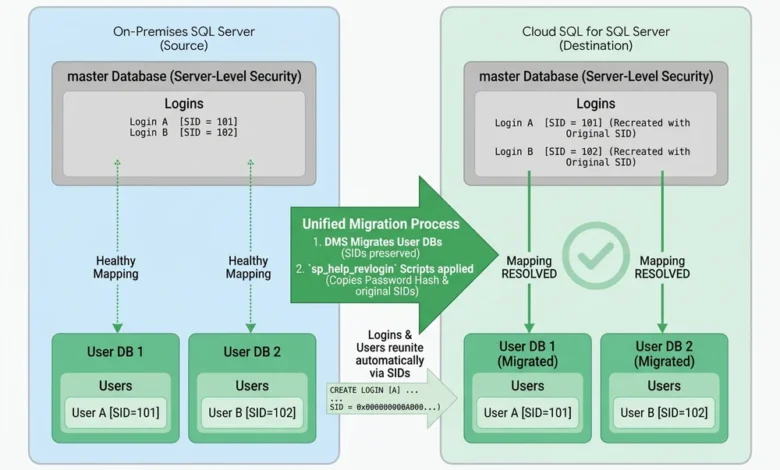
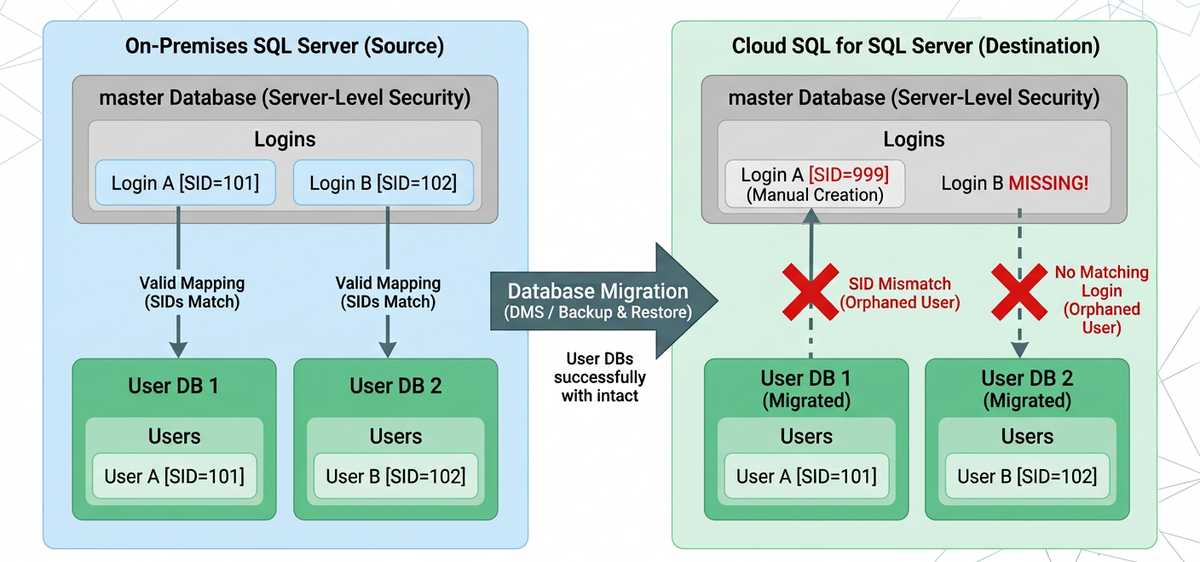
The cryptographic bridge connecting these two distinct layers is the Security Identifier (SID). When an administrator backs up and restores a database—or when DMS replicates a database structure to a target instance—the database-level users and their corresponding SIDs are faithfully copied inside the database files. However, if the matching server-level login does not exist in the destination instance’s master database, or if it exists but was created independently with a different SID, the mapping shatters instantly.
This phenomenon produces what database administrators refer to as "orphaned users." An orphaned user possesses all the necessary permissions inside the database, but because the server-level login lacks a synchronized SID, SQL Server rejects the authentication request at the gate. The application attempts to log in, the server finds no matching credential or SID, and the connection fails.
Deploying the Industry-Standard Resolution: The Role of sp_help_revlogin
Historically, database administrators faced tedious manual labor when trying to recreate dozens or hundreds of SQL Server logins on a new target instance, often resorting to guessing password hashes or forcing users to reset credentials. Fortunately, Microsoft provides a robust, battle-tested administrative utility designed specifically for this scenario: the stored procedure known as sp_help_revlogin.
Originally published as part of Microsoft Support documentation, sp_help_revlogin generates a dynamic T-SQL script containing the precise CREATE LOGIN statements for every SQL Server authentication login on a source instance. Crucially, the script captures the original, encrypted password hashes alongside their exact Security Identifiers (SIDs). This allows the target instance to recreate the logins with identical security parameters, ensuring that database-level users immediately recognize and map to their corresponding server logins without intervention.
The migration workflow using this utility follows a structured, three-step process designed for minimal downtime during cutover windows. First, administrators connect to their source SQL Server instance via SQL Server Management Studio (SSMS) and execute the official Microsoft script to establish two helper procedures within the master database: sp_hexadecimal and sp_help_revlogin.
Second, the administrator executes the generated helper procedure within an SSMS query window, ensuring output settings are configured to "Results to Text" to capture clean T-SQL syntax. The output yields a series of auto-generated create statements explicitly utilizing the HASHED password option and the original SID.
Third, the administrator connects to the destination Cloud SQL for SQL Server instance, pastes the generated script, and executes the query. The server instantly provisions the logins in the cloud with their correct password hashes and SIDs intact. Because the SIDs match the pre-existing database users migrated via Google Cloud DMS, the orphaned user dilemma is entirely averted, and application connectivity is restored.
Remediating Orphaned Users and Troubleshooting Edge Cases
Even with meticulous planning, edge cases can occur. If an engineer inadvertently creates a login manually on the target Cloud SQL instance before executing the sp_help_revlogin script, the newly minted login will generate a fresh, randomized SID. This mismatch breaks the mapping, resulting in an orphaned user state.
Fortunately, resolving this condition requires minimal intervention. Administrators can inspect the database for orphaned users using system queries and instantly reconcile the discrepancy with a single command utilizing the ALTER USER statement paired with the WITH LOGIN parameter. By explicitly binding the database user to the newly created server login, the SIDs are synchronized, and application traffic flows normally once again.
Industry analysts note that while executing scripts like sp_help_revlogin remains an efficient method for lift-and-shift migrations, organizations should view this phase as an opportunity to modernize their broader identity management architectures. Cloud SQL for SQL Server offers robust, native integration with Customer-Managed Active Directory (CMAD). By coupling cloud database instances with centralized directory services, enterprises can gradually phase out legacy SQL Server authentication entirely, pivoting toward enterprise-grade Kerberos authentication and multi-factor security policies.
Broader Implications for Enterprise Cloud Modernization
The technical nuances surrounding SQL Server login migration highlight a broader truth about cloud adoption: data migration is fundamentally an exercise in risk management, compliance preservation, and operational continuity. While automated utilities like Google Cloud’s Database Migration Service handle the immense complexity of schema translation and continuous data replication, the final mile of a migration requires human oversight, security awareness, and administrative precision.
As organizations increasingly look to migrate mission-critical transactional workloads to fully managed cloud environments, understanding the mechanics of security identifiers and instance-level objects prevents costly downtime during cutover windows. By mastering tools like sp_help_revlogin and aligning cloud migration strategies with modern identity governance frameworks, database administrators and IT leaders can ensure that their modernized data estates remain secure, compliant, and fully operational from day one.