With the official rollout of iOS 27, Apple has significantly expanded the utility of the Wallet app, transforming it from a simple repository for payment cards and transit passes into a comprehensive digital organizer for physical documentation. The introduction of custom pass creation marks a departure from Apple’s previously restrictive ecosystem, which historically required third-party developers or specific merchant integration to issue digital passes. By leveraging the new "Visual Intelligence" capabilities, users can now digitize a wide array of physical items—ranging from local gym membership cards to paper event tickets—directly on their iPhones.
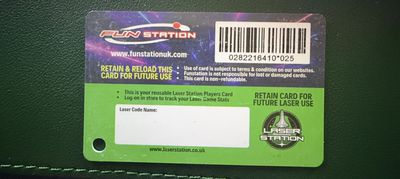
This functionality addresses a long-standing friction point for iPhone users: the inability to consolidate physical clutter into the digital ecosystem when a business or event organizer has not provided a native Apple Wallet pass. The feature allows for the manual or automated creation of digital representations of almost any card or ticket, provided it contains a scannable barcode or QR code.
The Mechanism of Digital Digitization
The core of this new feature lies in its dual-approach system: automated scanning via Visual Intelligence and a manual, template-based construction tool.
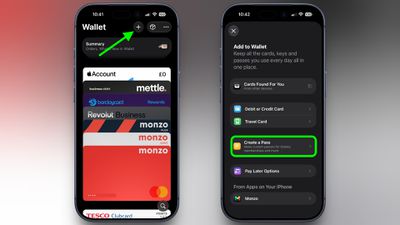
When a user initiates the process of creating a new pass, the Wallet app activates the camera-based Visual Intelligence interface. This system is designed to recognize the layout of common card types. Once the physical card is placed within the frame, the AI analyzes the visual data, identifying critical fields such as the issuer’s name, the unique identifier (represented by the barcode), and the category of the card. The software then maps this information into a pre-configured template. If the AI correctly identifies the field labels, the user is presented with a nearly finished pass, requiring only minor verification before it is added to the user’s digital library.
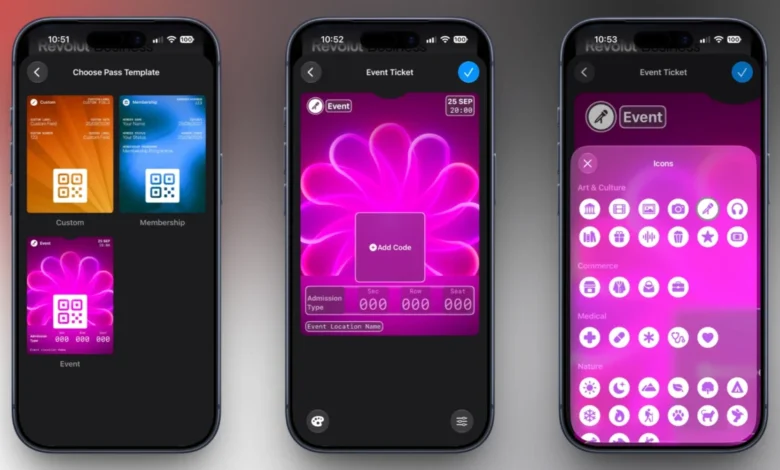
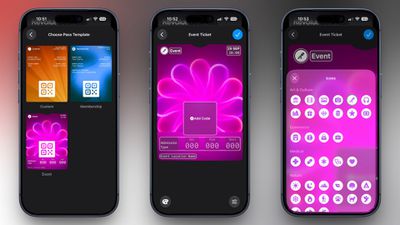
For items that do not conform to standard formats, or in instances where the user prefers greater control, the manual creation workflow is available. Users may select from three primary templates: Membership, Event, or Custom. Once a template is selected, the application prompts the user to input data fields such as the entity name, expiration date, membership ID, or specific event details. The process is finalized by scanning the physical barcode or QR code, which the app then encodes into a digital format compatible with Apple’s Wallet infrastructure.
Customization and Organizational Versatility
Apple has provided a robust suite of aesthetic and functional customization options, recognizing that users often prefer to distinguish their various passes at a glance. The system includes 12 distinct background color options, allowing for a color-coded organization strategy. Furthermore, for users managing specific categories, the app provides seven specialized background themes tailored to industry-standard activities, including theater, music, sports, and cinema.
Functionality is further extended through the ability to add or remove specific metadata fields. The system is designed to handle a diverse taxonomy of information, including:
- Identification: Membership numbers and contact details.
- Logistics: Dates, times, and venue locations.
- Transaction/Security: Coupon codes, Vehicle Identification Numbers (VINs), and insurance policy identifiers.
This level of granular control ensures that even specialized physical documents, such as insurance cards or private garage entry passes, can be effectively stored and accessed without the need for physical storage.
Historical Context and the Evolution of Apple Wallet
The trajectory of the Apple Wallet app reflects a broader corporate strategy to position the iPhone as a central hub for personal identity and daily logistics. Launched in 2012 as "Passbook," the application was initially limited to boarding passes, retail coupons, and movie tickets. Over the past decade, Apple has aggressively expanded its capabilities, most notably through the integration of Apple Pay in 2014, the adoption of Car Keys in 2020, and the more recent push toward state-issued digital IDs.
The inclusion of custom pass creation in iOS 27 is the latest in a series of updates aimed at domesticating the "physical wallet." In the months leading up to the release of iOS 27, Apple has been in negotiations with various regional authorities to expand the reach of digital driver’s licenses. As of September 2026, 16 U.S. states have adopted the digital ID feature, signaling a shift in how government and private entities view mobile authentication. The ability for users to create their own custom passes is seen by industry analysts as a bridge technology; it allows users to experience the convenience of the Wallet app for non-supported entities while Apple continues to work on official, encrypted, and government-backed digital wallet integration.
Implications for Merchants and Industry Standards
The impact of this update on the ticketing and loyalty program industry is multifaceted. Historically, businesses had to implement Apple’s "Wallet Pass" developer specifications to offer official digital cards. This process often required technical overhead and partnership agreements with Apple.
By allowing users to "self-digitize" their cards, Apple has effectively democratized the digital wallet experience. For small-to-medium enterprises that lack the resources to develop native Apple Wallet integration, this feature serves as a surrogate solution. Customers can now digitize a loyalty card from a local coffee shop or a membership card from a small athletic club without requiring the business to change their operational software.
However, security experts have noted that the responsibility for the validity of these passes shifts partially to the user and the scanner at the point of service. Since the user is manually creating the pass, the burden of ensuring the accuracy of the barcode or QR code lies with them. Apple has implemented verification prompts during the creation process to mitigate errors, but the system does not inherently "verify" the authenticity of the information provided.
Broader Impact on Digital Identity
The move to allow custom passes has been welcomed by privacy advocates and consumer groups who have long argued for greater user agency over personal data. By enabling a user to store information in a standardized, secure format on their own device rather than relying on a multitude of third-party, potentially insecure applications, Apple is reinforcing the "privacy-first" narrative that has become a pillar of their marketing.
Furthermore, this update provides a degree of future-proofing for the Wallet app. As more entities move toward digital-only entry—such as the recent expansion of iPhone Car Keys to brands like Lincoln, Lucid Motors, and Freelander—the habit of checking the Wallet app for all physical needs is becoming ingrained in the user experience. By lowering the barrier to entry for digitization, Apple is effectively training its user base to view the iPhone as the primary repository for all forms of physical proof, from insurance documentation to event attendance.
Future Outlook
As the iOS 27 ecosystem continues to mature, it is expected that the "Visual Intelligence" component will receive further updates to improve text recognition and the parsing of complex, non-standardized barcode formats. While the current implementation is robust, it remains a tool for convenience rather than a secure, authenticated document system like the digital ID or passport integration.
For the average user, the takeaway is clear: the physical wallet is becoming increasingly optional. With the ability to carry digital IDs, vehicle keys, and now custom-made loyalty and event passes, the transition toward a fully paperless existence is reaching a new level of accessibility. As this feature gains widespread adoption, it is likely that many businesses will find it necessary to ensure their physical scanners are fully compatible with the high-resolution displays of modern iPhones, further accelerating the adoption of digital-first interactions in daily life.