Apple’s iPhone Duo Developer Transition Guide: How iOS 27 Changes Mobile Architecture Forever

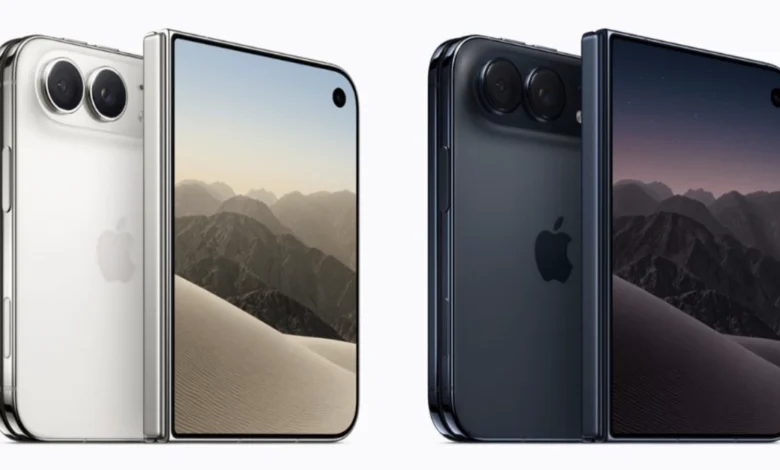
The announcement of the iPhone Duo marks a watershed moment in the history of mobile computing, fundamentally challenging foundational assumptions that have governed iOS application development since the App Store debuted in 2007. As Apple’s first foldable device—featuring a 5.4-inch outer display and an expansive 7.6-inch inner display running iOS 27.x—the hardware introduces complex layout realities that render traditional single-screen logic obsolete. For the global ecosystem of iOS developers, the introduction of the iPhone Duo requires an immediate reevaluation of user interface design, moving away from static screen bounds and rigid orientation constraints toward truly adaptive, multi-surface architecture.
Background Context and Evolution of the Foldable Form Factor
The arrival of the iPhone Duo has been anticipated for years as foldable technology matured in the broader consumer electronics market. While competitors experimented with various folding mechanisms throughout the early 2020s, Apple historically waited for hardware durability, display engineering, and software frameworks to reach a unified threshold of reliability. The introduction of iOS 27 and iOS 27.1 provides the necessary operating system infrastructure to support dynamic, dual-display environments without compromising system stability.
The core engineering challenge stems from a shift in basic physical paradigms. For nearly two decades, iOS apps operated under the reliable assumption of a single, uniform display surface with symmetric margins and predictable orientation changes. The iPhone Duo shatters this model. With multiple screens, dynamic aspect ratios that shift while an application is actively running, asymmetric safe areas, and physical interruptions such as hinges and internal camera placements, developers face a paradigm shift comparable to the transition from desktop software to mobile applications.
Immediate Remediation: What Happens to Unupdated Apps?
Apple has engineered backward compatibility into iOS 27 to ensure that older applications do not experience catastrophic failures or widespread rejections from the App Store. However, the user experience of an unoptimized application varies significantly depending on the software development kit (SDK) used for its last compilation.
Applications compiled against older SDKs continue to run on the inner display, but they are automatically letterboxed, retaining their legacy aspect ratios with vertical or horizontal black bars filling the remaining screen real estate. Applications built using the baseline iOS 27 SDK exhibit improved behavior, extending past the status bar while deliberately avoiding camera cutout zones. True edge-to-edge rendering and the automatic vertical reorganization of standard navigation and toolbar buttons require applications to be rebuilt using the iOS 27.1 SDK.
Consequently, the initial imperative for development teams is straightforward: recompile existing codebases using Xcode 27.1. While this procedural step elevates an application from visibly outdated to functionally acceptable, realizing a polished user experience requires deeper architectural modifications.
The Four Operational Poses and Mental Model Shifts
The most critical mental model shift required for the iPhone Duo involves moving beyond the binary classification of portrait versus landscape orientations. Applications on the foldable device must natively support four distinct physical poses: fully closed using the outer display, fully open in a traditional tablet-like orientation, partially folded like a book (often referred to as laptop or tabletop mode), and propped up in a tent configuration.
Furthermore, applications must survive fluid transitions between these states in real time while maintaining active user sessions and preserving application state. This requires an architectural reliance on size classes rather than traditional device orientation flags.
A Shift from Orientation to Size Classes
In standard iOS development, checking UIDevice.orientation or querying supportedInterfaceOrientations has long been standard practice for managing layout changes. On the iPhone Duo, however, these methods frequently return misleading data, particularly on the expansive inner display. Apple’s developer guidance explicitly mandates the adoption of trait collections and size classes.
Size classes evaluate the actual spatial dimensions available to an application rather than the physical orientation of the device hardware. In SwiftUI and UIKit, developers must monitor horizontal and vertical size classes to trigger layout shifts. When unfolded, the inner display of the iPhone Duo presents a regular horizontal and vertical size class profile, functionally mimicking an iPad-shaped canvas. Hardcoding layout branches based on device type or static orientation variables will result in persistent rendering errors on the new hardware.
Deprecation of Main Screen References and Geometric Adaptations
The global reference UIScreen.main is officially deprecated in the context of multi-display hardware. Because the iPhone Duo features multiple active screens, relying on a singleton main screen introduces ambiguity and potential runtime exceptions.
Developers are instructed to query the active trait collection for display scale (traitCollection.displayScale) or dynamically retrieve the screen context from the active window scene (view.window?.windowScene?.screen). Project-wide audits to eliminate instances of UIScreen.main are strongly recommended as a primary remediation task. Additionally, layout primitives introduced in iOS 26, such as ConcentricRectangle in SwiftUI and UICornerConfiguration in UIKit, should replace hardcoded corner radii to ensure visual elements seamlessly match the physical curvature of the device hardware.
Navigating Asymmetric Safe Areas and Reserved Regions
On traditional smartphones, horizontal and vertical safe area insets are symmetrical, allowing simplified calculations for usable display width. The iPhone Duo introduces asymmetric safe areas, driven by off-center camera placements and multi-window Split View configurations where an application occupies only a fraction of the total display area.
Calculations that assume equal left and right margins will cause clipping and layout distortion. Developers must evaluate bounding boxes using inset methods that respect all four edges independently. Apple enforces a clear design hierarchy: interactive foreground elements must remain strictly within the designated safe areas, while background artwork and media can bleed past them using edge-to-edge rendering rules.
Physical hardware characteristics—specifically the central hinge and camera arrays—are classified as reserved regions. These regions are divided into active areas (currently intersecting the application window) and inactive areas. Developers can query these regions using geometry readers and view methods in both SwiftUI and UIKit. While standard layout containers like NavigationStack, TabView, and ScrollView automatically accommodate the hinge and camera cutouts, custom-drawn interfaces require explicit handling. Apple advises that continuously scrolling content feeds should remain uniform across the hinge, reserving spatial displacement exclusively for discrete control clusters and UI containers.
Arrangements, Hinge APIs, and Scene Accessories
To simplify complex multi-view layouts, iOS 27.1 introduces ArrangementView. Acting as an intermediary container between navigation structures and application content, ArrangementView manages primary and secondary views based on available size classes and division regions. It offers two primary styles: .split, which divides available screen space horizontally or vertically depending on aspect ratio, and .overlay, which stacks content vertically and transitions to a side-by-side layout as the device folds.
For applications requiring direct hardware integration, the new hinge API (onHingeChange in SwiftUI and UIHingeInteraction in UIKit) provides continuous angle tracking and coarse status reporting (closed, partially open, fully open). This API is strictly intended for interactive effects, physical instrument controls, or dynamic UI responses rather than structural layout calculations.
Furthermore, the introduction of scene accessories enables advanced use cases such as CameraCaptureAccessory. This feature allows an application to project supplementary content onto the outer display while the primary camera interface operates on the inner screen—exemplified by teleprompter displays or dual-operator camera monitoring tools.
Implications and Industry Outlook
The release of the iPhone Duo and its supporting iOS 27 architecture establishes a new benchmark for mobile hardware and software integration. Industry analysts note that while the initial developer burden involves significant code refactoring, the long-term implications favor richer, more versatile applications capable of bridging the gap between handheld convenience and tablet productivity.
As adoption of the iPhone Duo scales among consumers, software engineering teams that proactively modernize their user interfaces will secure a distinct competitive advantage, ensuring their applications remain robust, visually polished, and fully responsive across Apple’s expanding hardware ecosystem.