BigQuery Studio Notebook Gallery Now Generally Available to Streamline Data Analysis Workflows

Data professionals often grapple with the initial hurdle of a "blank slate" when embarking on new projects. The prospect of meticulously crafting a data cleaning pipeline from scratch or painstakingly researching the optimal approach for time-series forecasting can significantly impede progress before substantive analysis even commences. Addressing this common challenge, Google Cloud has announced the general availability (GA) of the BigQuery Studio notebook gallery. This curated collection of pre-built templates is engineered to enable users to bypass the often time-consuming setup phase and dive directly into data discovery and analysis.
The introduction of the BigQuery Studio notebook gallery marks a significant stride in enhancing the productivity and efficiency of data professionals working within the Google Cloud ecosystem. Historically, the initial stages of any data-intensive project have been characterized by a period of setup, configuration, and template creation. This "blank slate" phenomenon, as described by many in the field, can lead to delays, frustration, and a potential loss of initial momentum. By providing ready-to-use templates, Google Cloud aims to democratize access to sophisticated data analysis techniques and accelerate the time-to-insight for users of all skill levels.
Accelerating Discovery with Curated Templates
BigQuery Studio notebooks themselves represent a powerful integration, bringing the interactive capabilities of Colab Enterprise directly within the BigQuery user interface. This seamless integration fosters a fluid transition between various stages of the data workflow, encompassing SQL-based data preparation, Spark-powered processing for large-scale analytics, and Python-based in-depth analysis. The newly launched notebook gallery acts as a vital component of this unified experience, offering a diverse array of templates specifically designed to cater to different user skill sets and project objectives.
The gallery is thoughtfully organized, allowing users to efficiently locate the most suitable starting point for their specific analytical endeavors. Whether the goal is straightforward data exploration, intricate data visualization, or the development of advanced machine learning models, the gallery provides a structured pathway. For individuals new to BigQuery Studio notebooks, a selection of introductory templates is available. These foundational templates are designed to familiarize users with the core functionalities and best practices of the platform.

For seasoned data scientists and analysts who are already adept with notebook environments, the gallery offers specialized templates. These advanced templates are crafted to tackle more complex analytical workflows, addressing sophisticated use cases such as anomaly detection, predictive modeling, and deep learning implementations. The aim is to empower users to leverage powerful analytical tools without the need for extensive boilerplate code or complex configuration.
Navigating the Notebook Gallery for Optimal Project Starts
The organization of the gallery is a key feature, enabling users to quickly filter and identify templates based on their specific project requirements. This task-oriented approach ensures that users can find the exact workflow that aligns with their objectives, whether it be data transformation, feature engineering, or building robust forecasting models.
For newcomers to BigQuery Studio notebooks, the gallery presents a range of introductory templates. These are crucial for understanding the foundational capabilities. One such essential template is the "Introduction to Notebooks" template. This comprehensive resource serves as an excellent starting point for any new project, as it meticulously covers the major features and functionalities of BigQuery Studio notebooks. It guides users through the process of connecting to data sources, executing SQL queries, leveraging Python libraries for data manipulation, and visualizing results. This template effectively demystifies the initial learning curve, making the transition into using notebooks for analytical tasks smoother.
For experienced notebook users, the gallery offers a treasure trove of specialized templates. These are designed to expedite the development of sophisticated analytical solutions. Examples of such advanced templates might include those for:
- Time-Series Forecasting: Pre-built models and methodologies for predicting future trends based on historical data, crucial for business planning and resource allocation.
- Anomaly Detection: Templates that help identify unusual patterns or outliers in datasets, vital for fraud detection, system monitoring, and quality control.
- Natural Language Processing (NLP) Workflows: Ready-to-use pipelines for tasks like text classification, sentiment analysis, and named entity recognition, enabling deeper insights from textual data.
- Machine Learning Model Development: Templates that streamline the process of building, training, and evaluating machine learning models, covering various algorithms and use cases.
- Data Visualization Dashboards: Pre-configured notebooks that generate interactive dashboards, allowing for dynamic exploration of data insights.
By providing these specialized templates, Google Cloud empowers data professionals to focus on the unique aspects of their problems rather than reinventing common analytical frameworks. This not only saves time but also promotes the adoption of best practices and standardized methodologies across organizations.

Seamless Integration into Existing Workflows
The accessibility of the notebook gallery within the BigQuery Studio console is designed for maximum convenience. Users can locate the gallery through two primary pathways, ensuring it’s readily available as part of their regular analytical workflow:
-
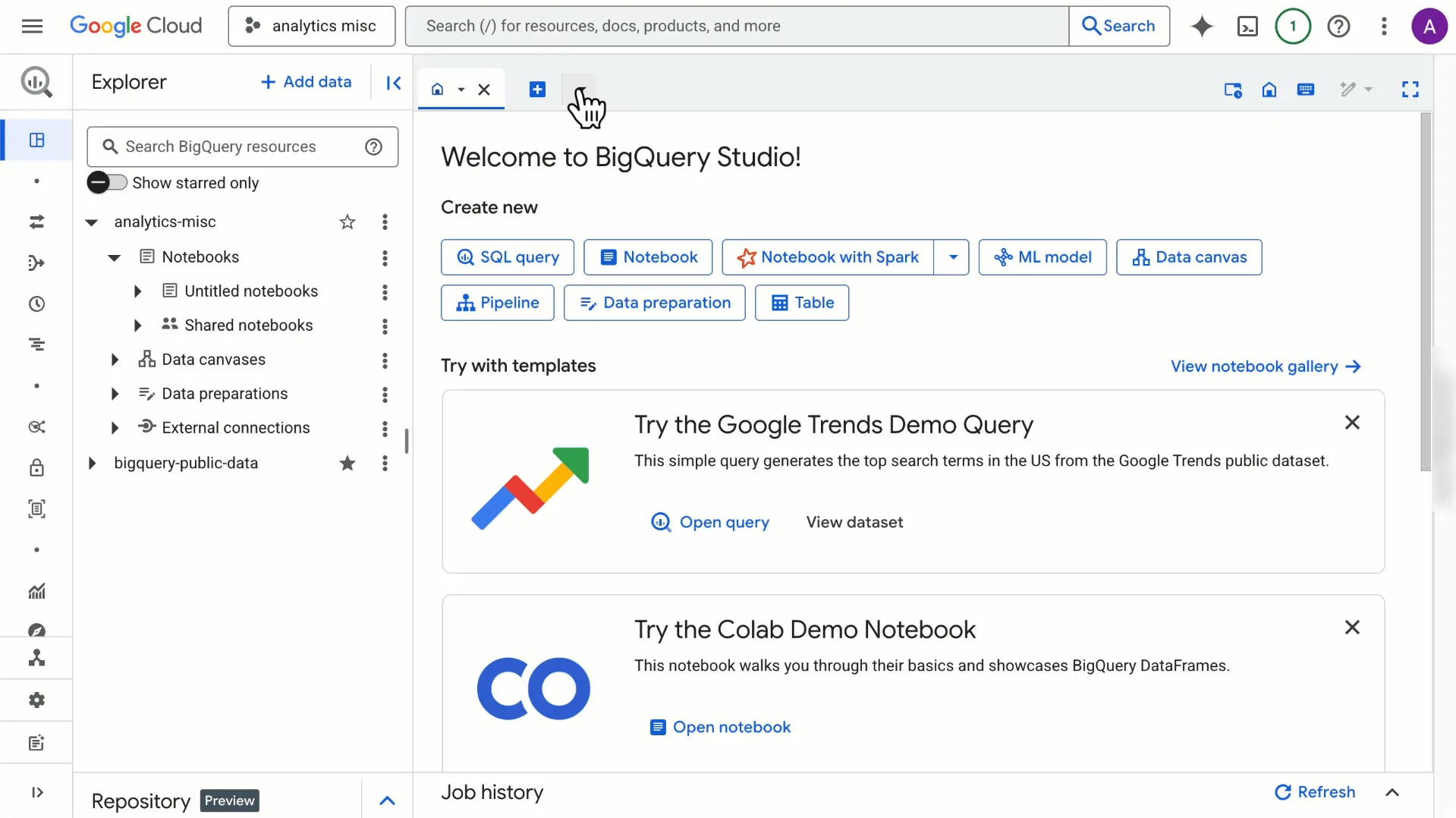
From the Welcome Page: Upon navigating to the "Welcome to BigQuery Studio" page, users will find a prominent option labeled "View notebook gallery." A single click on this button directs users to the comprehensive collection of templates. This intuitive placement ensures that new users are immediately presented with the opportunity to leverage these pre-built resources.
-
From the Asset Menu: Within the BigQuery Studio interface, users can create new assets by clicking the "+" icon. From the dropdown menu, selecting "Notebook" and then choosing "All templates" will also grant access to the gallery. This method provides an alternative route for users who prefer to initiate notebook creation directly from their project workspace.
Once accessed, the gallery empowers users with robust filtering capabilities. They can refine their search by specific tasks, such as data transformation, predictive analysis, or exploratory data analysis, to pinpoint the precise workflow that aligns with their project objectives. The interface allows users to open a read-only version of any template to preview its content and functionality. Upon finding a suitable template, a simple click of a button allows users to add a copy of that template directly into their BigQuery Studio project, ready for customization and execution.
The Broader Impact on Data Professionals and Organizations

The general availability of the BigQuery Studio notebook gallery is more than just a feature update; it represents a strategic move by Google Cloud to lower the barrier to entry for advanced data analytics and significantly accelerate the pace of innovation. For data professionals, this translates into reduced time spent on repetitive setup tasks and more time dedicated to deriving meaningful insights from data. This can lead to improved job satisfaction and a greater capacity to tackle complex business challenges.
For organizations, the implications are substantial. Faster project completion times can lead to quicker decision-making, improved operational efficiency, and a more agile response to market dynamics. By standardizing common analytical tasks through templates, organizations can also enhance the consistency and reproducibility of their data analysis efforts, leading to more reliable and trustworthy insights. Furthermore, the accessibility of these templates can democratize data science within an organization, empowering a broader range of employees to engage with data and contribute to data-driven initiatives.
The introduction of this gallery also aligns with broader trends in the data analytics industry, where there is a growing demand for tools that simplify complex processes and promote collaboration. By offering a curated and accessible repository of pre-built solutions, Google Cloud is positioning BigQuery Studio as a central hub for data exploration and analysis, fostering a more productive and collaborative environment for data teams.
The ability to quickly deploy and iterate on data science workflows is becoming increasingly critical in today’s fast-paced business environment. Companies that can rapidly extract value from their data are more likely to gain a competitive edge. The BigQuery Studio notebook gallery directly addresses this need by providing a structured and efficient pathway to implement sophisticated analytical techniques.
Looking ahead, the continued development and expansion of the notebook gallery are likely to be key factors in its long-term success. As new analytical techniques emerge and best practices evolve, the inclusion of updated and innovative templates will ensure that BigQuery Studio remains at the forefront of data analysis tools. This commitment to continuous improvement suggests that Google Cloud recognizes the evolving landscape of data science and is dedicated to providing its users with the most effective and efficient tools available.
In essence, the BigQuery Studio notebook gallery is poised to become an indispensable resource for data professionals, transforming the way they approach new projects and ultimately accelerating their ability to unlock the full potential of their data. By removing the friction of the "blank slate," Google Cloud is empowering users to move directly to the critical phase of analysis and discovery, driving greater value and innovation.

Getting Started with the BigQuery Studio Notebook Gallery
To begin leveraging the power of the BigQuery Studio notebook gallery, users are encouraged to access it directly within the BigQuery Studio console. The gallery offers a straightforward entry point, allowing users to discover and deploy a wide range of pre-built templates designed to accelerate data analysis projects. Whether starting a new project or seeking to enhance existing workflows, the gallery provides a valuable resource for data professionals aiming to maximize their efficiency and impact. The curated collection ensures that users can find relevant and effective starting points, from basic data preparation to advanced machine learning applications, all within a unified and intuitive environment.
Related posts: