Microsoft General Availability of WSL Containers Brings Native Linux Orchestration to Windows Developers and Enterprise Environments


Microsoft has officially reached a major milestone in its cross-platform development strategy by announcing the general availability of WSL Containers, expanding the capabilities of the Windows Subsystem for Linux far beyond simply running standard Linux distributions. This new release empowers software developers, systems administrators, and enterprise IT departments to seamlessly build, run, deploy, and manage Linux containers directly within a Windows environment, eliminating much of the friction historically associated with multi-platform development.
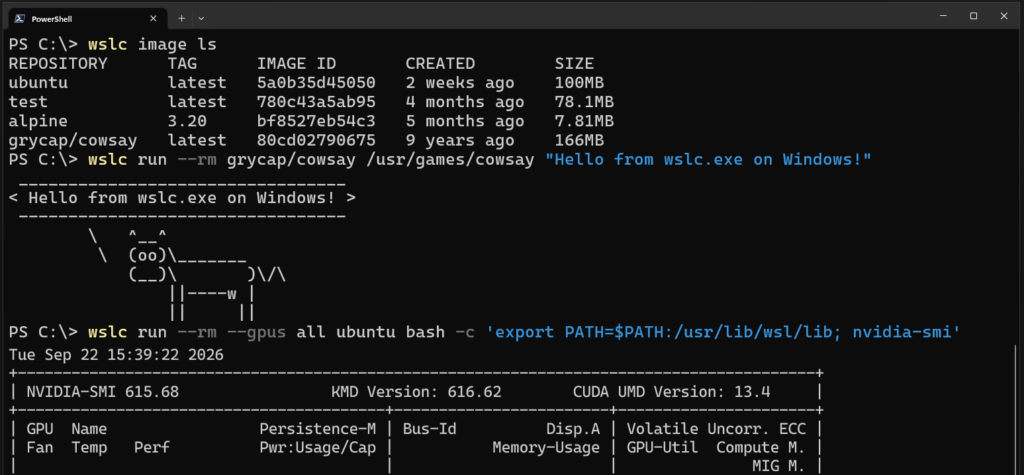
The feature can now be accessed easily by updating existing installations using the simple command wsl --update. Once the update is fully installed, users gain access to a dedicated command-line interface tool known as wslc.exe. To ensure a smooth transition and maintain familiarity for engineers accustomed to standard containerization workflows, Microsoft has also included a built-in alias called container.exe. This allows developers to rely on familiar commands and syntax while leveraging the underlying architecture of the Windows Subsystem for Linux.
Background Context and Evolution of the Windows Subsystem for Linux
To fully understand the significance of the general availability of WSL Containers, it is essential to examine the trajectory of the Windows Subsystem for Linux since its initial introduction. Launched by Microsoft years ago, WSL was designed to bridge the historical divide between Windows and open-source operating systems. Initially, it allowed developers to run a GNU/Linux environment—including command-line tools, utilities, and applications—directly on Windows, unburdened by the traditional overhead of dual-boot setups or traditional virtual machines.
Over successive iterations, WSL evolved from WSL 1, which used a translation layer to convert Linux system calls into Windows system calls, to WSL 2. WSL 2 represented a massive architectural leap forward by introducing a lightweight, managed utility virtual machine running a genuine Linux kernel. This delivered vastly superior file I/O performance and full system call compatibility.
Despite these dramatic improvements, running and managing containerized workloads on Windows often required third-party tools, resource-heavy desktop applications, or separate virtualization layers. Developers frequently had to navigate complex configuration steps to get Docker or other container runtimes functioning smoothly alongside local Windows tooling. The introduction of WSL Containers directly addresses this pain point, bridging the gap between desktop development and containerized deployment by embedding native container management directly into the core operating system framework.
Core Features and Technical Capabilities in General Availability
The transition from the preview phase to general availability brings a robust suite of production-ready features designed to give developers granular control over their containerized environments. During the initial preview stages, several critical management capabilities were absent, often limiting workflows to basic testing. The general availability release fills these gaps comprehensively.

Key features now fully supported include the ability to restart running containers seamlessly, copy files in and out of active containers with high performance, execute comprehensive health checks, and utilize dedicated network connect and disconnect commands. Furthermore, administrators and developers can now monitor real-time container events, leverage advanced mount support, and configure custom storage locations to optimize disk space usage across different drives.
In addition to the command-line interface, Microsoft has introduced a dedicated WSL Containers Application Programming Interface (API). This powerful API allows native Windows applications to programmatically launch, monitor, and interact with Linux containers. According to Microsoft’s engineering teams, this unlocks entirely new architectural scenarios, such as running local artificial intelligence workloads, executing complex machine learning pipelines, or leveraging cloud-based containerized applications locally on a developer workstation before pushing them to production cloud environments.
Moreover, underlying performance enhancements have been integrated into this release. Microsoft reports that WSL Containers can deliver up to double the performance when accessing Windows files directly from Linux environments, significantly reducing compilation times and data synchronization bottlenecks for large projects.
Ecosystem Integration and Developer Tooling Support
A robust developer tool ecosystem is critical for the widespread adoption of any new technology. Recognizing this, Microsoft has worked closely with industry partners and internal product groups to ensure that WSL Containers integrates seamlessly with existing modern development pipelines.
Visual Studio Code has added comprehensive support for the new architecture. Specifically, VS Code Dev Containers can now utilize wslc as their default driver, streamlining the process of spinning up isolated, containerized development environments. Additionally, Microsoft Aspire and the broader VS Code Containers extension suite now feature native support for WSL Containers, allowing developers to orchestrate microservices and cloud-native applications without leaving their preferred integrated development environment.
Looking ahead on the product roadmap, Microsoft has confirmed that it is actively developing support for Docker Compose-style orchestration, which has consistently ranked as the most requested feature from the developer community. The upcoming feature, provisionally referred to by the command wsl compose up, is designed to work seamlessly with existing, unmodified compose.yaml files. This will allow teams to lift and shift multi-container applications directly into the WSL Containers environment with zero configuration changes.
Enterprise Security, Compliance, and Management Controls
While the initial appeal of WSL Containers lies heavily in developer productivity, enterprise adoption hinges upon robust security, visibility, and compliance controls. Addressing these requirements, Microsoft has deeply integrated WSL Containers with core enterprise security and management solutions.
For security operations centers, WSL Containers now features native integration with Microsoft Defender for Endpoint. This integration grants security teams deep visibility into process execution, file modifications, and network activity occurring inside individual containers, allowing analysts to correlate container events directly back to the underlying Windows host machine for comprehensive threat hunting and incident response.
Simultaneously, IT administrators can leverage Microsoft Intune to govern how WSL Containers are deployed and utilized across corporate hardware fleets. Organizations can configure policies to disable WSL Containers entirely where security posture demands it, or alternatively, restrict developers to pulling container images exclusively from pre-approved, corporate-vetted container registries.
"With container registry allow lists, administrators can define approved registries and help ensure developers only pull container images from that list, that meet organizational security and compliance requirements," Microsoft noted in its official release documentation. This capability ensures that rogue or unvetted open-source images do not inadvertently introduce vulnerabilities into corporate development pipelines.
Broader Industry Implications and Future Outlook
The general availability of WSL Containers represents a strategic maturation of Microsoft’s hybrid operating system vision. By blurring the lines between Windows and Linux environments, Microsoft continues to position Windows not merely as a standalone desktop operating system, but as an all-encompassing development hub capable of supporting virtually any modern software stack.
For individual developers, the reduction in virtualization overhead and the streamlining of local AI and cloud workloads promise a faster, more cohesive workflow. For enterprise organizations, the dual-pronged approach of empowering developer velocity while maintaining strict administrative guardrails through Microsoft Defender and Intune provides the necessary assurance to deploy these advanced capabilities at scale.
As the developer community begins adopting wslc.exe and preparing for upcoming orchestration additions like wsl compose up, WSL Containers is poised to become a foundational component of modern enterprise software engineering on Windows.