
Running AI Locally: How to Ditch Cloud Subscriptions and Run Open-Weight Models on Your Own Hardware


The artificial intelligence landscape is undergoing a profound structural shift. While proprietary, closed-source models developed by major technology conglomerates continue to command headlines and monthly subscription fees, open-weight AI alternatives are rapidly closing the capability gap. Today, the performance deficit between top-tier closed models and their open-weight counterparts has shrunk to an average of just four months. This rapid convergence has coincided with a democratization of hardware, enabling a growing demographic of users to run advanced large language models (LLMs) directly on consumer-grade computing equipment they already own.
For years, engaging with a sophisticated chatbot required parting with a recurring $20 monthly subscription fee and relinquishing data sovereignty by routing sensitive prompts through third-party cloud infrastructure. The rise of accessible open-weight models—paired with free, user-friendly software utilities like Ollama and LM Studio—fundamentally alters this dynamic. Users can now download, customize, and execute powerful AI models entirely offline, eliminating subscription overhead, bypassing recurring cloud fees, and ensuring absolute conversational privacy.
Understanding Open-Weight Models and Licensing
The term "open-weight" designates AI models whose underlying neural network weights—the numerical parameters that encapsulate everything the model has learned during its training phase—are published openly by their creators. Once downloaded, these weight files serve as the engine for local AI applications. Software platforms such as Ollama and LM Studio act as the interface and runtime environment, managing how the hardware processes these files. For instance, recent iterations of Google’s Gemma family feature model sizes ranging from roughly 4.6GB to 20GB, making them viable downloads for standard broadband connections.
Beyond the financial savings, running open-weight models introduces flexibility regarding software licenses. Unlike proprietary services governed by restrictive enterprise terms, prominent open models are distributed under permissive open-source licenses. DeepSeek’s R1 series, for example, is governed by the MIT License, while Google’s Gemma series and OpenAI’s gpt-oss offerings ship under the Apache 2.0 license.
These licenses explicitly permit commercial use, modification, and the creation of derivative works. Consequently, developers and enterprises are no longer locked into a generalized, one-size-fits-all chatbot. A medical researcher can fine-tune an open-weight model specifically for clinical diagnostics, deprioritizing general coding capabilities in favor of domain-specific accuracy. This level of granular personalization remains fundamentally impossible within closed cloud ecosystems.

Hardware Realities: What Your Machine Can Actually Run
Transitioning from cloud-based AI to local execution shifts the primary operational cost from software subscriptions to physical hardware. Because an LLM must reside actively in memory to generate responses, the computer’s specifications dictate the scale and capability of the model it can support. Specifically, models require substantial video memory (VRAM) on a dedicated graphics processing unit (GPU), or unified memory architecture found on modern system-on-chip platforms like Apple Silicon Macs.
As a baseline, consumer systems equipped with at least 8GB of VRAM can handle smaller, heavily compressed models. However, power users and professionals aiming for responsive, high-fidelity generation typically invest in dedicated gaming GPUs with 24GB or more of VRAM, or multi-GPU configurations, or specialized hardware architectures like the Mac Mini or enterprise-grade edge appliances.
To make massive neural networks fit within consumer memory constraints, the industry relies heavily on quantization. Quantization is a mathematical process that shrinks model size by reducing the precision of the numerical weights—representing them using low-precision data types, such as 8-bit integers (int8), instead of standard 32-bit floating-point numbers (float32). While this process drastically reduces memory consumption and hardware requirements, it introduces a marginal trade-off in output accuracy.
System requirements vary depending on the chosen runtime environment. LM Studio documentation specifies that Apple Silicon Macs running macOS 14 or newer should ideally feature 16GB or more of unified memory, though 8GB models can accommodate lighter architectures. For Windows users, the platform recommends a minimum of 16GB of system RAM, 4GB of dedicated VRAM, and a processor supporting AVX2 instructions, explicitly excluding legacy Intel-based Mac hardware.
Meanwhile, storage and memory requirements scale directly with parameter counts. Ollama’s library lists mid-tier iterations of Gemma models requiring between 16GB and 20GB of memory. Conversely, OpenAI’s gpt-oss-20b requires a modest 16GB of system memory, whereas its larger sibling, gpt-oss-120b, demands up to 80GB of memory headroom to function smoothly.
Step-by-Step: Setting Up Ollama and LM Studio
Deploying a local AI assistant has become significantly less intimidating thanks to specialized orchestration tools. Users generally choose between two primary applications based on their technical proficiency: LM Studio or Ollama.
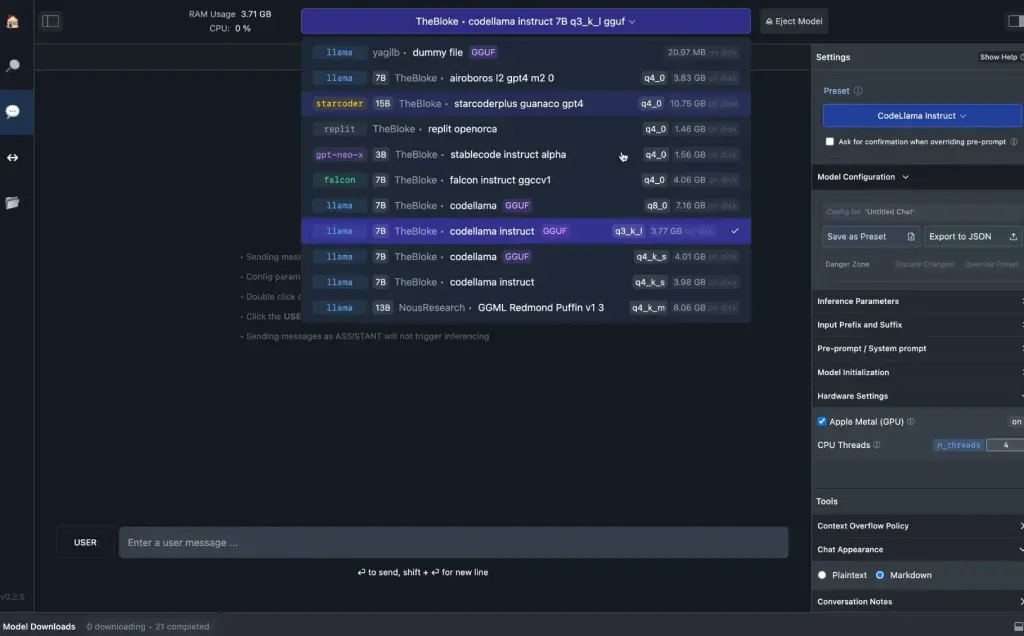
LM Studio provides a polished, graphical user interface (GUI) designed for accessibility. Operating similarly to a traditional desktop application, LM Studio connects directly to Hugging Face—the central public hub for open-source AI models—allowing users to search, download, and interact with model weights through a point-and-click environment. Crucially, LM Studio can operate entirely offline once the model files are secured, ensuring that documents attached to chats never leave the host machine.
Ollama, by contrast, is engineered primarily for developers and advanced users who prefer a command-line interface (CLI). Installation is streamlined: macOS and Linux users deploy a simple shell script via curl, while Windows users execute a PowerShell command. Once installed, commands such as ollama pull and ollama run retrieve and initiate models instantly. Furthermore, Ollama establishes a local application programming interface (API) running at localhost, enabling other desktop applications to leverage the local model seamlessly.
It is worth noting that certain libraries include cloud-designated variants—such as model names ending in ":cloud"—which execute on remote servers rather than local hardware. While these require no local download, users prioritizing strict data privacy should bypass them, reserving local execution exclusively for offline-flagged weights.
Optimizing Local Performance: Speed and Integration
A historical hurdle of local AI has been generation speed—the rate at which tokens appear on the screen. Recent engineering breakthroughs, however, have largely mitigated this bottleneck. Innovations such as Google’s Multi-Token Prediction drafters, integrated into platforms like Ollama under Apache 2.0 licenses, accelerate generation speeds by up to three times without requiring new hardware upgrades. This technique utilizes speculative decoding, where a smaller auxiliary model proposes multiple tokens ahead, which the primary large model then verifies simultaneously in a single computational pass.
Furthermore, local models are no longer isolated text-generation boxes. Through the implementation of Model Context Protocol (MCP) servers—supported by platforms like LM Studio—local models can safely interface with external file systems and execute web searches, bridging the gap between isolated local processing and dynamic information retrieval.
The Privacy Imperative vs. Cloud Superiority
The decision to migrate from commercial cloud chatbots to local open-weight models ultimately hinges on a balance between privacy and absolute computational power.
Cloud-based AI infrastructure requires users to transmit every prompt, document, and query to centralized corporate servers. Legal precedents have underscored the vulnerability of this data pipeline; notably, court orders have compelled major AI providers to preserve comprehensive chat logs—including deleted entries—raising significant compliance and confidentiality concerns for enterprise and individual users alike. Local models eliminate this exposure entirely; the data remains strictly contained within the physical boundaries of the user’s machine.
Despite these distinct privacy advantages, local models still face inherent limitations when compared to top-tier frontier cloud services. The four-month capability lag primarily applies to the most competitive open models that can still fit on consumer hardware. Massive proprietary architectures, such as Alibaba’s Qwen3.8-Max, boast staggering scales—including 2.4 trillion total parameters—that vastly exceed the memory limits of standard desktop computers. When a model exceeds available VRAM and spills over into system RAM, inference speeds degrade significantly. Additionally, massive context windows, which allow models to analyze hundreds of thousands of tokens of text simultaneously, demand substantial memory allocations that stretch consumer hardware to its absolute limits.
For everyday drafting, sensitive document analysis, and cost-conscious computing, setting up a local AI assistant offers a viable, private, and increasingly powerful alternative to commercial subscriptions. As open-weight efficiency continues to climb and hardware capabilities expand, the boundary between cloud exclusivity and local empowerment will continue to blur, placing enterprise-grade intelligence directly into the hands of individual consumers.