Microsoft Deploys Emergency Fixes for Dell PCs Plagued by Performance Issues and Unexpected Shutdowns Following Windows 11 July 2026 Security Updates

Microsoft has rapidly issued critical emergency updates designed to rectify a significant known issue that has been causing a subset of Dell PCs to experience severe performance degradation, increased thermal output, accelerated battery drain, and even unexpected system shutdowns. These widespread disruptions began manifesting after users installed the comprehensive July 2026 Windows 11 security updates. The rapid deployment of these out-of-band (OOB) patches underscores the urgency and potential widespread impact of the compatibility conflict that emerged within the Windows ecosystem.
Understanding the Core Issue and Affected Systems
The problematic scenario, as officially acknowledged by Microsoft earlier in the week, specifically targets Dell systems that had previously installed the cumulative update KB5101650 for Windows 11 versions 25H2 and 24H2. This particular update, intended to bolster system security and stability, inadvertently triggered a deep-seated hardware-software incompatibility. The root cause of this instability traces back to a change introduced in an earlier preview cumulative update, KB5095093, released in June 2026. This preview update debuted a new Windows USB-C Connection Manager interface. Unfortunately, this new interface entered into direct conflict with a crucial system component: the Intel Innovation Platform Framework (IPF) Processor Participant driver.
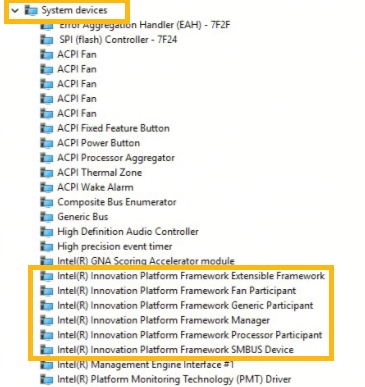
The Intel Innovation Platform Framework (IPF) is a cornerstone of modern PC architecture, serving as a critical system-level hardware driver responsible for managing various fundamental aspects of a computer’s operation. Its responsibilities include intricate power management, dynamic thermal regulation, and overall processor participant orchestration. When this driver, vital for maintaining optimal system health and performance, encounters an incompatibility, the consequences can be far-reaching and debilitating. The conflict manifests visually within the Windows Device Manager, where the Intel Processor Participant driver displays a distinctive yellow exclamation mark, signaling a malfunction or a driver issue. This visual cue is a red flag for system administrators and users alike, indicating that a core component is not operating correctly.
Microsoft’s official statement elaborated on the observed symptoms: "After installing the June 23, 2026, Windows preview update (KB5095093), a limited number of Dell devices might display a yellow exclamation point in Device Manager next to the Intel Innovation Platform Framework Processor Participant driver. These devices can potentially experience unexpected shutdowns, poor performance, increased heat, and battery drain." The company further clarified the genesis of the problem, stating, "This issue was reported by Dell during testing and identified as an incompatibility between the Intel driver and the new Windows USB-C Connection Manager interface introduced in the June 23, 2026, Windows preview update (KB5095093)." This highlights the critical role of original equipment manufacturer (OEM) testing and collaboration in identifying and mitigating potential issues before they impact a broader user base.
A Detailed Chronology of Events
The unfolding of this critical issue and its subsequent resolution followed a precise timeline, emphasizing the collaborative efforts between Microsoft, Dell, and implicitly, Intel.
- June 23, 2026: The initial catalyst for the problem, the Windows 11 KB5095093 preview cumulative update, is released. This update introduces the new Windows USB-C Connection Manager interface, a seemingly innocuous enhancement designed to improve the management of versatile USB-C ports.
- Late June – Early July 2026: During routine, pre-release validation processes for upcoming Windows updates, Dell engineers identify a significant incompatibility. They observe that certain Dell systems, after receiving the KB5095093 preview update, exhibit erratic behavior when interacting with the Intel IPF Processor Participant driver. This proactive detection and reporting by Dell to Microsoft were instrumental in preventing a more widespread and prolonged outage.
- Early July 2026: As the general availability of the July 2026 Windows 11 security updates (KB5101650) approaches, Microsoft, leveraging Dell’s findings, implements a temporary safeguard. The company strategically blocks the distribution of KB5101650 to all potentially affected Dell systems. This proactive measure, while temporarily delaying security updates for some users, was crucial in preventing further device instability.
- Tuesday, July [Specific Date] 2026: Microsoft officially acknowledges the issue publicly, detailing the symptoms and the specific updates involved. This public statement provided clarity to users and IT professionals who might have already encountered the problem or were wondering why their Dell systems were not receiving the latest security patches.
- Saturday, July [Specific Date] 2026 (Three Days Later): Demonstrating a swift response, Microsoft releases two crucial emergency out-of-band (OOB) updates. KB5121767 is deployed for Dell PCs running Windows 11 25H2 and 24H2, addressing the primary affected versions. Concurrently, KB5121768 is released for devices running Windows 11 Enterprise LTSC 2024, ensuring comprehensive coverage for enterprise environments. These OOB updates are specifically designed to deliver the fix without waiting for the next scheduled "Patch Tuesday."
The Critical Role of the Intel IPF Processor Participant Driver and USB-C Management
To fully appreciate the gravity of this issue, it’s essential to delve deeper into the components involved. The Intel Innovation Platform Framework (IPF) is not merely a single driver but a suite of software components that enable various Intel technologies to communicate effectively with the operating system and other hardware. The "Processor Participant driver" within this framework is particularly critical, as it directly influences how the processor manages its power states, thermal thresholds, and overall performance. A compromised or malfunctioning IPF driver can lead to a cascade of problems: the processor might not correctly throttle its speed, leading to overheating; power consumption might become inefficient, draining batteries rapidly; and system stability could be jeopardized, resulting in crashes or unexpected shutdowns. For a device reliant on intricate power and thermal management, such as a modern laptop or desktop, the integrity of this driver is paramount.
Conversely, the USB-C Connection Manager interface is a relatively newer addition to Windows, designed to handle the increasing complexity and versatility of USB-C ports. USB-C has become ubiquitous, capable of delivering power, high-speed data transfer, and video output through a single reversible connector. Managing these diverse functionalities, especially across a wide array of hardware configurations from different OEMs, requires robust and intelligent software. Microsoft’s introduction of a new Connection Manager aimed to streamline this process, enhance compatibility, and potentially introduce new features. However, in this instance, the new interface inadvertently created a conflict with a deeply integrated, hardware-level Intel driver, highlighting the challenges of ensuring seamless interoperability in a constantly evolving hardware and software ecosystem. The interaction between a high-level operating system component and a low-level hardware driver is often delicate, and even minor changes can have significant, unforeseen consequences.
Scale of Impact and Broader Implications

While Microsoft stated that a "limited number" of Dell devices were affected, the implications for those users and for the broader IT landscape are significant. Dell maintains a substantial presence in the global PC market. For example, in Q1 2026, Dell’s market share in PC shipments could be estimated to be in the range of 15-20%, translating to millions of devices worldwide. Even a small percentage of this vast installed base experiencing critical system failures represents a considerable number of affected users.
For individual users, unexpected shutdowns can lead to data loss, lost productivity, and immense frustration. The recurring nature of performance issues, increased heat, and rapid battery drain can also erode confidence in their hardware and software. For businesses and IT administrators, the impact is magnified. Managing a fleet of potentially affected Dell PCs requires immediate attention, diverting resources from other critical tasks. The need to expedite the deployment of OOB updates across an enterprise network can be a complex logistical challenge, potentially leading to helpdesk overload and operational disruptions. The temporary block on the July security updates also posed a dilemma, forcing IT teams to weigh the risk of an unpatched system against the certainty of system instability.
Official Responses and Collaborative Efforts
Microsoft’s response to the crisis was commendably swift. Their decision to temporarily block the problematic July update for affected Dell systems demonstrates a proactive approach to preventing wider user impact. The subsequent rapid development and release of out-of-band updates within three days of acknowledging the issue publicly highlights their commitment to maintaining system stability and user trust. In their Messenger Center update, Microsoft advised, "Devices affected by this issue and that were temporarily prevented from receiving the July 2026 security update (KB5101650) can now install this OOB update, which includes all improvements from previous security and non-security updates, along with this additional fix." They also clarified, "This OOB update is only recommended for devices affected by this issue. If your device is not affected, no action is required." This clear guidance is crucial for preventing unnecessary installations and potential complications.
Dell’s role in identifying and reporting the incompatibility cannot be overstated. Their rigorous testing protocols, which presumably involve evaluating upcoming Windows preview builds with their hardware, allowed for early detection. This collaboration between an OEM and Microsoft is a testament to the complex interdependencies within the PC ecosystem and the necessity of shared responsibility in ensuring software and hardware harmony. While Intel was not explicitly mentioned in the resolution announcement, it is highly probable that their engineers collaborated closely with both Microsoft and Dell to diagnose the driver-level conflict and provide necessary insights for the patch development. Such tripartite collaborations are standard practice when core hardware drivers are implicated in OS-level issues.
Future Outlook and Lessons Learned
This incident serves as a pertinent reminder of the inherent complexities involved in managing a global operating system with an immense diversity of hardware. The continuous push for innovation, whether in USB-C functionality or processor efficiency, always carries the risk of unforeseen incompatibilities. However, the structured approach to problem-solving demonstrated by Microsoft and Dell offers valuable lessons.
Firstly, the importance of robust preview programs and comprehensive OEM testing cannot be overstated. The June 2026 preview update allowed for early detection by Dell, preventing a far more widespread and severe outage had the issue only emerged with the general release of the July security updates. These programs, despite occasionally introducing temporary instability, are vital for refining software before broad deployment.
Secondly, the rapid response capability through out-of-band updates is a critical tool for modern operating system management. While "Patch Tuesday" provides a predictable cadence for security and feature updates, critical issues demand immediate attention, and OOB updates fulfill this need effectively.
Finally, the incident underscores the ongoing challenge of maintaining seamless interoperability in an ecosystem where Microsoft, Intel, and numerous OEMs constantly introduce new technologies and updates. Moving forward, continued emphasis on improved telemetry, enhanced testing methodologies, and even deeper collaborative frameworks will be crucial to minimize such occurrences and ensure a consistently stable and reliable computing experience for users worldwide.
For IT administrators managing corporate environments, Microsoft has provided clear pathways for deploying these emergency updates. Devices managed by Windows Autopatch with hotpatch updates enabled will receive this emergency update automatically, simplifying the process for large organizations. For those utilizing Microsoft Intune, specific guidance is available on how to expedite these critical updates, allowing IT teams to swiftly restore stability and performance across their Dell PC fleets. This layered approach to deployment ensures that both individual users and large enterprises can access the necessary fixes promptly and efficiently.