Azure Chaos Studio Workspaces Revolutionizes Application Resilience Testing with Scenario-Based Failure Simulations

Microsoft is enhancing its commitment to robust cloud application stability with the public preview of Azure Chaos Studio Workspaces. This advanced managed service aims to empower organizations to proactively validate and fortify the resilience of their applications by simulating a wide array of real-world failure scenarios before they can impact production environments. The introduction of Workspaces marks a significant evolution in chaos engineering, moving beyond isolated fault injection to encompass holistic, scenario-driven testing that mirrors the complexities of actual outages.
The fundamental principle underpinning Chaos Studio is the understanding that true application resilience cannot be assumed; it must be proven. As the adage goes, it is far preferable to discover an application’s vulnerabilities in a controlled test environment rather than through a disruptive failure in live production. Azure Chaos Studio provides a safe, deliberate, and managed platform for precisely this purpose. The newly announced Workspaces feature introduces a more intuitive, scenario-focused approach, enabling Azure customers to test the failure modes that are most commonly encountered in production deployments. This advancement represents a concerted effort by Microsoft to simplify chaos engineering, broaden the scope of fault simulation, and offer pre-defined scenarios that accurately reflect real-world outages, rather than requiring users to painstakingly assemble individual failure components.
The Critical Gap: Why Designing for Resilience Isn’t Enough
In today’s cloud-native landscape, organizations invest heavily in building resilient applications. This often includes architectural patterns such as multi-zone deployments for high availability, geo-redundant storage for data durability, automatic database failover mechanisms, sophisticated retry logic in application code, and load-balanced front-end systems. While these are essential building blocks, the critical question remains: when an incident inevitably strikes, do these meticulously designed mechanisms recover the application within the anticipated timeframe?
Real-world outages rarely adhere to theoretical architecture diagrams. A zone-redundant deployment, for instance, can falter due to a seemingly minor misconfiguration, such as an incorrectly set health probe that went unnoticed for years. Similarly, a database boasting automatic failover capabilities might leave an application inoperable if a connection string is hardcoded to a single region, rendering it inaccessible during a regional outage. Even geo-redundant storage, designed for data redundancy, can momentarily serve stale reads that the application code was never designed to handle, leading to unexpected behavior. These are not uncommon oversights; they are subtle yet critical flaws that often surface only when a failure occurs.
The responsibility for reliability and resilience on Azure is a shared one. Microsoft is accountable for the underlying platform and the inherent resilience built into Azure services. Conversely, customers bear the responsibility for correctly configuring this resilience and developing application code that leverages these capabilities effectively. No single layer of the cloud stack can compensate for a deficiency in another. Therefore, the only definitive way to ascertain whether an organization’s architecture, configuration, and application logic will withstand the rigors of production is to subject them to rigorous failure testing before an actual outage forces the issue.
Transforming Resilience Testing with Chaos Studio Workspaces
Azure Chaos Studio, the company’s managed chaos engineering service, is designed to validate how applications perform under duress. By orchestrating controlled disruptions across various layers—infrastructure, networking, databases, and application dependencies—it empowers development and operations teams to identify and remediate resilience gaps before they impact end-users. The introduction of Chaos Studio Workspaces elevates this capability by concentrating on realistic production scenarios. This means users can initiate testing based on established outage patterns, rather than starting from scratch by assembling individual fault injections.
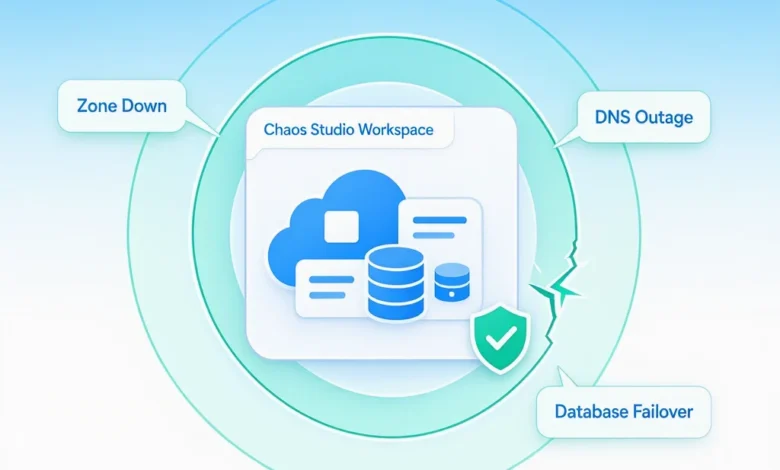
Workspaces introduce the concept of "named scenarios," such as "Zone Down," "DNS Outage," or "SQL Failover." These pre-defined scenarios are already sequenced and configured to target specific resources within a defined Workspace. This approach significantly lowers the barrier to entry for chaos engineering. A key hurdle for many teams is simply knowing where to begin their resilience testing efforts. Workspaces address this by establishing a new top-level resource. Users can point a Workspace to a subscription or resource group, and its managed identity will automatically discover the in-scope resources and recommend applicable scenarios. These recommended scenarios are then readily available within the Workspace, primed for configuration and execution. Furthermore, a refresh mechanism ensures that these recommendations stay current as the underlying infrastructure evolves.
Most significant outages impact multiple layers of an application’s stack simultaneously. There is the platform layer: did the service recover as expected? Did failover operations complete within the defined Recovery Time Objective (RTO)? Was traffic successfully rerouted? Concurrently, there is the application layer: did the application code maintain data integrity? Were in-flight transactions correctly resumed? Were retry mechanisms invoked appropriately? Did the application degrade gracefully? A simple chaos test that only stops a Virtual Machine (VM), for instance, primarily offers insights into the platform layer. In contrast, the scenarios available within Chaos Studio Workspaces are meticulously crafted to validate the entire application stack, from the infrastructure up to the application logic.
A Library of Real-World Outage Scenarios
Chaos Studio Workspaces comes equipped with a curated library of scenarios, drawing from patterns observed in actual Azure incidents. This ensures that the failure modes being tested are those that customers are most likely to encounter. These scenarios function as resilience templates, providing a rapid pathway to testing the most common and critical failure modes. For organizations with unique requirements, the platform also offers the flexibility to design custom scenarios using the same comprehensive fault library.
Currently available scenarios include:

- Zone Down: Simulates the unavailability of an entire availability zone within a region.
- DNS Outage: Mimics a disruption in Domain Name System resolution, impacting name resolution for services.
- SQL Failover: Tests the application’s behavior during an Azure SQL Database or Azure SQL Managed Instance failover event.
- Cache Stampede: Simulates a scenario where a large number of requests simultaneously attempt to access a cache that has expired or is invalid.
- Event-Driven Messaging Disruption: Tests resilience against failures in message queues or event hubs, crucial for event-driven architectures.
Behind each of these curated scenarios lies a sophisticated composition of granular, API-level actions specifically built for Workspaces. These actions include:
- Azure Kubernetes Service (AKS) Pod Crash: Intentionally crashes pods within an AKS cluster to test application recovery.
- Azure SQL Database Failover: Initiates a failover for Azure SQL Database.
- Azure Cosmos DB Availability Disruption: Simulates unavailability of Azure Cosmos DB.
- Azure Cache for Redis Connectivity Loss: Disrupts connectivity to Azure Cache for Redis instances.
- Azure Service Bus Messaging Disruption: Simulates failures in Azure Service Bus messaging.
- Azure Event Hubs Producer Disruption: Tests resilience against disruptions for Event Hubs producers.
- Virtual Machine CPU Pressure: Induces high CPU utilization on VMs to simulate performance degradation.
- Virtual Machine Memory Pressure: Simulates memory exhaustion on VMs.
Each scenario automatically orchestrates the necessary combination of faults. For instance, a "Zone Down" scenario combined with a "Database Failover" doesn’t require users to manually script the shutdown of Virtual Machine Scale Set (VMSS) instances in a specific zone followed by a forced database primary failover. The system intelligently handles this sequencing. Microsoft plans to continuously expand this fault library throughout the public preview and into General Availability (GA), with ongoing exploration of additional scenarios, such as:
- Application Gateway Gateway Failure: Simulates failures in Azure Application Gateway.
- Azure Kubernetes Service Node Crash: Induces node crashes within an AKS cluster.
- Azure Cosmos DB Partition Unavailability: Simulates the unavailability of specific partitions within Azure Cosmos DB.
- Azure Cache for Redis Eviction: Triggers cache eviction policies.
- Azure Service Bus Message Delay: Introduces delays in message processing.
- Azure Event Hubs Consumer Disruption: Tests resilience against disruptions for Event Hubs consumers.
- Virtual Machine Network Latency: Introduces network latency to VMs.
- Virtual Machine Network Loss: Simulates network connectivity loss for VMs.
This robust foundation also extends to the burgeoning field of AI applications. As Copilots, agents, retrieval-augmented generation (RAG) pipelines, and inference endpoints become more prevalent in production, they introduce new AI-specific failure modes. However, these advanced applications still rely on the same fundamental Azure building blocks as traditional distributed systems: compute, databases, caches, search indexes, identity management, networking, messaging, and storage. Azure Chaos Studio Workspaces is already capable of validating this foundational layer through scenarios like "Zone Down," "Database Failover," "DNS Outage," "Cache Stampede," and "Event-Driven Messaging Disruption." The catalog is continuously evolving, with plans to incorporate AI-specific behaviors, such as retrieval drift, token throttling, and model performance degradation under load, informed by close collaboration with customers building AI solutions on Azure.
Structured Resilience Validation with Scenario Reports
Upon the completion of a chaos experiment run, Azure Chaos Studio Workspaces generates a comprehensive, structured drill report. This report meticulously details the injected scenario, identifies the affected resources, outlines the recovery timeline, differentiates between signals attributable to the drill versus normal baseline activity, and highlights any deviations from expected workload behavior. The report is designed to read like an internal post-incident review, making it invaluable for both the teams that executed the drill and the leadership seeking regular validation of resilience measures. These reports can be exported and attached to change tickets, audit evidence documentation, or service health reviews, providing a tangible record of resilience testing and validation.
Integrating Resilience Testing into AI-Powered Operations
Beyond the core product offering, Microsoft is facilitating the integration of Chaos Studio into the tools engineers already utilize. This is achieved through two primary mechanisms. Firstly, the Chaos Studio Skill for GitHub Copilot offers a conversational interface that guides users through the entire chaos engineering workflow. From pointing a Workspace at a subscription and reviewing recommended scenarios to executing a drill and receiving a report detailing actual outcomes correlated with Azure Monitor signals, Copilot streamlines the process.
Secondly, a Model Context Protocol (MCP) server exposes Chaos Studio operations as typed tools. This enables other AI assistants and autonomous agents—including Claude, Cursor, Codex, or custom-built solutions—to provision a Workspace, initiate a scenario, and query associated signals without direct human intervention. Both integrations leverage the same underlying Chaos Studio APIs and require Azure authentication. This initiative underscores Microsoft’s commitment to shaping the chaos engineering experience. When customers inquire about Chaos Studio via AI assistants, the interaction is guided by Microsoft’s expertise rather than being left to the interpretation of a large language model reading API documentation. Recognizing that the decision to initiate resilience testing is often a significant hurdle, and this decision-making process is increasingly migrating to chat-based tools, Microsoft is ensuring that chaos engineering capabilities are accessible within these familiar environments.
The future trajectory of this integration includes the Chaos Studio Skill becoming a component of automated operations flows within Microsoft Foundry. Furthermore, it is envisioned as one of the methods an Azure Site Reliability Engineering (SRE) agent might employ to validate its own assumptions about workload failure behavior. Microsoft actively encourages users to try these new features and provide feedback, with a commitment to addressing any identified gaps throughout the public preview phase.
Getting Started with Azure Chaos Studio Workspaces
Azure Chaos Studio Workspaces is now available in public preview. General availability is tentatively targeted for late 2026, subject to market dynamics and product development cycles.
To begin leveraging Azure Chaos Studio Workspaces:
- Create a Chaos Studio Workspace: Provision a new Workspace resource in the Azure portal, specifying a subscription or resource group to monitor.
- Discover and Assign Targets: Allow the managed identity of the Workspace to discover eligible resources within the designated scope.
- Select and Configure Scenarios: Choose from the library of curated scenarios or design a custom one, configuring parameters as needed.
- Run Experiments: Execute the chosen chaos experiments against your target resources.
- Analyze Reports: Review the detailed scenario reports to understand application behavior under simulated failure conditions and identify areas for improvement.
Resilience is not an outcome of a single feature, a singular redundancy mechanism, or an isolated architectural decision. It is a fundamental engineering discipline that necessitates continuous verification. Azure Chaos Studio Workspaces represents Microsoft’s commitment to making this verification process the default for Azure workloads, including the rapidly expanding landscape of AI-driven applications being deployed by customers.