The integration of artificial intelligence into the digital product ecosystem has triggered a fundamental reassessment of how user interface (UI) and user experience (UX) professionals approach their craft. While early anxieties centered on the complete automation of creative roles, contemporary industry practice points toward a more nuanced reality: AI functions not as a replacement for human cognition, but as a high-velocity catalyst for execution. Recent insights from practicing designers, such as UI/UX specialist Mustofa Al-Ameen Mustafa, highlight a growing consensus that while generative models excel at accelerating production and ideation, the core responsibilities of strategic decision-making, empathy, and product vision remain firmly in human hands.
The Evolution of the Modern Design Workflow
Traditionally, the path from an initial Product Requirements Document (PRD) to a high-fidelity, testable prototype has been a linear, time-intensive marathon. Product designers spent weeks translating abstract business goals into structural user flows, sketching rudimentary wireframes, and manually building out component libraries before ever reaching a stage fit for user testing.
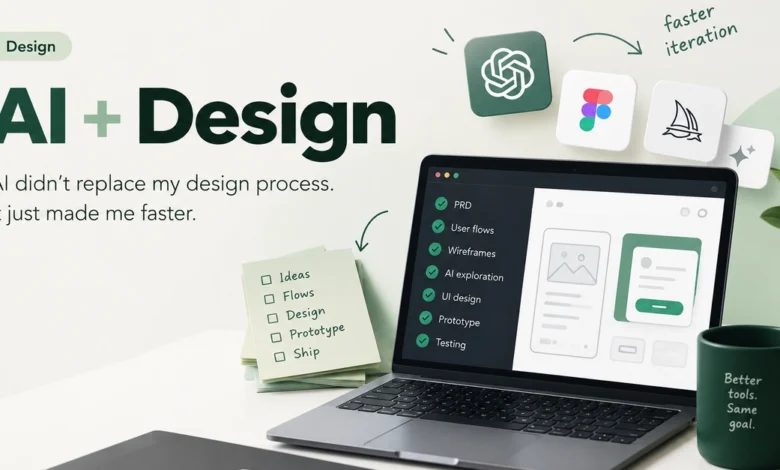
In the contemporary workflow, AI tools have been systematically inserted into this pipeline, primarily acting as accelerators during the exploratory phase. The updated design lifecycle now typically follows a structured trajectory:
- Product Requirements Document (PRD): Defining the scope, business objectives, and technical constraints.
- User Flows: Mapping out the navigational logic and behavioral pathways of the target audience.
- Wireframes: Establishing structural layouts and information hierarchy.
- AI-Assisted Exploration: Utilizing generative models, layout generators, and automated styling suggestions to rapidly prototype diverse visual directions.
- UI Design: Refining the selected direction with brand-specific typography, color theory, and micro-interactions.
- Prototyping: Assembling clickable models to simulate real user interactions.
- Testing: Gathering empirical data from actual users to validate usability and accessibility.
Rather than short-circuiting this established sequence, artificial intelligence compresses the timeline specifically around the exploration and drafting phases. Designers are no longer forced to choose a single visual direction early in the process due to time constraints; instead, they can evaluate dozens of conceptual variations within hours.
Data and Industry Adoption: Speed Versus Originality
Recent surveys across the software development and design sectors indicate a massive surge in AI tool adoption. According to industry reports from major design platform ecosystems, over 70% of digital product teams now integrate some form of generative AI into their daily routines.

However, this widespread adoption is accompanied by a distinct philosophy. The primary metric of success reported by senior designers is not automation—the notion that "AI designed this for me"—but rather velocity: the compression of time required to move from an abstract cognitive concept to a tangible, visual artifact.
| Workflow Phase | Traditional Timeline | AI-Assisted Timeline | Primary Value Add of AI |
|---|---|---|---|
| Ideation & Sketching | 3 to 5 days | A few hours | Rapid generation of diverse visual concepts |
| Wireframing & Layout | 1 week | 2 to 3 days | Automated component placement and grid alignment |
| Asset Production | 4 to 6 days | 1 to 2 days | Automated image generation and variant scaling |
| Prototyping & Testing | 2 weeks | 1 to 2 weeks | Faster iteration based on real-time feedback |
This data illustrates that while the administrative and mechanical burdens of design are diminishing, the time allocated to high-level evaluation, user research, and strategic pruning remains largely unchanged. The bottleneck has shifted from how fast can we draw this to what should we actually build.
The Human Element: Curation, Context, and Empathy
As generative tools become more sophisticated, the distinction between production and creation becomes increasingly critical. Artificial intelligence models operate on pattern recognition derived from vast training datasets of existing human design work. Consequently, they are exceptionally skilled at extrapolation and combination, yet incapable of original intent.
Designers stress that knowing what to build, what to remove, and why a user should care requires deep contextual understanding that algorithms lack. A model can generate twenty distinct dashboard layouts in seconds, but it cannot interview a frustrated user, interpret subtle emotional cues during a usability test, or navigate the complex internal politics of a corporate stakeholder meeting.
Furthermore, over-reliance on generative outputs introduces significant risks, including homogenization—where digital products begin to look identical due to reliance on the same training data—and accessibility oversight. Human oversight remains the ultimate safeguard against poorly structured information hierarchies and exclusionary design patterns.
Chronology of AI Integration in UI/UX
The rapid shift in design operations did not happen overnight. A brief retrospective highlights the milestones that brought the industry to its current state:

- 2018–2020 (The Automation Era): Early tools focused on repetitive tasks, such as auto-layout features, basic design token generation, and simple asset export plugins.
- 2021–2022 (The Generative Breakthrough): The emergence of transformer-based text-to-image and text-to-code models introduced the possibility of generating UI assets from natural language prompts.
- 2023–2024 (Ecosystem Integration): Major design software suites embedded AI natively into their applications, allowing real-time translation, background removal, copywriting generation, and layout suggestions directly within the workspace.
- 2025 and Beyond (Strategic Curation): The current phase focuses on workflow orchestration, where designers act less as pixel-pushers and more as directors, curators, and editors of AI-generated options.
Broader Implications for the Tech Industry
The transformation of the design process carries profound implications for both individual careers and organizational structures within the technology sector.
For individual practitioners, the skill set required to remain competitive is shifting away from pure technical execution—such as mastering vector networks or pixel-level alignment—toward strategic thinking, prompt engineering, critical evaluation, and advanced user research. Junior designers must learn to leverage these tools early to bridge the experience gap, while senior leaders must establish rigorous ethical and brand guidelines to govern AI output.
For organizations, the accelerated execution timeline changes product delivery expectations. Stakeholders now anticipate faster iteration cycles and more comprehensive prototyping phases before development begins. However, organizations must remain vigilant against the temptation to cut corners on user research under the false assumption that speed equals quality.
As the tooling continues to evolve at a rapid pace, the central challenge for the design community remains clear: harnessing the immense computational speed of artificial intelligence while preserving the critical thinking, empathy, and human intent that define truly great user experiences.