Windows Administrators Report Severe Remote Desktop Services Failures Following September 2026 Cumulative Updates


System administrators across enterprise environments are scrambling to mitigate a critical post-update flaw affecting Remote Desktop Services (RDS) across multiple iterations of the Windows Server operating system. The widespread disruptions trace back to the deployment of Microsoft’s September 2026 Patch Tuesday cumulative updates. According to extensive reports gathered from professional IT forums, independent system administrators, and direct communications with technical publications, the updates are triggering catastrophic session hangs, preventing new incoming connections, and forcing IT personnel to execute hard reboots of affected virtual and physical infrastructure.
The issue impacts a broad spectrum of enterprise environments running Windows Server 2019, Windows Server 2022, and the newly released Windows Server 2025. Because RDS and Terminal Services form the backbone of remote workforce accessibility, virtual desktop infrastructures (VDI), and administrative management for thousands of organizations globally, the disruption has introduced significant operational bottlenecks. As businesses increasingly rely on continuous uptime for distributed teams, software failures of this magnitude emphasize the fragile balance between deploying critical security patches and maintaining operational continuity.
Anatomy of the RDS Failure and Progression
The manifestation of the bug follows a deceptive pattern that complicates immediate detection by automated monitoring tools. Administrators note that upon a fresh boot and installation of the September updates, Remote Desktop Services appear to function entirely normally. Servers accept incoming connections, sessions initialize smoothly, and users can execute their daily workloads without immediate interference.
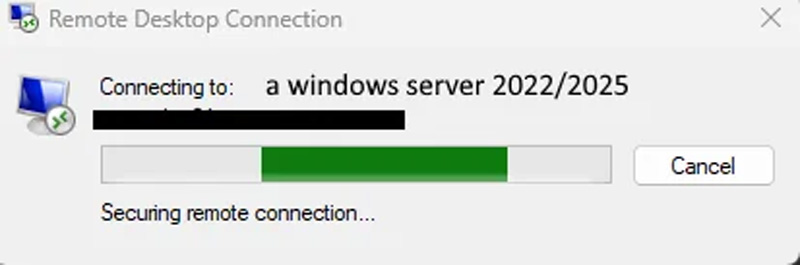
However, a systemic degradation occurs over time. Typically within a few hours—or immediately following the first wave of user logouts—the underlying service encounters a terminal state. Existing sessions become frozen, preventing users from properly logging off or disconnecting cleanly. Simultaneously, any new connection attempts initiated by other users hang indefinitely during the authentication or session-establishment phase before eventually timing out with error messages.
Diagnostic deep-dives shared within the systems administration community shed light on the technical root of the failure. Preliminary debugging sessions conducted by enterprise engineers point toward a severe thread deadlock occurring between the Remote Desktop Service and the Local Session Manager (LSM). Specifically, diagnostic traces indicate that the RDP service hangs indefinitely at the function call RDPSERVERBASE!WDLIB_Close. Because the software contains no built-in timeout mechanism to break or gracefully abort this hanging routine, the thread blocks permanently. This locks up the session manager, preventing subsequent user sign-ins and rendering standard administrative service restarts ineffective.
Chronology and Scope of the Outbreak
The rollout of the September 2026 Patch Tuesday updates began on the second Tuesday of the month, as is standard for Microsoft’s predictable patch cadence. The update package in question addressed a massive catalog of 966 security vulnerabilities, including two actively exploited zero-day flaws. Eager to secure their networks against emerging threats, enterprise administrators rapidly deployed the monthly cumulative packages to their server fleets.
Within hours of deployment, the initial wave of failures was documented across community platforms such as Reddit’s r/sysadmin and various IT management channels.
- Initial Deployment: IT departments install the September 2026 cumulative updates, which include KB5122876 for Windows Server 2019, KB5122882 for Windows Server 2022, and KB5122871 for Windows Server 2025.
- Grace Period: Affected servers run without noticeable incident for a brief window, masking the underlying software conflict.
- The Trigger Event: As users conclude their shifts or voluntarily log out of their remote sessions, the Local Session Manager attempts to close the corresponding handles.
- The Deadlock: The lack of a timeout within the
RDPSERVERBASE!WDLIB_Closefunction causes the RDP service and LSM to lock up permanently. - System Failure: The server becomes partially unresponsive regarding remote management. Standard service-restart commands fail to clear the frozen state, leaving administrators with no recourse other than executing a hard power reset or physical server reboot.
Workarounds and Mitigation Strategies
Faced with a complete breakdown of remote accessibility, systems administrators have been forced to choose between two undesirable paths: operational stability or absolute network security.
The primary and currently most reliable workaround reported by the IT community involves rolling back the September 2026 cumulative updates. Administrators who have uninstalled KB5122876, KB5122882, and KB5122871 confirm that Remote Desktop functionality immediately returns to normal, allowing sessions to close and new users to sign in without impediment.
However, this workaround introduces a severe security compromise. By removing the September cumulative updates to restore RDS stability, organizations concurrently strip away the 966 security fixes packaged by Microsoft for that month. In an era marked by sophisticated automated threat actors and widespread ransomware campaigns operating at machine speed, leaving servers unpatched against critical vulnerabilities creates an unacceptable risk window. Consequently, security teams are forced to weigh the risk of local user lockout against the danger of exposing unpatched server infrastructure to the public internet or internal lateral movement threats.
Official Response and Enterprise Implications
As of the publication of this report, Microsoft has not formally acknowledged the Remote Desktop Services deadlock in its official support documentation, nor has it released an out-of-band patch or a targeted mitigation script. Industry outlets, including BleepingComputer, have reached out to Microsoft’s press and engineering divisions seeking clarification on whether a hotfix is currently in development, but official commentary remains pending.
The recurrence of disruptive cumulative update bugs highlights persistent challenges within Microsoft’s modern software validation pipeline. Enterprise IT organizations have increasingly voiced frustration regarding the reliability of monthly patches. While automated update delivery systems are designed to streamline security maintenance, bugs that bypass internal telemetry testing cycles can paralyze business operations globally within hours of release.
For organizations currently managing large fleets of Windows Server 2019, 2022, and 2025 machines, best practices dictate cautious staging. IT departments are advised to route updates through non-production testing rings, maintain robust deployment blocks, and monitor administrative channels closely for an official Microsoft acknowledgment or hotfix release. Until a verified patch is distributed, system administrators must navigate a delicate balancing act between maintaining business-critical remote access and preserving enterprise-grade cybersecurity postures.