Google Workspace Unifies Gemini AI Across All Apps for Cross-App Task Management

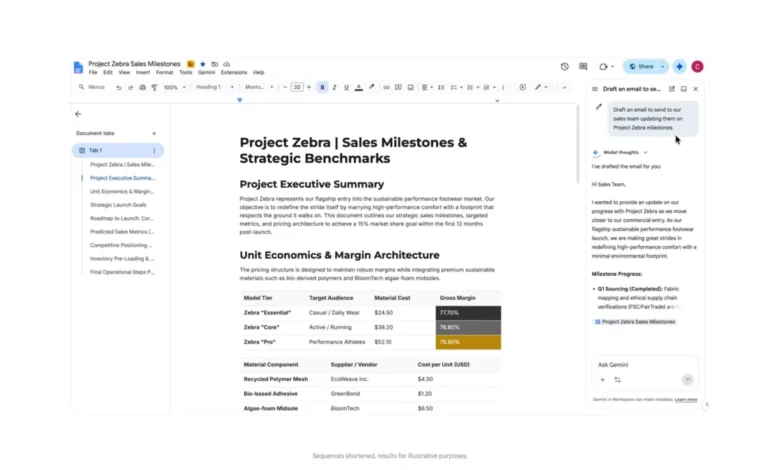
Google has announced a major architectural upgrade to its Gemini artificial intelligence assistant within Google Workspace, breaking down the traditional application silos that previously limited AI functionality to specific software environments. Driven by advancements in Workspace Intelligence and deeper cross-platform integrations, the update empowers users to complete complex, multi-app workflows from within any Workspace application.
Historically, interacting with Gemini in Google Workspace required users to operate within specific context-bound boundaries. Generating text documents through AI commands necessitated opening Google Docs, while building and formatting spreadsheets required working directly inside Google Sheets. Similarly, summarizing email threads or drafting correspondence was confined to the Gmail sidebar.
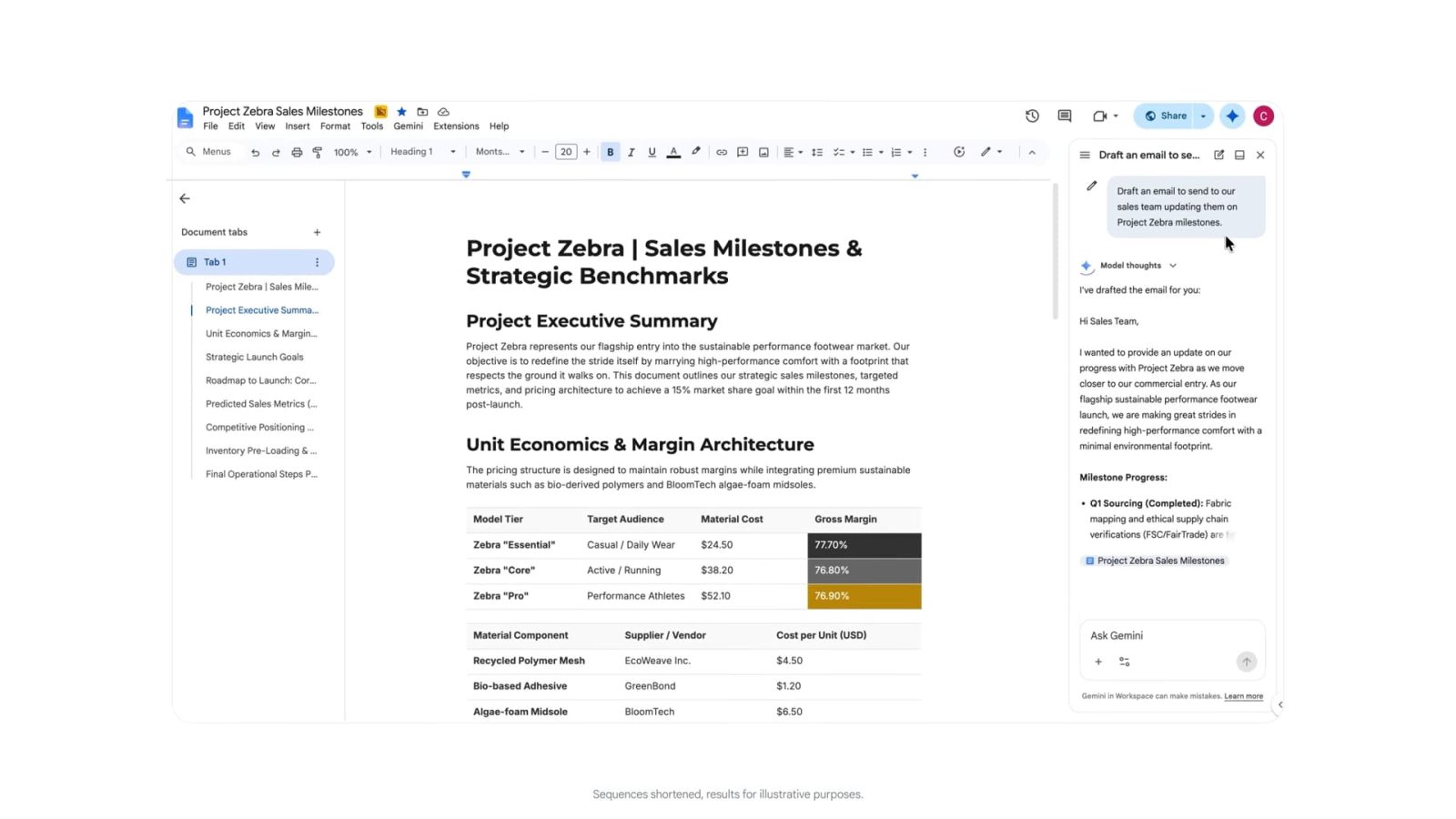
Under the newly deployed infrastructure, every instance of the Gemini side panel across Gmail, Google Drive, Docs, Slides, and Chat will feature a unified, comprehensive feature set. This harmonization allows users to execute unified commands regardless of their current active window, significantly reducing the friction associated with switching between distinct productivity tools.
Expanding Capabilities and Cross-App Functionality
The rollout introduces advanced interoperability between productivity services, fundamentally changing how professionals interact with everyday software. For example, a user drafting a project proposal in Google Docs can now issue a direct command to Gemini to email the document to a sales team for review and feedback, eliminating the need to manually transition to Gmail, compose a message, and attach the file.
Cross-functional utility is similarly enhanced within communication and organization tools. In Google Chat, users can ask Gemini to analyze calendars, identify open meeting times, coordinate schedules, and resolve scheduling conflicts directly within the messaging stream. Furthermore, the integration with Google Tasks enables users to instantly log reminders, parse action items from conversations, or generate comprehensive to-do lists from any supported Workspace service.
Google has also emphasized enhancements to content creation and transformation. Users can seamlessly convert lengthy email threads into structured, formatted Google Docs, or instantly build branded presentation outlines in Google Slides directly from source material stored in Google Drive or composed in Docs.
Rollout Timeline and Availability
The expanded feature set began rolling out globally this month, reaching users in phases. Access to the unified cross-app functionality depends on subscription tiers and enterprise governance policies.
For individual consumers, the upgrade is available to subscribers of the Google AI Ultra plan. Google AI Pro subscribers also receive access to the expanded side-panel capabilities, though Google has noted a specific limitation regarding automated scheduling functionality for this tier. Additionally, the feature set is being deployed across enterprise, education, and government tiers that maintain active Gemini add-on licenses, subject to administrative controls managed by organization IT departments.
Background Context and Workspace Evolution
The integration of generative artificial intelligence into office productivity suites has accelerated rapidly across the technology sector. Following the initial industry-wide pivot toward large language models, early iterations of AI assistants functioned primarily as localized copilots—useful for brainstorming, summarizing text, or generating boilerplate content within a single document or message.
However, productivity software users frequently manage workflows that span multiple distinct applications. A typical enterprise task—such as compiling a quarterly report—often requires extracting data from spreadsheets, synthesizing feedback from chat logs, drafting narrative summaries in word processors, and scheduling review meetings via calendar software. By bridging these distinct applications, Google’s latest update addresses a primary limitation of first-generation enterprise AI: the necessity of manual context-switching between tools.
Workspace Intelligence serves as the underlying orchestration layer for these updates, utilizing advanced reasoning capabilities to interpret user intent, identify the correct target applications, and execute sequential instructions across different APIs securely and efficiently.

Industry Implications and Enterprise Analysis
The convergence of AI capabilities across software suites signals a broader shift in enterprise software design. As artificial intelligence transitions from an additive feature to the primary interface for digital work, traditional application boundaries are becoming increasingly porous.
Industry analysts note that unified AI side panels could significantly reduce administrative overhead and time spent navigating complex software interfaces. By allowing natural language prompts to orchestrate actions across mail, document management, cloud storage, and team communication channels, organizations may see measurable gains in operational efficiency.
At the same time, the centralization of cross-app execution places heightened demands on data governance, security, and privacy compliance. Because Gemini now accesses and modifies data across multiple repositories from a single conversational interface, enterprise administrators must carefully configure data boundaries, permissions, and compliance guardrails to ensure sensitive corporate information remains protected.
As Google continues to expand the capabilities of Gemini within Workspace, the focus of enterprise AI development is expected to shift further away from isolated content generation and toward autonomous, multi-step workflow execution—redefining the fundamental user experience of modern digital office environments.