Pixel Weather Receives a Functional Upgrade with Homescreen Refresh Button and Expanded Ecosystem Availability

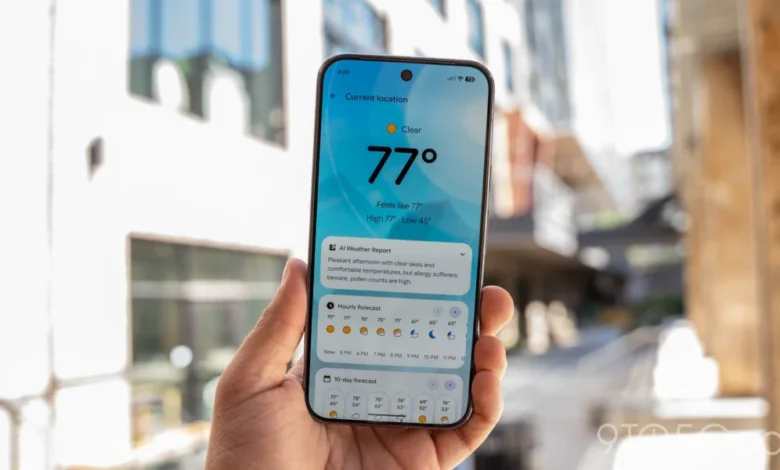
Google is continuing to refine its proprietary software ecosystem with a new update rolling out to Pixel Weather, introducing practical interface modifications designed to streamline user interaction. Following a recent icon refresh that modernized the visual identity of the application, version 1.1.20260716.x brings a long-requested utility feature directly to the user’s home screen alongside subtle UI adjustments within the main application feed.
The most notable alteration in the latest release is the integration of a dedicated refresh button positioned in the top-right corner of the standard Forecasted weather widget. Historically, users seeking to pull the most up-to-date meteorological data had to either wait for background synchronization or open the full Pixel Weather application to manually force a data fetch. With this update, a single tap on the newly minted icon triggers an immediate sync sequence, accompanied by a brief loading spinner that confirms incoming data retrieval. This enhancement significantly reduces friction for users who rely heavily on glances at their home screen to monitor rapidly changing weather conditions throughout the day.
In tandem with the home screen widget modification, Google has implemented minor adjustments to the layout of the primary application interface. Specifically, the hourly and 10-day forecast cards located within the city feed have undergone a structural trimming. The previous iteration of the app featured explicit left and right navigation buttons, enabling users to click through data points without relying on physical swiping gestures. In version 1.1.20260716.x, these navigation buttons have been completely removed, steering users exclusively toward touch-based swiping mechanics. While minor, this UI shift aligns the weather application more closely with modern Android design standards, which increasingly favor fluid, gesture-driven navigation over static on-screen buttons.
The update, designated as version 1.1.20260716.x, is currently propagating to compatible devices globally via the Google Play Store. Because it is being deployed as a standard application update rather than a full operating system patch, availability is decoupled from major Android version drops, allowing Google to iterate rapidly on user feedback.
Background Context and Evolution of Pixel Weather
To understand the trajectory of Pixel Weather, it is necessary to examine how Google has handled its meteorological services over the past several years. For a long time, weather information on Android devices was housed within the broader Google Search app or accessed via the Google Assistant interface. While functional, these implementations lacked the cohesive, dedicated experience found on competing hardware platforms, such as Apple’s native Weather app.
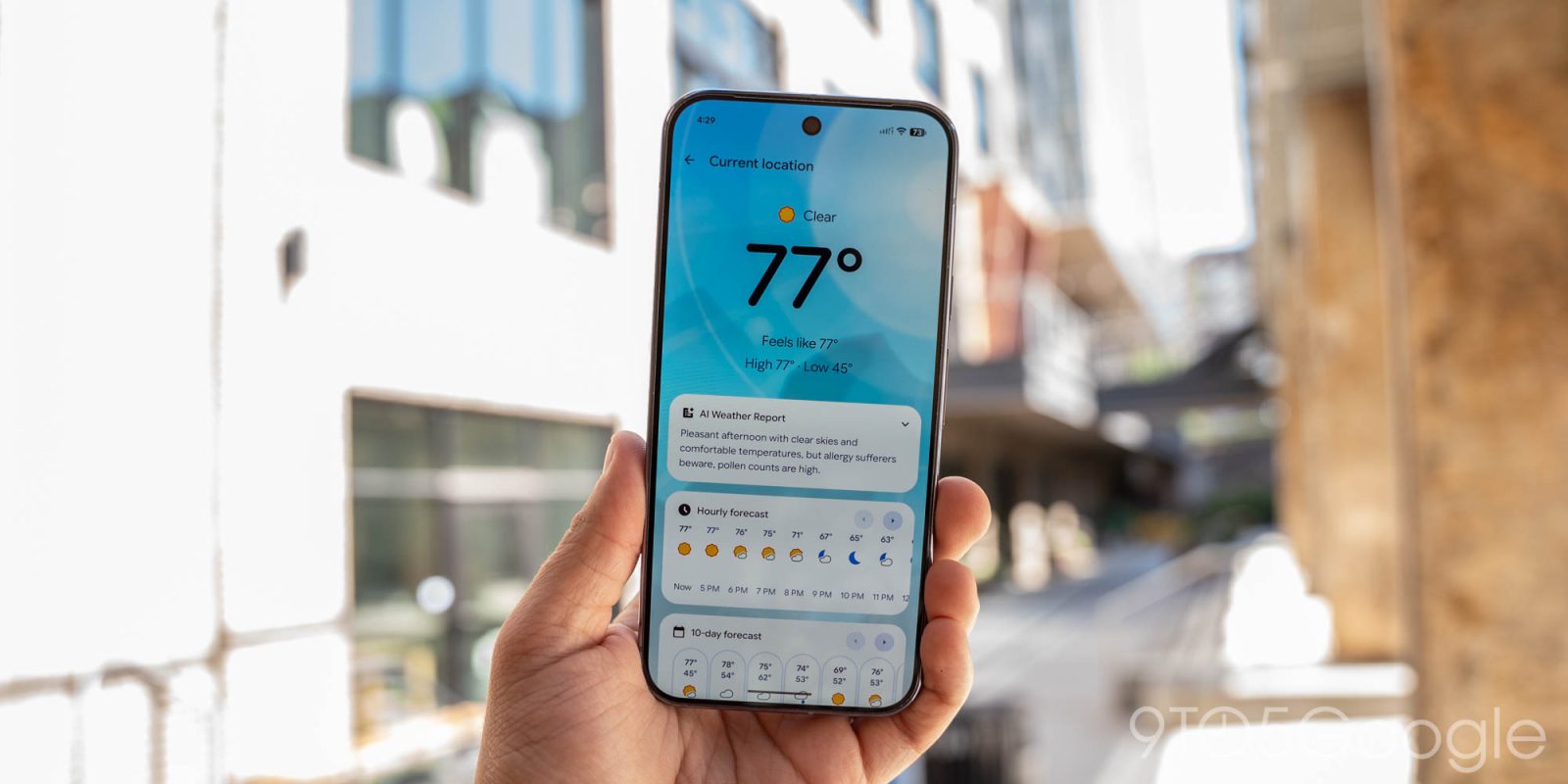
Google began aggressively separating its core utilities from the monolithic Google app to provide a more tailored, premium experience exclusively for owners of its Pixel hardware lineup. This strategy gave rise to Pixel Weather as a standalone application designed from the ground up to leverage Material You design principles. The app quickly gained a reputation for its clean aesthetic, dynamic frog animations representing various weather states, and hyper-local forecasting accuracy powered by advanced machine learning models.
Over successive updates, Google has continuously polished the application. Last month’s icon update altered the visual branding of the app drawer icon, signaling a broader commitment to keeping the interface fresh and visually aligned with the latest Android design iterations. The addition of the home screen refresh button represents a transition from purely aesthetic updates to functional, productivity-driven improvements requested by the user community on forums and feedback channels.
Chronology of Recent Pixel Weather Developments
The evolution of Pixel Weather has accelerated significantly over the past year. A detailed timeline highlights the pace of these software iterations:
- Early 2024: Google introduces Pixel Weather as a dedicated, standalone application built exclusively for Pixel devices, moving away from the embedded Google Search weather card.
- Late 2024 to 2025: Successive updates bring expanded regional forecasting, enhanced radar integration, and dynamic visual animations that adapt to real-time meteorological conditions.
- Mid-2026: Google rolls out a prominent icon update, modernizing the application’s visual presentation on the home screen and app drawer.
- August 2026: Version 1.1.20260716.x is released to the Google Play Store, introducing the home screen widget refresh button, removing manual navigation arrows from the forecast cards, and signaling a broader platform expansion strategy.
Broader Ecosystem Implications and Cross-Platform Availability
Perhaps the most significant strategic revelation accompanying the latest Pixel Weather update is not just what has changed within the app, but where the app will live moving forward. Historically fiercely guarded as a hardware-exclusive selling point meant to drive consumer adoption of Pixel smartphones, Pixel Weather—along with the popular Recorder application—is slated to become available across all Googlebooks moving forward.
This shift marks a notable pivot in Google’s hardware and software philosophy. For years, proprietary software features served as primary differentiators for the Pixel brand, incentivizing consumers to choose Google-manufactured handsets over competing Android manufacturers like Samsung, Motorola, or OnePlus. By decoupling Pixel Weather and Recorder from strict hardware exclusivity and making them available across a wider array of ChromeOS-powered Googlebooks and potentially broader form factors, Google is signaling a shift toward ecosystem ubiquity.

Industry analysts suggest that this strategy mirrors moves made by other major tech conglomerates, which increasingly realize that software-as-a-service and ecosystem stickiness can generate higher long-term engagement than hardware lock-in alone. By bringing a polished, highly rated weather application to larger screens and diverse device categories, Google ensures that its design language and machine-learning-driven services maintain a persistent presence in the daily routines of users, regardless of the primary computing device they operate.
User Reception and Technical Analysis
Initial reception to the Pixel Weather update within enthusiast communities has been largely positive. Power users who utilize multiple weather widgets across several home screen pages have praised the inclusion of the manual refresh button, noting that it eliminates the frustrating ambiguity of whether stale data is being displayed due to background sync intervals or network latency.
However, the removal of the left and right scroll buttons on the hourly and 10-day forecast cards has generated minor debate. While gesture-based swiping is the universally accepted standard for mobile interfaces, accessibility advocates and users who prefer precise, one-handed navigation via tap targets occasionally express frustration when explicit buttons are pruned in the name of minimalist design. Nonetheless, the overall footprint of the update remains lightweight and unobtrusive.
As Google continues to refine its software suite, the convergence of functional efficiency and broader device accessibility positions Pixel Weather as a benchmark application within the Android ecosystem. Whether checking a sudden shift in precipitation via the newly minted home screen button or experiencing the app on a broader range of hardware, users are witnessing a maturing utility that prioritizes speed, clarity, and universal availability.