Gmail Rolls Out New Inbox Shortcut for Instantly Copying Two-Factor Authentication Codes on Android and iOS

Google is continuing to refine the user experience of its ubiquitous email platform by introducing a streamlined productivity feature designed to simplify security protocols. Following the rollout of advanced live search functionalities and interactive chat integrations earlier this month, Gmail has now deployed a dedicated "Copy code" button tailored specifically for two-factor authentication (2FA) messages on mobile devices. This new quality-of-life update is currently rolling out to users across the Android and iOS operating systems, effectively eliminating several repetitive steps previously required to log into secure accounts.
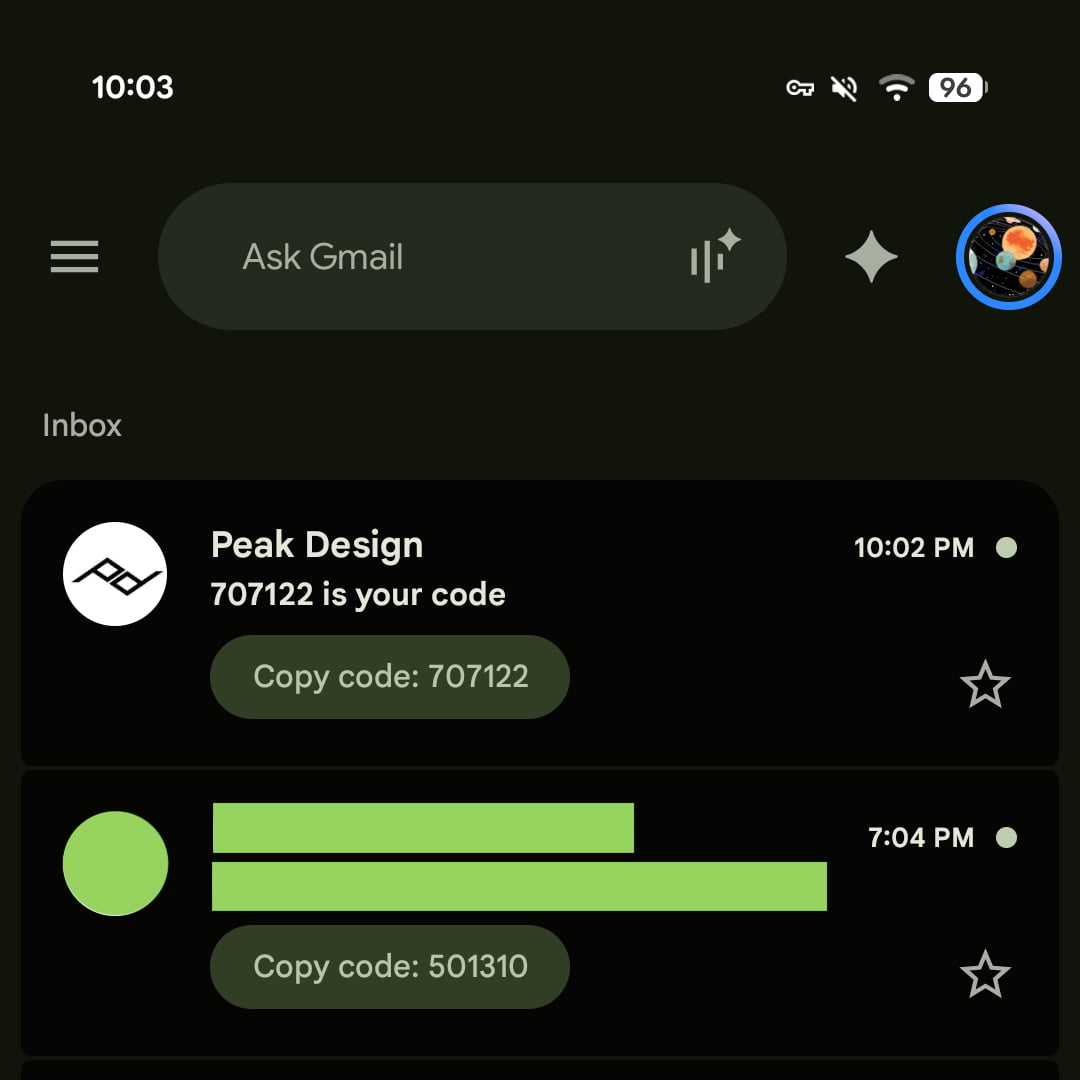
The mechanics of the new feature are straightforward yet remarkably efficient. Historically, when a user received a verification code via email—whether for banking, retail, or enterprise software—the process required navigating away from the main inbox view, opening the specific message, carefully highlighting the alphanumeric string, and manually selecting the copy function before switching back to the originating app. With the latest update, Gmail bypasses the need to open the email entirely. A pill-shaped shortcut button displaying the text "Copy code" alongside the numerical sequence now populates directly beneath the email’s subject line within the main inbox interface. This placement mimics the visual previews already utilized for attachments, documents, and thumbnail images, creating a cohesive and familiar design language.
Chronology of Recent Gmail Enhancements
The implementation of the 2FA copy shortcut is part of a broader, aggressive push by Google throughout 2026 to modernize its communication suite and integrate intelligent, context-aware tools. Earlier in the year, Google introduced foundational structural updates aimed at reducing friction in daily digital communication. The timeline of recent updates underscores this shift:
- Early 2026: Google initiates comprehensive interface modernizations for mobile email clients, focusing on reducing tap counts for routine tasks.
- Earlier This Month: Gmail rolls out advanced Live search capabilities and integrated chat functionalities to mobile platforms, enhancing real-time information retrieval.
- Mid-September 2026: The official rollout of the "Copy code" button begins for mobile users, targeting version 2026.09.07.x on Android and version 6.0.260907 on iOS.
Despite the rapid deployment across mobile clients, the feature remains absent from the desktop web interface of Gmail. Furthermore, early adopters and technology analysts have noted that while the button performs exceptionally well inside the main application feed, it has yet to be integrated into system-level push notifications on Android—a logical next frontier that would elevate convenience even further by allowing users to copy verification codes directly from their notification shade or lock screen.
Supporting Data and Technical Implementation
The deployment of micro-interactions like the 2FA copy button relies on advanced natural language processing and structured data parsing within incoming messages. Email infrastructure frequently utilizes specific metadata tags or standardized formats to convey verification codes, allowing Google’s parsing engines to accurately isolate the relevant sequence of numbers or letters without capturing extraneous text.
Initial field tests conducted across various account types demonstrate the reliability of the feature. Whether processing authentication prompts from major financial institutions, e-commerce platforms, or identity-management providers, the snippet extraction mechanism successfully identifies the token and routes it to the device clipboard with a single tap. Once tapped, the code is temporarily stored, allowing the user to seamlessly paste it into the designated authentication field of the target application.
The update is being distributed via standard application updates through the Google Play Store for Android devices and the Apple App Store for iOS devices. Because the rollout is managed via incremental server-side updates coupled with client-side version requirements, availability may vary slightly over the course of several days as the feature reaches the global user base.
Security Implications and User Experience
In the modern digital landscape, two-factor authentication has become a mandatory security baseline for protecting personal and professional data against unauthorized access. However, usability friction remains one of the primary hurdles in convincing everyday users to adopt robust security practices. When authentication processes are cumbersome—requiring users to juggle multiple windows, memorize transient codes, or navigate slow-loading email threads—user fatigue can set in, inadvertently weakening security postures.
By reducing the friction associated with retrieving 2FA tokens, Google’s new shortcut indirectly supports stronger digital hygiene. When security measures require minimal cognitive and physical effort, compliance rates rise. The instant clipboard integration minimizes the window of vulnerability during the login process, reducing the likelihood of transcription errors where users misread or mistype rapidly expiring security codes.
From a privacy perspective, the processing of authentication codes occurs locally within the application environment. The shortcut generation algorithm scans message content to identify authentication patterns, presenting the extracted token exclusively to the user interface. No additional data is transmitted to external servers for the sole purpose of generating the shortcut button, ensuring that sensitive login tokens remain private to the user’s local device ecosystem.
Industry Context and Future Outlook
Google’s focus on streamlining verification workflows mirrors broader trends across the software industry. Competitors in the email and productivity space have increasingly experimented with contextual shortcuts, smart replies, and automated parsing to reduce routine administrative burdens for users. As mobile operating systems continue to evolve, the boundary between notification management, application interfaces, and clipboard operations is becoming increasingly fluid.

Industry analysts suggest that features like the "Copy code" button represent the future of micro-productivity design. Rather than demanding that users navigate deep hierarchies of menus and screens, modern software architecture prioritizes preemptive actionability—bringing the necessary function directly to the point of discovery.
As Google gathers telemetry data and user feedback on the initial rollout, future iterations of the feature are anticipated. Potential enhancements could include expanding the shortcut functionality to desktop web browsers, incorporating the copy action directly into push notification banners, and broadening natural language support to accommodate non-standardized verification phrasing across international markets. For now, mobile users on Android and iOS can enjoy a smoother, faster, and more efficient authentication experience every time a security prompt lands in their inbox.