The landscape of software development is undergoing a paradigm shift, moving rapidly from deterministic coding structures to dynamic, autonomous systems capable of reasoning, utilizing external tools, and executing multi-step workflows. For developers working in Python, building artificial intelligence agents has historically required stitching together custom tool-calling loops, managing stateful conversations manually, and handling complex exception routines. However, the introduction of streamlined frameworks has dramatically lowered this technical barrier. Among these developments, the release of the OpenAI Agents SDK provides a robust, standardized environment for creating, managing, and scaling intelligent agents without the need to reinvent foundational architectural components.
This comprehensive guide explores the structural mechanics of modern AI agents, contrasts them with traditional large language model (LLM) applications, and walks through the systematic implementation of a production-ready research agent equipped with web search capabilities, custom Python tool execution, and persistent memory via SQLite.
Understanding the Evolution from Static LLMs to Autonomous Agents
To appreciate the architectural significance of modern developer kits, it is essential to examine the fundamental differences between legacy LLM implementations and contemporary agentic systems. Standard language model applications typically operate on a linear, single-turn trajectory. A user submits a prompt, the model processes the query through its parameter weights, generates a static response, and terminates the execution thread. This can be conceptualized as a basic linear sequence: Prompt to Model to Response.
While effective for creative writing, summarization, or basic code generation, this transactional model breaks down when faced with complex, dynamic tasks that require real-time data retrieval, multi-step calculations, or state retention over prolonged interactions.
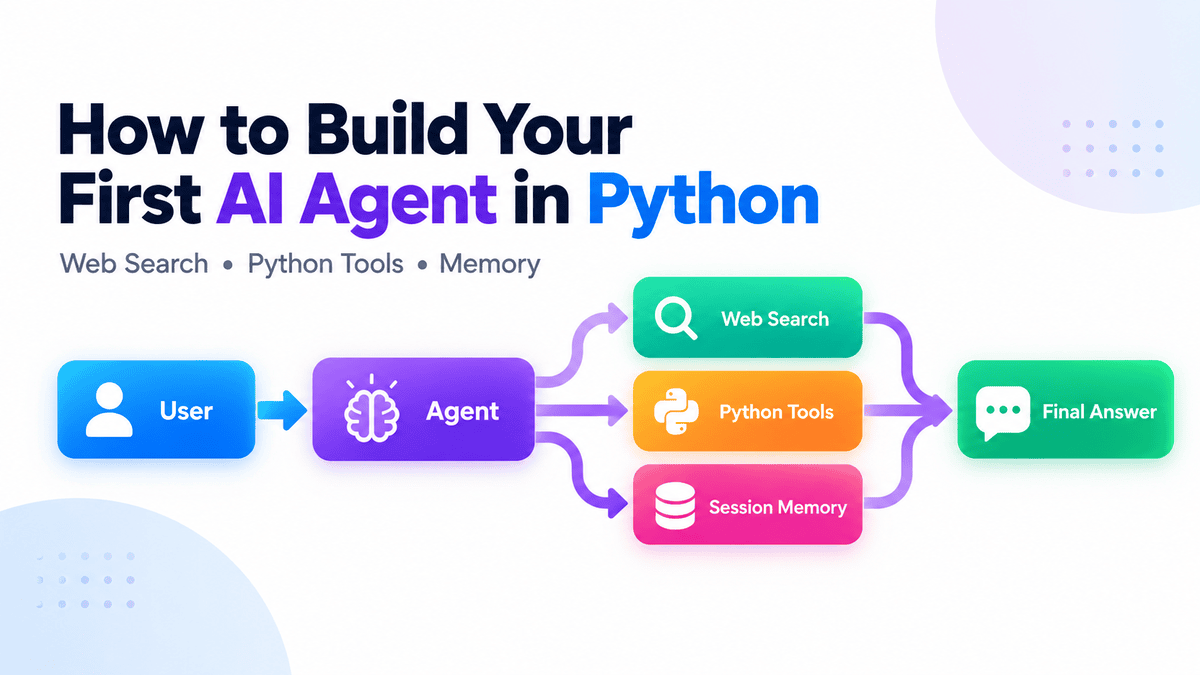
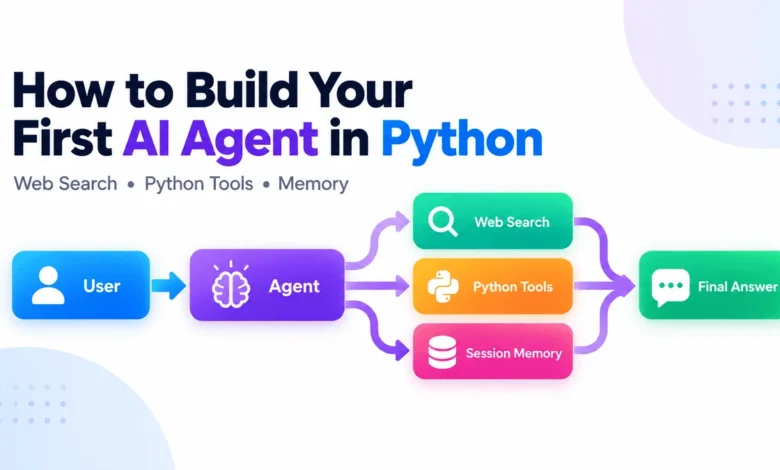
AI agents introduce an iterative execution loop that fundamentally alters this dynamic. Instead of stopping at the first generation step, an agent evaluates the user request, determines whether external capabilities are required, invokes the appropriate tool—such as a search engine, a database query, or a specialized math function—analyzes the output of that tool, and continues this cyclical reasoning process until it reaches a definitive conclusion. This architecture shifts the operational flow to: User to Agent to Tool Execution to Reasoning Loop to Final Response.
Underpinning this entire process within the OpenAI ecosystem is the Runner utility. The Runner abstracts away the boilerplate code traditionally required to manage the tool-calling lifecycle. It dispatches payloads to the model, intercepts tool execution requests, safely executes the requested functions, pipes the returned data back into the conversation context, and governs the agent’s multi-step decision-making progression. This autonomous orchestration enables developers to construct applications that reason, adapt, and execute complex workflows reliably.
Project Setup and Environment Configuration
Initiating an agentic project requires a clean, isolated development environment to manage package dependencies and API credentials securely. Modern Python toolchains, such as uv, offer rapid dependency resolution, making them ideal for setting up agent projects. Alternatively, standard virtual environments and the Python Package Index (pip) remain fully compatible.
To initialize a project using modern packaging tools, developers execute a series of terminal commands to establish the project directory and pull the required packages:
mkdir first-ai-agent
cd first-ai-agent

uv init
uv add openai-agents
Developers preferring traditional package management can utilize pip install openai-agents within an active virtual environment. Following installation, authentication requires provisioning the runtime environment with a valid OpenAI API key. On Unix-based systems, this is typically handled via shell configuration exports:

export OPENAI_API_KEY="your-api-key"For Windows environments utilizing Command Prompt or PowerShell, persistent environment variables can be set using system configuration utilities such as setx OPENAI_API_KEY "your-api-key". Ensuring this variable is correctly loaded prevents authentication errors during runtime execution.
Implementing a Web-Enabled Research Assistant
With the environment configured, the next phase involves constructing the primary agent instance. By leveraging built-inhosted capabilities such as the WebSearchTool(), developers can empower agents to fetch real-time information autonomously without writing custom scraping logic or managing external search APIs.
Consider the following foundational implementation within a main.py script:
from agents import Agent, Runner, WebSearchTool

agent = Agent(
    name="Research Assistant",
    instructions=(
        "You are a concise research assistant. "
        "Use web search when current information is required."
    ),
    tools=[WebSearchTool()],
)

result = Runner.run_sync(
    agent,
    "What are the latest developments in Python?"
)

print(result.final_output)
Executing this script via uv run main.py triggers the agent’s internal reasoning loop. Because the query requests real-time data regarding Python versions, the agent autonomously decides to invoke the WebSearchTool(), queries external indices, synthesizes the retrieved documents, and returns an accurate, time-stamped response—identifying specific stable feature series and upcoming maintenance releases without manual intervention from the developer.
Integrating Custom Python Functions as Agent Tools

While hosted web search tools provide access to external data, the true power of an agentic architecture lies in its ability to interface directly with proprietary codebases, internal databases, and custom business logic. The OpenAI Agents SDK simplifies this integration through intuitive Python decorators that automatically generate JSON schemas from type hints and docstrings.
To augment the agent with custom computational capabilities, developers can define a function and annotate it with the @tool decorator:
from agents.decorators import tool

@tool
def calculate_total(
    price: float,
    quantity: int
) -> float:
    """Calculate the total cost of an order."""
    return price * quantity
Once defined, this function can be bundled directly into the agent’s tool registry alongside hosted capabilities:
agent = Agent(
    name="Assistant",
    instructions="Help with research and calculations.",
    tools=[
        WebSearchTool(),
        calculate_total,
    ],
)
When a user submits a prompt requiring mathematical computation—such as determining the hourly operating cost of specialized hardware clusters—the model inspects the docstrings and parameter type hints of all available tools. It recognizes that calculate_total matches the computational requirement, extracts the necessary numerical arguments from natural language, executes the function locally, and seamlessly incorporates the result into its final answer. Writing descriptive docstrings is therefore a critical engineering practice, as the LLM relies entirely on these textual descriptions to determine semantic tool selection.
Maintaining State with Conversational Memory
Stateless interactions severely limit the utility of conversational applications. For an agent to function effectively in real-world scenarios, it must retain context across multiple turns of dialogue. The OpenAI Agents SDK addresses this requirement through pluggable session backends that manage conversation history transparently.
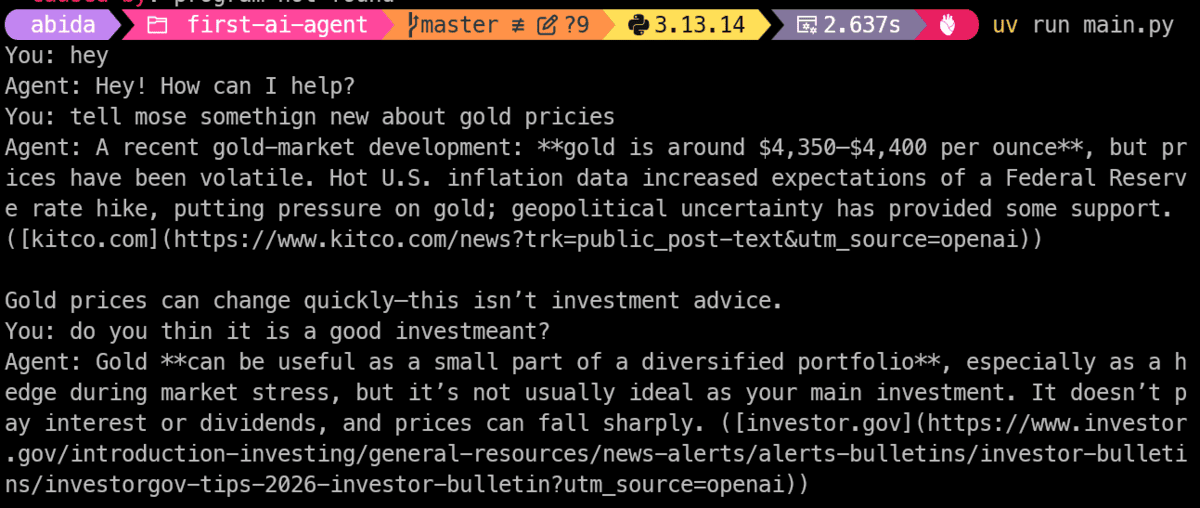
For local development and lightweight deployments, SQLiteSession provides a robust, file-backed storage mechanism that preserves dialogue history even across application restarts. Integrating persistent memory into a continuous chat loop requires initializing a session object and passing it to the execution runner:
from agents import SQLiteSession

session = SQLiteSession(
    "user_1",
    "conversations.db"
)

while True:
    message = input("You: ")

    if message.lower() in "exit", "quit":
        break

    result = Runner.run_sync(
        agent,
        message,
        session=session,
    )

    print("Agent:", result.final_output)
By leveraging this SQLite-backed session, follow-up queries referencing ambiguous pronouns—such as asking about "the latest version" immediately after discussing a specific programming language—are accurately resolved using historical context. For enterprise-grade, highly concurrent applications, the SDK extends this capability to distributed backends including Redis, SQLAlchemy, and MongoDB, ensuring scalable state management across multi-user environments.
Architectural Integration and Production Error Handling
Bringing all these components together results in a resilient, full-featured conversational agent capable of dynamic research, custom local execution, and persistent memory retention. In production environments, however, developers must also account for runtime exceptions, network disruptions, and graceful resource cleanup.
The complete architecture integrates tool registration, robust input validation, exception handling, and session management into a cohesive script structure:
import os
import sys

from agents import Agent, Runner, SQLiteSession, WebSearchTool
from agents.decorators import tool

@tool
def calculate_total(
    price: float,
    quantity: int
) -> float:
    """Calculate the total cost of an order."""
    return price * quantity

def main() -> None:
    if not os.environ.get("OPENAI_API_KEY"):
        sys.exit(
            "Error: set the OPENAI_API_KEY environment variable first."
        )

    agent = Agent(
        name="Assistant",
        instructions="""
        Help the user with research and calculations.
        Use the available tools when necessary.
        """,
        tools=[
            WebSearchTool(),
            calculate_total,
        ],
    )

    session = SQLiteSession(
        "user_1",
        "conversations.db"
    )

    try:
        while True:
            try:
                message = input("You: ")
            except (EOFError, KeyboardInterrupt):
                print()
                break

            command = message.strip().lower()

            if command in "exit", "quit":
                break

            if not command:
                continue

            try:
                result = Runner.run_sync(
                    agent,
                    message,
                    session=session,
                )
            except Exception as exc:
                print(
                    f"Agent error "
                    f"(type(exc).__name__): exc"
                )
                continue

            print("Agent:", result.final_output)

    finally:
        session.close()

if __name__ == "__main__":
    main()
Debugging and Observability in Agentic Workflows
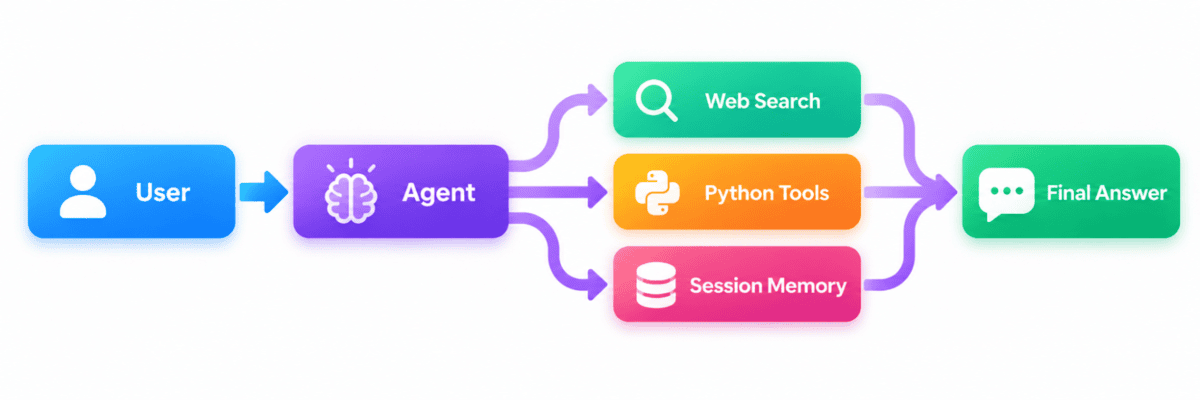
As agentic workflows scale in complexity—incorporating multi-agent handoffs, external API integrations, and conditional execution branches—debugging non-deterministic behavior becomes a central engineering challenge. To address this, the OpenAI Agents SDK enables native tracing by default.
Tracing captures granular execution telemetry, recording every model completion request, tool invocation parameter, intermediate reasoning step, and state transition. Developers can inspect these traces directly within the OpenAI dashboard to audit how an agent formulated a particular response, identify latency bottlenecks, evaluate tool selection efficiency, and refine system instructions to prevent hallucinations or improper function calls. This observability layer transforms agent debugging from speculative trial-and-error into a systematic, data-driven engineering discipline.
Broader Industry Implications and Future Outlook
The democratization of AI agent development through standardized software development kits marks a pivotal transition in enterprise software engineering. By abstracting the intricate mechanics of tool-calling loops and state management, frameworks like the OpenAI Agents SDK allow developers to focus on domain-specific logic rather than infrastructure plumbing.
The implications for industries reliant on data synthesis, customer operations, and automated research are profound. Organizations can transition from rigid, rule-based automation scripts to flexible, cognitive systems capable of interpreting unstructured user intent and executing complex operational pipelines safely. As these frameworks mature, developers can progressively introduce advanced architectural patterns—such as Model Context Protocol (MCP) servers, safety guardrails, specialized multi-agent handoffs, and deterministic verification layers—enabling autonomous systems to handle increasingly sophisticated enterprise tasks with high reliability.