Building a Local AI Customer Sentiment Analyzer for Private and Cost-Effective Call Center Insights

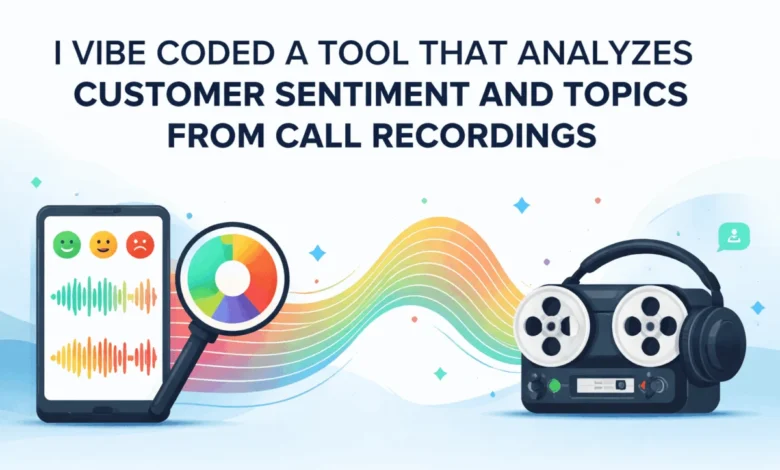
The global customer service industry generates millions of hours of audio recordings daily, yet a significant portion of this data remains unanalyzed due to the sheer volume of information and the complexity of manual review. Historically, extracting actionable insights from these recordings required either massive human labor or expensive, privacy-invasive cloud-based artificial intelligence services. However, a new paradigm in decentralized AI is emerging. By leveraging open-source models such as OpenAI’s Whisper, CardiffNLP’s RoBERTa, and BERTopic, organizations can now deploy sophisticated sentiment and topic analysis systems locally. This shift addresses the triple challenge of data privacy, operational costs, and the need for nuanced emotional intelligence in automated systems.
The Evolution of Speech Analytics in the Enterprise
Speech analytics has transitioned from basic keyword spotting to deep semantic understanding. Early iterations of call center monitoring relied on simple algorithms that flagged specific words like "angry" or "cancel." These systems often failed to capture the context, sarcasm, or the subtle emotional shifts that define a customer’s experience. The advent of Transformer-based models has revolutionized this field, allowing machines to process language with a level of sophistication that mimics human comprehension.
The demand for these insights is driven by the rapid growth of the Speech Analytics market. Industry reports suggest that the global market for these technologies, valued at approximately $2.8 billion in 2023, is expected to expand at a compound annual growth rate (CAGR) of nearly 20% through 2030. This growth is fueled by the need for "Voice of the Customer" (VoC) programs that provide direct feedback to product development and marketing teams.
The Architecture of a Localized Sentiment Analysis System
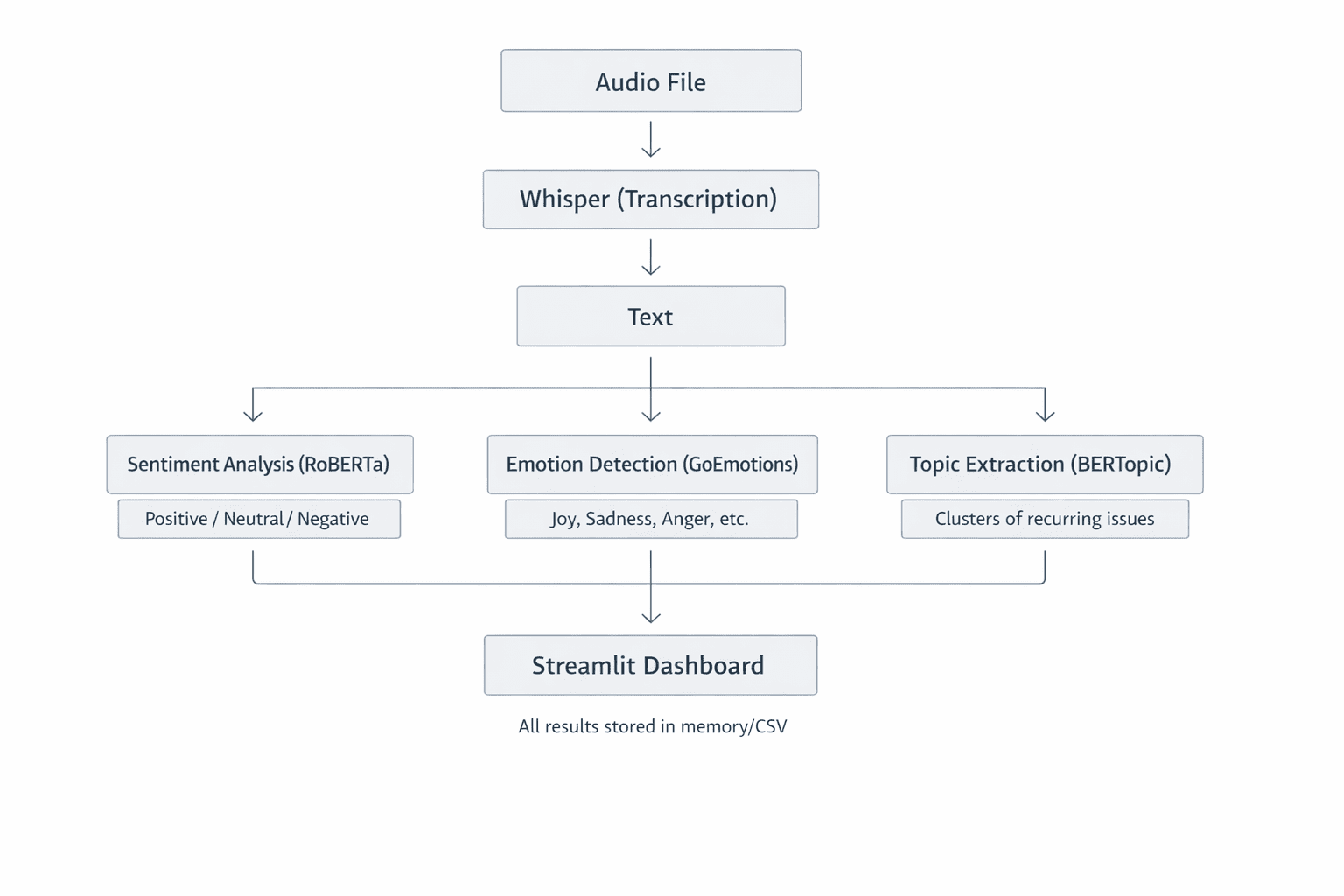
A modern, localized customer sentiment analyzer is built upon a modular architecture designed to handle distinct tasks: transcription, sentiment classification, and thematic clustering. By keeping these processes on-premises or on private hardware, companies bypass the security risks associated with transmitting sensitive customer data over the public internet.
High-Fidelity Transcription via Whisper
The first stage of the pipeline involves converting raw audio into text. This is achieved using Whisper, an automatic speech recognition (ASR) system. Unlike traditional ASR models, Whisper was trained on 680,000 hours of multilingual and multitask supervised data collected from the web.
The technical superiority of Whisper lies in its use of the Mel spectrogram—a representation of sound that mimics human auditory perception by focusing on frequencies the human ear is most sensitive to. The model processes these spectrograms through a Transformer encoder-decoder architecture, allowing it to maintain high accuracy even in the presence of background noise, varied accents, or technical jargon common in support calls. For developers and enterprises, Whisper offers a scalable range of model sizes—from "tiny" (39 million parameters) for rapid processing to "large" (1.55 billion parameters) for maximum transcription precision.
Contextual Sentiment and Emotion Detection
Once the transcript is generated, the system moves to the analytical phase. Simple lexicon-based methods, such as VADER, often struggle with the complexities of conversational English. For instance, a customer stating, "I am not happy with the lack of updates," contains the word "happy," which a basic counter might flag as positive.
To solve this, the local analyzer utilizes RoBERTa (Robustly Optimized BERT Pretraining Approach). Specifically, the CardiffNLP version, fine-tuned on millions of social media interactions, provides a robust framework for detecting sentiment (positive, neutral, negative) and specific emotions (anger, joy, sadness, etc.). By utilizing a Softmax activation layer in its final stage, the model assigns probabilities to various labels, allowing the system to output a "compound score" ranging from -1 to +1. This quantitative metric enables managers to track sentiment trends across thousands of calls simultaneously.
Automated Theme Discovery with BERTopic
Beyond how a customer feels is the question of what they are talking about. BERTopic serves as the thematic engine of the analyzer. Unlike older methods like Latent Dirichlet Allocation (LDA), which require users to pre-define the number of topics, BERTopic uses class-based TF-IDF (c-TF-IDF) to create dense clusters of meaning.
The process involves converting transcripts into embeddings—mathematical vectors that represent the meaning of the text. When customers mention "shipping delays," "late packages," or "delivery windows," the model recognizes their semantic proximity and clusters them into a single "Logistics" topic. This allows businesses to identify emerging issues in real-time, such as a localized warehouse problem or a recurring software bug, without manual tagging.
Addressing the Imperatives of Data Privacy and Cost
The decision to run AI models locally is increasingly driven by regulatory environments such as the General Data Protection Regulation (GDPR) in Europe and the California Consumer Privacy Act (CCPA) in the United States. These frameworks impose strict requirements on how personal identifiable information (PII) is handled.
The Privacy Advantage
In a cloud-based AI model, audio files containing names, addresses, and credit card numbers are transmitted to third-party servers. Even with encryption, this creates a potential surface for data breaches. According to IBM’s "Cost of a Data Breach Report 2023," the average cost of a data breach has reached $4.45 million. A local AI solution ensures that sensitive data never leaves the organization’s firewall, significantly reducing the compliance burden and the risk of catastrophic data leaks.
Economic Sustainability
While API-based models like those offered by OpenAI or Google Cloud are easy to implement, they carry significant recurring costs. For a call center processing 10,000 hours of audio per month, API fees can quickly escalate into tens of thousands of dollars. In contrast, a local implementation requires an upfront investment in hardware—specifically high-performance GPUs—but carries near-zero marginal costs for processing. Over a three-year lifecycle, the total cost of ownership (TCO) for a local system is often a fraction of a cloud-based equivalent.
Operationalizing Insights through Interactive Dashboards
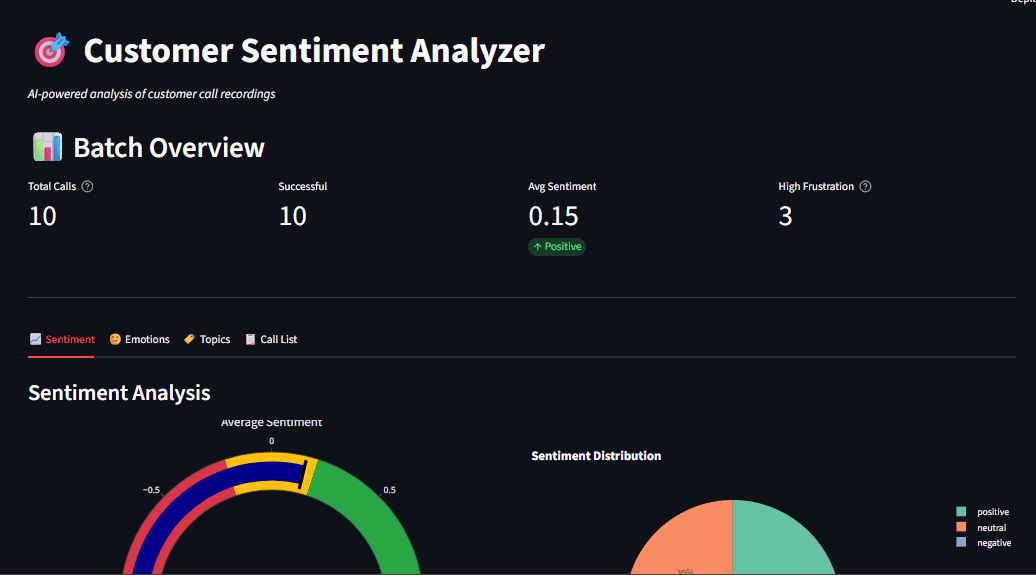
Data is only valuable if it is accessible to decision-makers. The integration of Streamlit—an open-source Python framework—allows for the rapid creation of interactive dashboards. These interfaces transform raw JSON outputs from AI models into visual narratives.
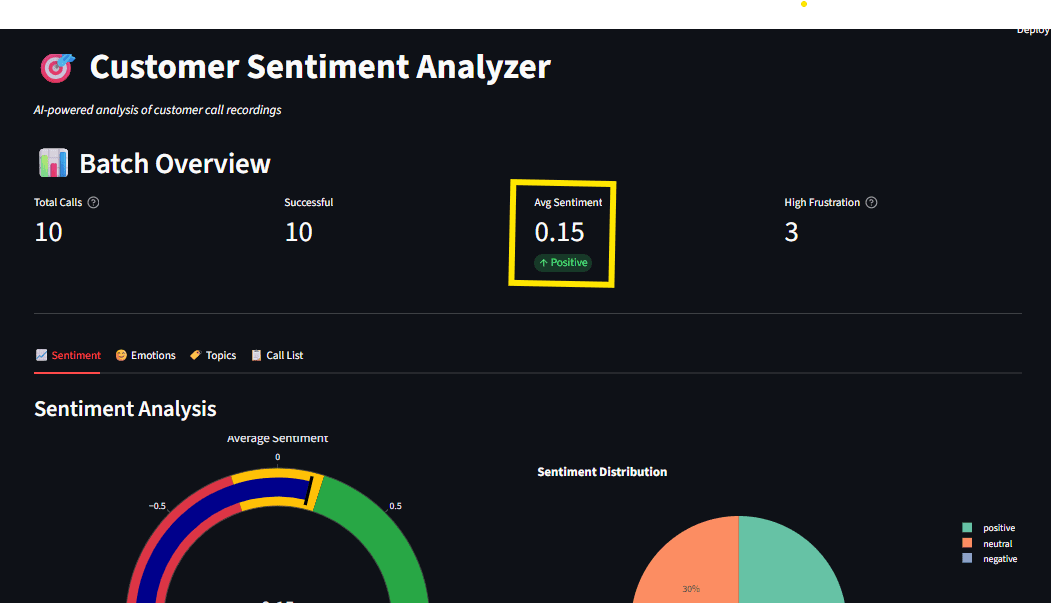
A typical executive dashboard for call analytics includes:
- Sentiment Gauges: Real-time visualizations of the overall "mood" of the customer base.
- Emotion Radars: Identifying if the predominant negative sentiment is driven by "anger" (requiring immediate intervention) or "disappointment" (requiring long-term product fixes).
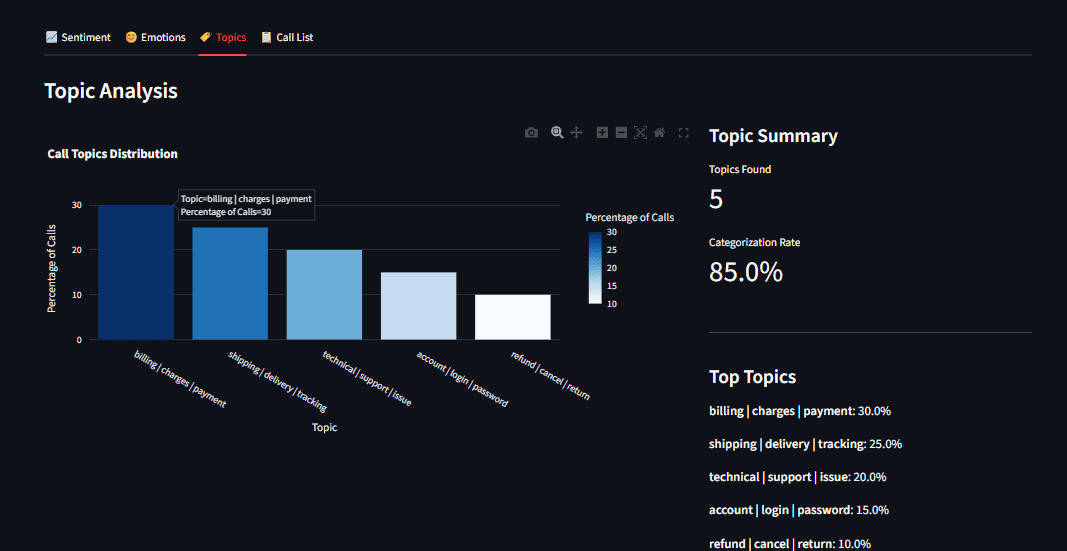
- Topic Distributions: Bar charts showing the frequency of specific complaints or inquiries.
- Drill-down Capabilities: Allowing supervisors to click on a "negative" data point and immediately view the corresponding transcript and audio segment.
To maintain performance, these dashboards utilize resource caching. This ensures that heavy AI models are loaded into the system’s memory only once, providing a seamless and responsive experience for the user.
Chronology of Implementation and Technical Milestones
The deployment of a local sentiment analyzer follows a structured technical timeline:
- Environment Configuration: Establishing a virtual Python environment and installing dependencies including PyTorch, Transformers, and Whisper.
- Model Acquisition: Downloading the pre-trained weights for the chosen models. Initial downloads typically total 1.5GB to 5GB depending on the precision required.
- Pipeline Integration: Writing the "glue code" that passes the output of the transcription engine directly into the sentiment and topic models.
- Batch Processing: Implementing logic to handle directories of audio files, allowing for the retrospective analysis of historical call data.
- Visualization Deployment: Launching the Streamlit server to provide the end-user interface.
Broader Implications and Future Outlook
The democratization of high-performance AI models signifies a shift in power from large cloud providers back to individual enterprises. As hardware becomes more efficient—specifically with the rise of AI-optimized silicon in consumer-grade laptops and server-grade GPUs—the barriers to entry for sophisticated local analytics will continue to fall.
Furthermore, this technology lays the groundwork for "Real-time Agent Assist." In the near future, these local models will not just analyze calls after they happen but will provide live feedback to customer service representatives during the conversation. If a model detects a customer’s frustration rising, it could automatically suggest a discount code or a specific troubleshooting script to the agent.
In conclusion, the development of local customer sentiment analyzers represents a critical intersection of machine learning, data ethics, and operational efficiency. By moving away from centralized APIs and toward local, open-source architectures, businesses can protect their customers’ privacy while gaining a deeper, more cost-effective understanding of the voices that drive their success. The project serves as a blueprint for the modern enterprise: one that is data-driven, privacy-conscious, and technologically sovereign.