The landscape of artificial intelligence has historically been defined by massive cloud infrastructure, proprietary APIs, and subscription paywalls. However, recent advancements in open-source software and consumer-grade hardware have fundamentally shifted this paradigm. Today, developers, hobbyists, and privacy-conscious technologists can construct a fully functional, localized AI voice assistant using entirely free tools. This comprehensive guide outlines the systematic process of hardware assessment, model selection, speech-to-text integration, and system architecture required to build a private voice assistant without relying on external cloud providers.
Hardware Assessment and VRAM Constraints
Before installing any software, the foundational prerequisite of local AI deployment is hardware evaluation. Unlike cloud-based solutions that offload computational demands to remote server farms, local large language models (LLMs) operate directly on the user’s local graphics processing unit (GPU). Consequently, performance hinges entirely on two critical metrics: the amount of dedicated Video RAM (VRAM) and the GPU architecture manufacturer.
Users must navigate to their operating system’s task manager or system monitor to verify dedicated VRAM capacity. This figure dictates the scale and complexity of the AI models that can be hosted locally. Furthermore, the underlying graphics architecture dictates software compatibility. The vast majority of machine learning tutorials and optimization frameworks are engineered for Nvidia GPUs, leveraging the company’s proprietary CUDA (Compute Unified Device Architecture) platform.
For users operating on AMD hardware, the deployment path requires alternative infrastructure. Rather than CUDA, AMD systems utilize Vulkan, a cross-platform graphics and compute application programming interface. While this necessitates minor adjustments during setup, Vulkan is natively supported by modern local AI deployment suites, ensuring that AMD users are not locked out of local model execution.
Deploying the Foundation with LM Studio
The orchestration of local AI models typically relies on dedicated model runners, with LM Studio serving as a prevalent engine for desktop environments. LM Studio provides a graphical interface that simplifies the management, downloading, and local hosting of open-source weights. By abstracting the complex command-line interfaces traditionally required to run machine learning frameworks, the software allows users to interact with models via a chat interface and deploy local API servers.
Once installed, the platform acts as the central hub for model selection. Choosing the appropriate model requires balancing hardware constraints with functional requirements. Industry standards recommend selecting models published by original developers—such as Qwen or Meta—or reputable community curators who package weights specifically for consumer hardware optimization.
A critical step in this phase is verifying GPU offloading capability. Software interfaces often feature specific indicators, such as a green status badge, confirming that a given model can be fully loaded into the GPU’s VRAM. If a model exceeds available VRAM, execution must fall back to system RAM, drastically reducing generation speeds. Additionally, quantization—represented by alphanumeric codes such as Q4_K_M—dictates the compression level of the model weights. The Q4_K_M standard offers an optimal balance between execution speed, output quality, and memory footprint.
Enabling Local Server Architecture and Interoperability
While running an AI model inside a chat application window offers isolated utility, true assistant integration requires cross-application communication. To enable external programs—such as voice recognition scripts or custom graphical user interfaces—to interact with the local model, users must activate the local server feature within the management software.
This mechanism spins up a local API endpoint, typically emulating standard cloud API structures. This allows secondary software to send prompt requests and receive text completions locally over the machine’s loopback address. However, hardware limitations remain a persistent factor. On systems equipped with modest VRAM allocations—such as 16GB configurations—multitasking between distinct models (such as a general conversational agent and a dedicated programming model) requires sequential loading. Switching between models incurs a brief initialization delay as weights are swapped in and out of memory.
Configuring System Prompts and Behavioral Parameters
Transforming a generic foundational model into a specialized assistant relies heavily on system prompts. The system prompt functions as a persistent set of instructions injected before every user interaction, dictating the persona, tone, and formatting constraints of the model’s outputs.
Developers often segment these configurations based on operational use cases. A casual interaction profile can be programmed for conversational engagement, while a productivity profile strips away conversational filler to emulate specific writing styles or technical output formats. Rigorous testing is essential during this phase; initial prompts must be evaluated against edge cases to ensure the model acknowledges knowledge limitations rather than fabricating information—a common phenomenon known as hallucination.
Implementing Wake Word Detection and Voice Pipelines
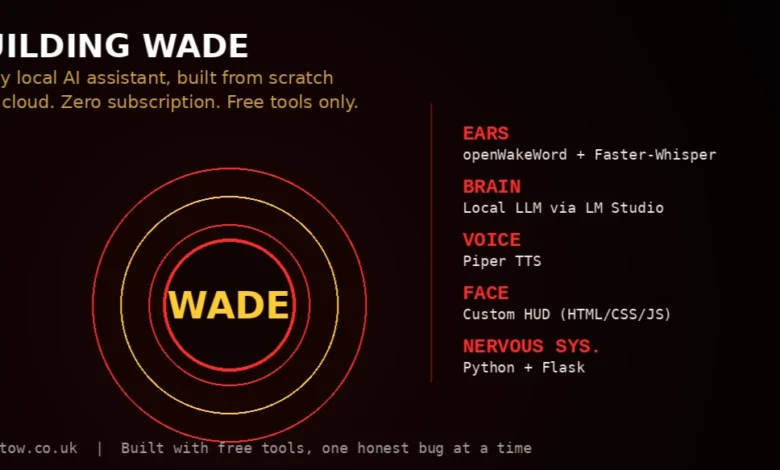
Transitioning from a text-based interface to a voice-activated assistant requires a continuous audio-monitoring pipeline. This is achieved through wake word engines such as openWakeWord, which locally process ambient microphone input to detect specific trigger phrases without transmitting audio data to external servers.
A notable limitation in current open-source wake word ecosystems is the lack of custom-trained, arbitrary phrase recognition out of the box. Users are generally restricted to a pre-trained lexicon of wake phrases unless they invest time in training custom voice models from scratch. Furthermore, audio hardware configuration often presents more troubleshooting hurdles than software code. Suboptimal microphone sensitivity or misconfigured default input devices frequently impede wake word detection long before software debugging becomes necessary.
Speech-to-Text and Text-to-Speech Integration
A complete voice loop requires bidirectional audio translation: converting spoken user input into text, processing that text through the LLM, and synthesizing the resulting text back into audible speech.
For speech recognition, frameworks like Faster-Whisper provide robust, locally executed transcription capabilities derived from OpenAI’s Whisper architecture. Conversely, text-to-speech (TTS) synthesis is managed by projects like Piper, which generate natural-sounding voice output entirely on local hardware. While these open-source tools offer complete data privacy and zero operational costs, developers must manage expectations regarding vocal expressiveness, as local TTS models generally exhibit a distinct trade-off in cadence and natural inflection compared to commercial cloud-based alternatives.
System Integration and Software Architecture
The final phase of building a local AI assistant transitions from configuration to software engineering. A comprehensive voice loop requires a backend orchestration script—frequently written in Python utilizing lightweight web frameworks like Flask—to manage the sequential execution of services:
- Continuous listening via the wake word engine.
- Audio capture upon trigger activation.
- Transcription via Faster-Whisper.
- Text generation via the local LLM server API.
- Speech synthesis via Piper.
- User interface rendering through a custom Head-Up Display (HUD) built with HTML, CSS, and JavaScript.
Broader Implications and Privacy Paradigm
The proliferation of accessible local AI tooling marks a significant shift in consumer computing and data privacy. Historically, advanced natural language processing and voice interaction required constant data transmission to centralized cloud servers, raising security and surveillance concerns. By leveraging consumer GPUs and open-source models, individuals can achieve functional parity with commercial smart assistants while retaining absolute ownership of their data.
As optimization techniques continue to improve, the hardware threshold required to run high-performance models locally is steadily decreasing. While building a bespoke assistant demands technical patience and troubleshooting across disparate software libraries, the resulting ecosystem represents a democratization of artificial intelligence infrastructure, shifting power from centralized cloud monopolies back to the end user.