Google Cloud Announces General Availability of Advanced Spend Caps to Combat Runaway Cloud Costs and Enhance Enterprise Financial Governance

Google Cloud has officially announced the general availability of spend caps on Google Cloud Budgets, marking a significant milestone in enterprise cloud financial management, commonly known as FinOps. Designed to address one of the most persistent operational headaches for modern engineering and finance teams—unexpected, runaway cloud bills—this new feature introduces robust programmatic and automated guardrails. Rather than relying on destructive resource-deletion policies, which can inadvertently disrupt critical production workloads or delete irreplaceable data, the newly released spend caps temporarily pause specific services or projects when predefined financial limits are breached, preserving the underlying architecture while halting financial exposure.
This general availability rollout is directly informed by extensive user feedback collected during the initial preview phase. Enterprise customers across industries have increasingly demanded tighter integration between their infrastructure deployment pipelines and their financial tracking tools. In response, Google Cloud has rolled out three major updates designed to inject programmability, real-time visibility, and automated lifecycle management into the cloud cost-control playbook.
The Evolution of Cloud FinOps and the Need for Spend Caps
To understand the significance of this release, one must examine the shifting paradigm of enterprise cloud consumption. Over the past decade, cloud computing has accelerated digital transformation, enabling organizations to scale compute, storage, and advanced artificial intelligence workloads on demand. However, this elasticity has a distinct downside: the decentralized nature of cloud provisioning often leads to decentralized cost management. Developers spinning up sandbox environments, data scientists training massive machine learning models, and automated CI/CD pipelines misfiring can generate staggering financial liabilities before traditional billing systems even register the anomaly.
Historically, organizations relied on reactive alert systems. Budgets would be set, and when thresholds were crossed, automated emails or chat notifications would be dispatched to engineering leads. By the time an engineer noticed the notification and manually investigated the source of the cost spike, thousands of dollars in excess charges might have already accumulated. In worst-case scenarios, companies attempted to mitigate this by implementing aggressive scripts that deleted resources entirely upon budget exhaustion—a heavy-handed approach that frequently broke dependent applications, interrupted continuous integration workflows, and degraded user experiences.
Google Cloud’s dual-pronged defense strategy, which pairs predictive anomaly detection with non-destructive spend caps, represents a maturation in FinOps tooling. By acknowledging that human intervention is often too slow to combat automated cloud scaling, Google is providing enterprises with systemic, automated financial safety nets.
Automation Through the New Spend Caps API
One of the most operationally burdensome aspects of cloud governance is managing financial guardrails at scale. For organizations managing hundreds or thousands of discrete cloud projects—such as large financial institutions, software-as-a-service (SaaS) providers, and digital-native startups—manually configuring and updating budget thresholds in a graphical user interface (GUI) is practically impossible.
To solve this enterprise scaling challenge, Google Cloud has launched the dedicated spend caps API, integrated directly into the existing Cloud Billing Budgets API. This programmatic interface allows infrastructure and finance teams to codify their financial boundaries and embed them directly into their Infrastructure-as-Code (IaC) workflows, such as Terraform or custom deployment scripts.
Through the spend caps API, administrators can automatically enforce financial caps on eligible services within any given project with zero manual overhead. For example, when a developer or a continuous integration script spins up a new sandbox or testing project, automation scripts can now instantly apply a predefined spend cap. Furthermore, the API enables teams to lift, update, or delete caps on the fly as project requirements evolve or funding is approved. This eliminates the latency between project creation and financial governance, ensuring that no shadow IT or untracked sandbox environment can run up unexpected bills.
Real-Time Visibility Powered by Live Cost Reports
Financial governance in the cloud is only as effective as the data driving it. Standard cloud billing pipelines traditionally rely on batch-processing mechanisms that aggregate net costs over several hours or even days. While sufficient for end-of-month accounting and high-level forecasting, delayed reporting is entirely inadequate for real-time spend cap enforcement, particularly in the era of resource-intensive AI and machine learning workloads.
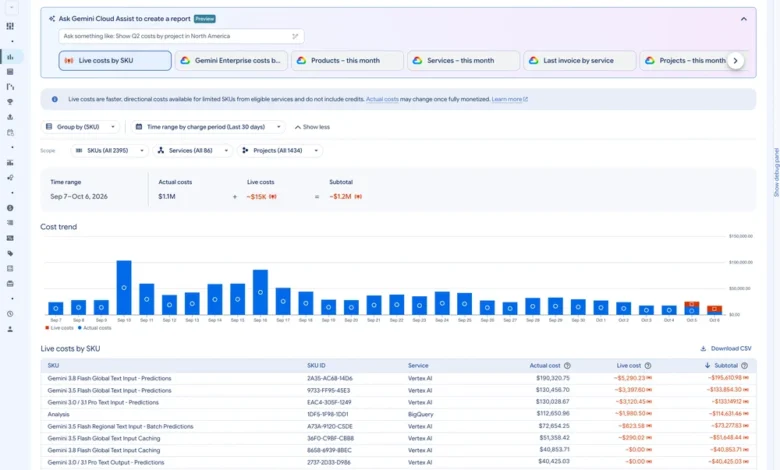
To bridge this operational gap, Google Cloud has enhanced its Cost Reports to support live, estimated costs, specifically tailored to trigger spend caps for AI services within minutes of usage. When a spend cap is enforced, administrators need immediate context to understand the root cause of the breach.
By integrating faster, estimated cost metrics directly into the Cost Reports dashboard, Google Cloud provides teams with instantaneous financial snapshots. Instead of waiting for delayed billing pipelines to settle net costs, engineers and finance managers can immediately identify the precise service, SKU, or user activity that triggered the limit. This rapid feedback loop allows for precise root-cause analysis and swift remediation, preventing minor configuration errors from turning into major budget crises.
Automated Guardrails and Monthly Resets
During the initial preview phase of Google Cloud Budgets, one of the primary pieces of feedback from enterprise users concerned the lifecycle management of triggered spend caps. Previously, once a spend cap was breached and usage was paused, the restriction remained locked in place until an administrator manually intervened in the Cloud Console to lift the cap.
While this strict manual control appealed to organizations with exceptionally rigorous compliance requirements, it created unnecessary friction for routine operational workflows. If a non-production project hit its cap on the tenth day of the month, services remained blocked for the remaining three weeks unless someone remembered to manually reset the budget—or until the calendar rolled over, which previously required distinct manual administrative action depending on the configuration.
To streamline this process without sacrificing security, Google Cloud is introducing automated monthly resets. Under this new operational model, enforced spend caps will automatically reset at the beginning of each billing cycle, allowing blocked services to seamlessly resume operations without manual administrative intervention.
For organizations that maintain strict internal governance policies requiring human auditing before any paused service can resume, Google has ensured continuity by preserving the manual override option. Enterprises can choose whether they want a fully automated lifecycle or a strictly audited, human-in-the-loop restoration process based on their specific risk tolerance and compliance frameworks.
Integrating Spend Caps Into the GCP Dual-Pronged Defense Playbook
Google Cloud’s broader architectural vision for cost management relies on a symbiotic relationship between predictive monitoring and active financial enforcement. The release of general availability spend caps completes what Google refers to as its "dual-pronged defense playbook," combining Early Anomalies Detection with active spend capping.
The first line of defense in this framework is predictive monitoring via Early Anomalies Detection. This feature analyzes early cost signals on a daily basis, utilizing machine learning algorithms to alert administrators of directional spend variances before they result in catastrophic budget overruns. By spotting anomalous cost spikes early and pinpointing the exact Stock Keeping Unit (SKU) driving the trend, cloud architects can investigate unusual patterns—such as a runaway query or a misconfigured storage bucket—before financial damage accumulates.
The second line of defense is financial enforcement through spend caps. While anomaly detection warns teams of abnormal behavior, spend caps act as the definitive backstop. Once a budget threshold is breached, the system programmatically pauses usage for the specific project or service, providing absolute protection against runaway spend while preserving the underlying project resources from deletion. Together, these two features create a closed-loop defense system that covers both proactive awareness and reactive protection.
Industry Implications and Best Practices for Implementation
The general availability of advanced spend caps arrives at a critical juncture for the cloud computing industry. As macroeconomic pressures prompt enterprises to scrutinize technology expenditures more closely, the demand for granular cloud financial management has never been higher. The proliferation of generative artificial intelligence and large language model training has further exacerbated the urgency, as AI workloads are notoriously compute-intensive and capable of generating massive financial footprints in remarkably short windows of time.
Industry analysts note that tools like Google Cloud’s spend caps shift the burden of cost management away from reactive spreadsheet auditing and toward proactive, automated software engineering practices. By treating cloud budgets as code via APIs and integrating financial guardrails directly into deployment pipelines, organizations can foster a culture of financial accountability among developers without stifling innovation.
As organizations prepare to deploy spend caps across their cloud environments, Google Cloud and independent FinOps practitioners recommend several operational best practices:
- Gradual Rollout: Begin by implementing spend caps on non-production environments, such as development, testing, and sandbox projects, where temporary service pauses will not impact end-user experience or business-critical revenue streams.
- API Integration: Leverage the new spend caps API to automate the application of financial boundaries whenever new projects are provisioned, ensuring comprehensive coverage across the entire organizational hierarchy.
- Policy Alignment: Coordinate closely between finance and engineering teams to determine whether automated monthly resets or manual audit overrides best align with corporate compliance and governance requirements.
- Monitoring Integration: Combine spend caps with Early Anomalies Detection to establish baseline monitoring, ensuring that teams receive early warnings well before a hard financial cap is actively enforced.
Getting Started with Google Cloud Spend Caps
With spend caps now generally available and fully supported for enterprise-scale workloads, Google Cloud is encouraging organizations to review its official technical documentation to plan their deployment strategies.
Administrators and FinOps practitioners can navigate directly to the Budgets and Alerts page within the Google Cloud Billing Console to configure their first spend caps. For teams looking to integrate programmatic guardrails into existing continuous integration and deployment workflows, comprehensive guides and references for the new spend caps API are available through the official Google Cloud documentation portal.
By marrying programmatic flexibility with real-time visibility and automated lifecycle management, Google Cloud’s latest release provides enterprises with the sophisticated tooling required to navigate the complexities of modern cloud economics safely and efficiently.