A New Era of macOS Interaction
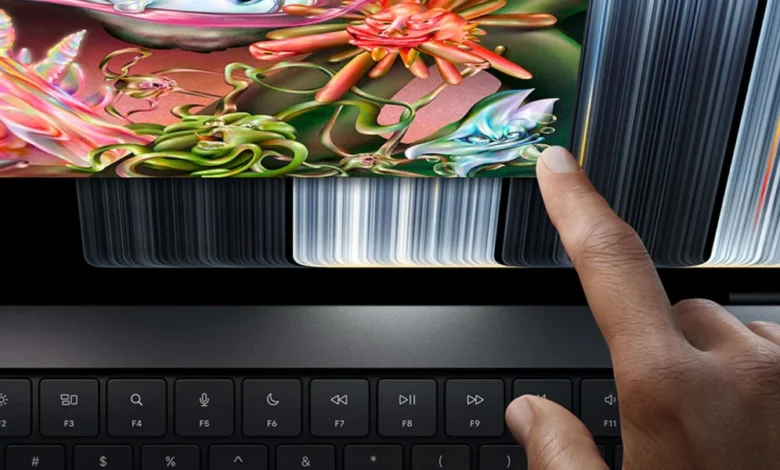
The unveiling of the MacBook Pro with PROLED XDR coincides with the maturation of macOS 27 Golden Gate, an operating system update specifically engineered to handle dual-input paradigms. While the transition from mouse and trackpad to touch has been a gradual process, the release of this hardware confirms that Apple’s strategy has evolved. The company is no longer viewing the Mac solely as a "pointer-and-click" machine, but as a hybrid powerhouse capable of responding to the nuances of human touch.
Engineers at Apple have spent the better part of the last three years refining the touch-target architecture within macOS. Early implementations focused on high-level accessibility, but macOS 27 introduces system-wide adjustments that prioritize precision and tactile feedback. These changes are not merely aesthetic; they represent a fundamental restructuring of how windows, menus, and system-level tools recognize user intent in a touch-first environment.

Chronology of the Touch-Enabled Mac
The path to this moment has been paved with years of speculation and incremental software releases. For years, Apple executives, including CEO Tim Cook, dismissed the idea of a touchscreen Mac, arguing that the ergonomics of reaching toward a vertical screen were inferior to the trackpad experience. However, the internal roadmap shifted as the line between iPadOS and macOS began to blur.
- 2023–2024: Apple initiates internal testing on "Project Cascade," a series of prototypes aimed at integrating touch-sensitive layers into existing Liquid Retina XDR displays without sacrificing color accuracy or brightness.
- Early 2026: macOS 27 Golden Gate is teased at the Worldwide Developers Conference (WWDC), featuring "Touch Foundation" frameworks that provide developers with the API support necessary to convert pointer-based inputs into touch-ready coordinates.
- October 2026: Apple officially announces the MacBook Pro with PROLED XDR, featuring a redesigned display stack capable of processing multi-touch gestures at a high polling rate.
- Late 2026: The product hits retail shelves, marking the first time in the company’s history that a professional MacBook is marketed with native touch capabilities.
Technical Enhancements and UI Adaptations
The integration of touch technology required Apple to rethink the visual language of the desktop. The most immediate change is the implementation of "dynamic touch targets." When the system detects a finger approaching the display, UI elements that are traditionally small—such as the "traffic light" window controls (close, minimize, and zoom)—dynamically expand. This prevents the frustration of "fat-fingering" small icons, a common complaint in earlier attempts at hybrid computing by other manufacturers.
Beyond static elements, Apple has translated the sophisticated gesture library of the trackpad to the screen. Mission Control, a core component of macOS, can now be triggered by a three-finger swipe up directly on the glass. Similarly, navigating between Spaces or scrolling through long-form web content in Safari feels fluid, matching the high-refresh-rate performance of the ProMotion display.

A particularly significant addition for developers is the fully touch-interactive iOS simulator. Previously, testing touch-based iOS applications on a Mac required cumbersome workarounds using a mouse to mimic swiping or pinching. With the new MacBook Pro, developers can interact with their builds exactly as they would on an iPhone or iPad, drastically streamlining the development-to-deployment pipeline.
Market Context and Industry Implications
The decision to introduce a touchscreen Mac is widely viewed as a reaction to changing market expectations. As tablets have become more powerful, users have increasingly demanded that their professional laptops offer the same level of tactile engagement. However, Apple’s implementation differs from the "convertible" trend seen in the Windows ecosystem. By maintaining the traditional clamshell form factor rather than opting for a 360-degree hinge or detachable keyboard, Apple is positioning the MacBook Pro as a laptop first, with touch as an intuitive secondary input method.
From an industry perspective, this move signals a broader consolidation of Apple’s hardware. By standardizing touch support across macOS, Apple is likely preparing for a future where the distinction between iPad and Mac hardware is even further minimized. Analysts suggest that this could lead to a more unified software experience, where professional applications like Final Cut Pro or Logic Pro are rewritten to prioritize a "touch-and-pen" workflow, potentially encroaching on the market share of dedicated drawing tablets and specialized editing consoles.

Official Stance and Future Roadmap
During the announcement, Apple representatives emphasized that this is merely the "first phase" of a multi-year strategy. While the current optimizations in macOS 27 are robust, the company has hinted at deeper integrations, including enhanced haptic feedback through the display and more sophisticated stylus support.
"We are committed to maintaining the precision of the mouse and trackpad while unlocking the creative potential of direct touch," said an Apple spokesperson. The firm has confirmed that more touch-centric refinements are already in the pipeline for future point releases of macOS 27 and will be a major focus of the upcoming WWDC.
Analysis: A Shift in Creative Workflow
The implications for creative professionals are profound. For a graphic designer, the ability to zoom into a canvas with a pinch gesture while simultaneously using a mouse for pixel-perfect adjustments represents a significant boost in efficiency. For developers, the ability to test UI responsiveness on a desktop screen without moving to a separate test device saves time and resources.

However, the success of this hardware will ultimately depend on third-party developer adoption. While Apple has optimized its first-party apps—Safari, Mail, and the Finder—the true test lies in how professional suites like Adobe Creative Cloud and Microsoft 365 leverage these new inputs. Early indicators are positive, with major software vendors already announcing plans to update their macOS interfaces to support the new touch-target API.
Conclusion
The release of the MacBook Pro with PROLED XDR marks a pivot point for personal computing. By successfully integrating touch into the Mac without compromising the professional reliability that the platform is known for, Apple has set a new benchmark for premium hardware. As the company continues to refine its software to match the capabilities of its new displays, the lines between mobile and desktop computing will continue to fade, offering users a more versatile, fluid, and intuitive way to interact with their digital workspaces.
For now, the industry watches closely to see if this implementation of touch will eventually migrate to the MacBook Air and the wider Mac desktop lineup. Given Apple’s history of cascading new features from its Pro-tier products down to the consumer level, it is highly probable that touch will become a standard requirement for all future Mac computers within the next three to five years. For current users, the choice is clear: the future of the Mac is not just on the keyboard, but directly on the screen.
Related posts: