Pumpkin Lights is a creative Mac utility that reimagines the system theme toggle through interactive 3D physics.

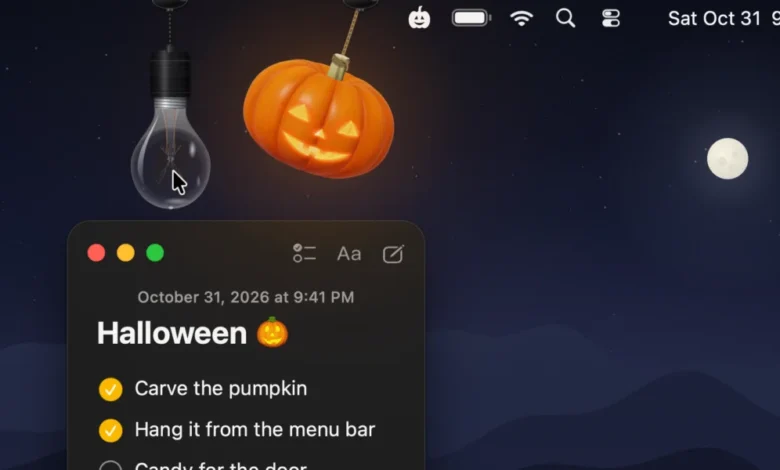
As the macOS ecosystem continues to mature, indie developers are increasingly focusing on "delightful utility"—the intersection of high-end software engineering and whimsical user interface design. The latest application to emerge from this movement is Pumpkin Lights, a menu bar utility for macOS that transforms the mundane task of switching between Light and Dark modes into a tactile, physics-based experience. Released just in time for the Halloween season, the application serves as a prime example of how small-scale developers are leveraging Apple’s advanced graphics frameworks to breathe new personality into the desktop environment.
The Evolution of Menu Bar Customization
The history of macOS menu bar utilities is extensive, tracing back to the early days of System 7 and evolving into the modern era of the App Store. While system settings are traditionally buried within the Control Center or the System Settings app, a sub-genre of "niche utilities" has emerged to provide shortcuts to these functions. Applications like Festivitas, released in late 2024, set a precedent for seasonal, interactive menu bar ornaments.
Pumpkin Lights builds upon this legacy by integrating real-time ray tracing—a technology typically reserved for high-end gaming—into a functional desktop shortcut. By moving away from static icons and toward dynamic, physics-driven models, the developer, Boyu Cheng, has successfully bridged the gap between a system utility and a decorative desktop toy. This shift reflects a broader trend in software development where user engagement is driven by the "feel" of an interface as much as its core utility.
Technical Architecture and Design Philosophy
At its core, Pumpkin Lights is a lightweight application designed to interface directly with the macOS window server to toggle system-wide appearance settings. However, the technical implementation is what distinguishes the software from simple shell scripts or menu bar aliases. The app utilizes a custom physics engine to simulate the movement of a jack-o-lantern or a light bulb suspended from the top of the display.
The developer notes that the primary objective was to replace the abstract, digital nature of the system toggle with a tangible, object-oriented interaction. To achieve this, the app features:

- Real-time Ray Tracing: The 3D models of the pumpkins and bulbs are rendered in real-time, allowing light to interact with the geometry of the "carved" face. This ensures that the glow emitted by the candle inside the pumpkin remains consistent with the orientation of the object.
- Physics-Based Interaction: Users can pull, swing, or spin the object. The "rope" or cord supporting the decoration utilizes kinematics to mimic real-world weight and tension.
- Customization Parameters: The application includes four distinct color variants and multiple design templates, allowing users to tailor the aesthetic to their specific desktop wallpaper or workspace theme.
Functional Utility Beyond the Aesthetic
While the visual presentation is the primary hook, the functional capabilities of Pumpkin Lights are robust. By default, clicking the swinging object triggers the macOS theme toggle, switching the system from Light Mode to Dark Mode. However, the utility is highly extensible, allowing users to map the interaction to a variety of secondary functions:
- System Automation: Users can configure the object to execute specific shell commands or custom Shortcuts, effectively turning the pumpkin into a launchpad for complex workflows.
- Productivity Tools: The app includes a "Keep Awake" function, which prevents the Mac from entering sleep mode—a useful feature for users presenting content or monitoring long-running background tasks.
- Utility Integration: The ability to mute system sounds or launch specific applications directly from the interaction provides a secondary layer of utility that justifies the app’s presence in the menu bar beyond its seasonal novelty.
Developer Insights and Design Intent
In a statement regarding the development process, Boyu Cheng emphasized the importance of "delight" in software design. "The idea came from something most of us do every day without thinking: switching between Light and Dark Mode," Cheng explained. "It’s always a toggle buried in Control Center or System Settings, and it never feels like anything. I wanted it to feel like touching a real object."
This design-first philosophy is a recurring theme in the current indie app landscape. By spending significant development time on the "feel"—the way the cords sway, the responsiveness of the physics, and the subtle lighting effects—the developer aims to create a persistent emotional connection with the user. This is intended to ensure that the utility remains relevant long after the initial novelty of the Halloween season fades.
Broader Implications for the macOS Ecosystem
The release of Pumpkin Lights highlights a significant shift in how developers interact with the macOS UI. Traditionally, developers have been encouraged to adhere strictly to Apple’s Human Interface Guidelines, which emphasize uniformity and predictability. However, the popularity of highly customized menu bar items suggests that users are increasingly seeking ways to personalize their digital environments.
The implication for the future of macOS is clear: users want their operating system to be more than just a productivity tool; they want it to be an extension of their personal style. When an app as simple as a toggle button can be transformed into a piece of interactive digital art, it challenges the industry to rethink the standard UI elements that have remained largely unchanged for years.
System Requirements and Availability
Pumpkin Lights is currently distributed as a free utility, reflecting the developer’s commitment to accessibility within the indie community. The application is built specifically for modern macOS architectures, requiring macOS 14 (Sonoma) or later to function correctly. This restriction is primarily due to the reliance on modern graphics APIs (such as Metal) required to handle real-time ray tracing and complex physics calculations.

For users interested in the development cycle or seeking to contribute feedback, the developer maintains an active presence on social media platforms, including X (formerly Twitter). The project is open to future updates, with potential for seasonal variations beyond the current Halloween theme, such as winter or holiday-themed ornaments.
Conclusion
Pumpkin Lights represents the best of the indie developer community: a small, focused project that prioritizes high-quality craftsmanship, creative engineering, and a genuine desire to improve the user experience. By gamifying a system setting that is usually static and boring, the application provides a refreshing perspective on interface design. As users continue to spend more time at their workstations, the value of such "delightful" software—apps that make the act of using a computer feel just a little bit more engaging—is likely to grow.
Whether one is a casual user looking for a festive desktop decoration or a power user interested in the technical implementation of real-time physics in a menu bar app, Pumpkin Lights offers a compelling, free addition to the macOS toolkit. It serves as a reminder that even the smallest components of an operating system can be transformed into something extraordinary with the right amount of creativity and attention to detail.
For those looking to install the utility, the developer has provided a direct download link via their official website. As the app continues to gain traction, it stands as a testament to the fact that the most impactful software is often that which successfully balances form and function, proving that even a simple toggle can have personality.