Ulysses updates for macOS 27 and iOS 27 with Siri AI integration and enhanced customization


The recent public release of macOS 27 Golden Gate and iOS 27 has triggered a wave of software updates across the Apple ecosystem, with the professional writing application Ulysses leading the charge. Known for its minimalist, Markdown-focused interface, Ulysses has officially rolled out a significant update that integrates deep-level Siri AI functionality, overhauled toolbar customization, and the introduction of structured project templates. These changes reflect a broader industry trend toward AI-augmented writing environments, balancing the need for advanced machine learning tools with the preservation of a focused, distraction-free environment for authors.
The Evolution of Ulysses: A Decade of Iteration
Since its initial rise to prominence in the mid-2010s, Ulysses has maintained a reputation as the gold standard for long-form writing on Apple devices. The software, which transitioned to a subscription-based model in 2017, has historically resisted the urge to clutter its interface with feature creep.
The chronology of the app’s development highlights a deliberate pace:

- 2016–2018: Expansion into the cloud with iCloud sync and refinement of the "Library" structure.
- 2019–2021: Introduction of advanced export styles, including ePub and PDF formatting for self-publishers.
- 2022–2024: Broadening cross-platform compatibility and integration with third-party tools like Setapp.
- 2025–2026: Pivot toward AI integration, culminating in the current support for macOS 27 and iOS 27.
This latest update arrives at a time when professional writers are increasingly utilizing large language models (LLMs) to assist with drafting, proofreading, and syntactical refinement. By integrating these capabilities directly into the operating system’s native Siri AI layer, Ulysses aims to reduce the "context-switching" penalty, where users frequently jump between their writing app and a web-based AI interface.
Siri AI Integration and Onscreen Awareness
The centerpiece of the update is the integration of Siri AI. This feature allows users to invoke the system’s intelligence directly within the writing environment. By leveraging the updated APIs provided in macOS 27 and iOS 27, Ulysses can now analyze the text currently displayed on the user’s screen.
The implementation is categorized into four primary workflows:
- Drafting: Users can generate outlines or preliminary text blocks based on existing notes.
- Rewriting: Siri AI can suggest stylistic changes, tone adjustments, or sentence structure improvements to match specific editorial guidelines.
- Proofreading: Automated grammar and syntax checks that operate beyond standard spell-check capabilities.
- Contextual Analysis: Because the tool possesses "onscreen awareness," it can answer questions about the current document, such as summarizing long-form chapters or extracting key points for metadata.
It is important to note that this functionality is currently subject to regional availability. Users within the European Union will not have access to these specific AI features at launch, a byproduct of the complex regulatory environment surrounding data privacy and AI deployment in that region.
Toolbar Customization and User Experience Improvements
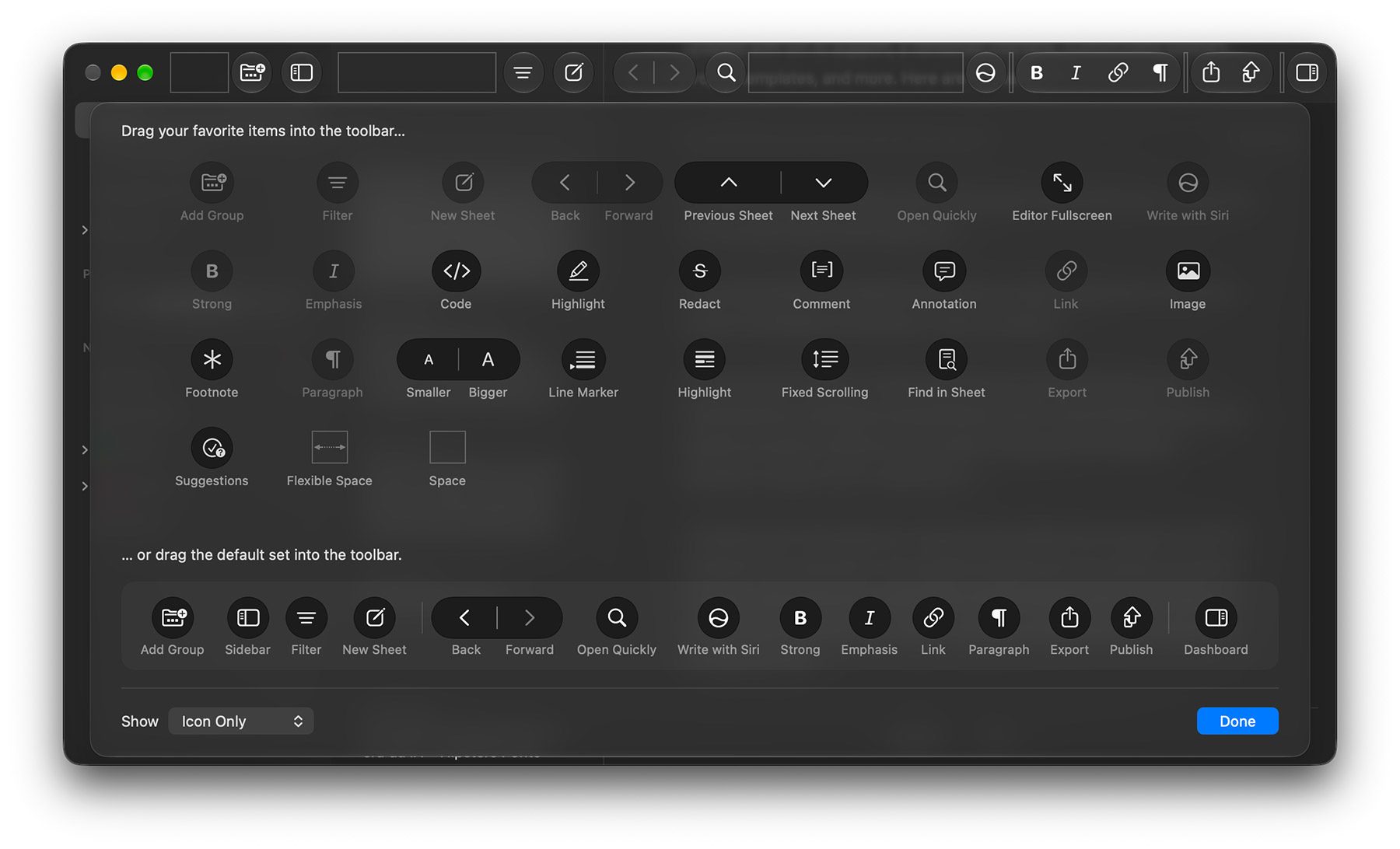
Beyond the headline-grabbing AI features, the Ulysses development team has prioritized user interface modularity. The new version allows for complete customization of the macOS toolbar. Historically, the toolbar provided a fixed set of options; however, users can now drag-and-drop specific functional buttons, block types, and navigation elements to suit their unique workflows.
This is a functional response to user feedback requesting a more personalized workspace. Power users often maintain distinct toolsets depending on whether they are writing technical documentation, journalistic articles, or creative fiction. By allowing for "spaces" and "suggestions" to be pinned to the toolbar, the application enables a more efficient interaction with the app’s internal library of Markdown blocks.
Furthermore, the update addresses accessibility and visual consistency. New group icons and expanded support for screen readers when modifying filter conditions underscore a commitment to inclusive design. The aesthetic language has also been updated to align with the visual design language of the new operating systems, ensuring that the app feels native to the updated macOS 27 and iOS 27 environments.
Project Templates: Streamlining Workflows
The introduction of project templates represents a shift toward helping users manage complexity. Ulysses has historically functioned as a "bottom-up" application, where files are created individually and organized later. The new template system shifts this to a "top-down" approach.

When a user initiates a new project, they can now select from a variety of templates that automatically populate the workspace with dummy groups and sheets. For authors working on multi-part series or journalists maintaining recurring columns, these templates provide a pre-structured environment—complete with naming conventions and organization hierarchies—from the moment the project begins. This reduces the administrative overhead of setting up new folders and files, allowing writers to begin the creative process immediately.
Industry Context and Market Implications
The software update arrives during a period of high competition in the text-editor market. Alternatives such as Obsidian, Scrivener, and Bear have each taken different approaches to AI. While Obsidian relies heavily on community-developed plugins, Ulysses is opting for a first-party integration that relies on Apple’s system-wide AI architecture.
From a market perspective, this move is a strategic attempt to maintain relevance among professional writers who are currently evaluating the utility of AI in their creative workflows. Data from industry analysts suggests that while adoption of AI-writing tools is high, the "trust" factor remains a primary barrier. By integrating with Siri AI, Ulysses is effectively outsourcing the privacy and security protocols to Apple, which may provide a level of comfort to users concerned about their intellectual property being used to train third-party models.
Official Stance and Future Outlook
While Ulysses has not released a formal statement regarding the long-term roadmap for their AI implementation, the release notes imply that this is merely the first step. The integration of "onscreen awareness" is a foundational capability that will likely be expanded as Apple refines its own AI models in future iterations of macOS.

For existing users, the update is available immediately through the App Store and is included for subscribers of the Setapp platform. For those who rely on Ulysses for daily production, these changes represent a significant shift in the app’s utility. By providing a bridge between the traditional, distraction-free writing experience and the modern requirement for AI-assisted efficiency, Ulysses is positioning itself to remain a fixture in the professional writing software ecosystem for years to come.
Summary of Key Updates
- Platform Compatibility: Full support for macOS 27 Golden Gate and iOS 27.
- Siri AI: Integration of rewriting, proofreading, and drafting tools with onscreen awareness.
- Interface: Fully customizable toolbars for macOS users.
- Productivity: New project templates to automate the creation of document hierarchies.
- Accessibility: Improved navigation and editing controls for group icons and filter conditions.
As users continue to migrate their workflows to these updated environments, the effectiveness of the Siri AI implementation will likely be the primary metric by which this update is judged. For now, the combination of UI refinement and system-level AI integration provides a robust framework for both long-form writers and short-form content creators.