
MacOS 27.3 brings native Markdown rendering to Quick Look as Apple doubles down on AI-driven workflows

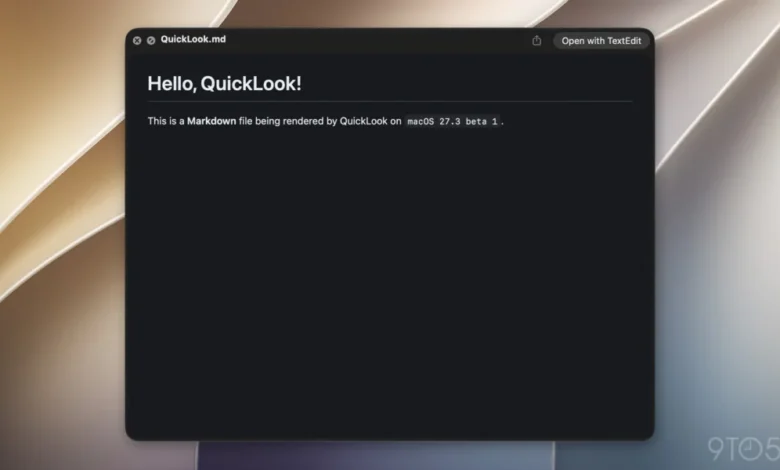
The release of macOS 27.3 beta 1 marks a significant evolution in how Apple’s desktop operating system handles plain-text documentation. Among a suite of updates that includes new Safari features like Vertical Tabs and Adaptive Dark Mode, as well as expanded Siri AI capabilities, is a subtle but highly functional enhancement to Quick Look: native support for Markdown (.md) file rendering. For years, users interacting with Markdown files in the Finder have been limited to viewing raw syntax—a display of asterisks, hashes, and brackets. With the latest beta, the operating system now interprets these files, presenting them with proper formatting, headers, and bulleted lists the moment the user taps the spacebar.
A Chronology of Markdown Integration at Apple
To understand the significance of this update, one must look at the trajectory of Apple’s software ecosystem over the past several years. Markdown, the brainchild of John Gruber, was introduced in 2004 as a tool to bridge the gap between human-readable plain text and machine-readable HTML. For two decades, it remained the domain of developers, technical writers, and power users who relied on third-party editors like Obsidian, Ulysses, or Typora.
Apple’s initial hesitation to embrace the format was long interpreted as a preference for its proprietary rich-text frameworks. However, the paradigm shifted significantly in 2025 with the release of iOS 26, which saw the Notes app gain robust import and export support for Markdown. This signaled that Apple was beginning to view Markdown not merely as a niche coding language, but as a standard for structured data. The inclusion of native rendering in macOS 27.3 is the logical next step, moving the format from the confines of specific applications into the fundamental architecture of the Finder.
The Role of AI in Standardizing Markdown
The transition of Markdown from a writing tool to a structural necessity is inextricably linked to the rapid advancement of generative AI. As Apple expands its Siri AI features, the need for standardized, lightweight, and highly readable instruction sets has become paramount.
Industry analysts have observed that AI agents function most efficiently when provided with contextual information formatted in a way that is easily parsed by Large Language Models (LLMs). Markdown fits this requirement perfectly. It provides a lightweight structure—headings, bolding, and lists—that helps AI models maintain context during complex tasks.

This is evidenced by the introduction of the SKILL.md file standard, which developers are now using to create advanced app skills for Siri. As noted by industry observers, these files serve as the "instruction manuals" for Siri to navigate third-party application interfaces. By allowing these files to be rendered in Quick Look, Apple is providing developers and power users with an immediate, visual way to audit and debug the very instructions that govern how their applications interact with the system’s AI.
Technical Implications for the Finder and Quick Look
Quick Look has long been the unsung hero of the macOS experience. By allowing users to inspect the contents of a file without the overhead of launching a heavy application, it has maintained a reputation for speed and efficiency. Previously, the inability to render .md files meant that a user wanting to verify the contents of a Markdown document had to either rely on a text editor or interpret the raw code mentally.
The integration in macOS 27.3 utilizes the same rendering engine that Apple has been deploying across its platforms to ensure consistency. By treating Markdown as a first-class citizen in the Quick Look framework, Apple is effectively acknowledging that a growing segment of its user base—ranging from professional software engineers to academic researchers—relies on these files as their primary documentation format.
From a performance standpoint, this is a low-impact implementation. Because Markdown is essentially plain text, the rendering process adds virtually zero latency to the Quick Look preview, preserving the fluid, instant nature of the feature that users have come to expect.
Industry Context and Competitive Landscape
The move to natively support Markdown puts Apple in closer alignment with industry standards favored by the developer community. While Microsoft’s Visual Studio Code has long set the benchmark for Markdown integration in development environments, Apple’s implementation is focused on the general-purpose user.
The broader industry trend is clearly moving toward "AI-ready" file formats. Other platforms, including various cloud-based storage services and collaborative tools like Notion and GitHub, have built their entire business models around the fluidity of Markdown. By integrating this into the core of macOS, Apple is effectively reducing the friction for users to migrate their workflows into the Apple ecosystem. Users who previously relied on third-party "previewer" plugins—which were often inconsistent or abandoned by their developers—will now have a reliable, system-level solution.

Broader Impact on Productivity Workflows
The implications for professional productivity are substantial. For technical writers, the ability to quickly verify documentation files without exiting the Finder streamlines the editing cycle. For the average user, the shift may be less immediate but equally transformative. As more apps adopt AI-driven features, users are increasingly likely to encounter Markdown files, whether they are logs generated by a smart-home automation or instructions for an AI-powered project manager.
Furthermore, this update suggests that Apple is committed to transparency in its AI implementations. By allowing users to easily view the content of SKILL.md files, Apple is effectively opening the "black box" of its AI skills to a degree. It allows for a level of user oversight that is vital as AI agents take on more autonomous roles within the operating system.
Looking Ahead
As macOS 27.3 moves through its beta cycle, the community is closely watching for further refinements. While the current implementation handles standard Markdown, there is ongoing discussion regarding support for "flavors" of the language, such as GitHub Flavored Markdown (GFM), which includes features like tables and task lists.
The inclusion of this feature in a point-release update like 27.3 demonstrates that Apple’s development cycle for macOS has become increasingly responsive to the needs of its professional and technical user base. Whether this will lead to further Markdown integration—such as native editing capabilities within the Finder or more robust support in the TextEdit application—remains a subject of speculation.
However, the current trajectory is clear: Markdown has moved from the periphery to the center of Apple’s productivity strategy. As the operating system continues to lean into AI-driven assistance, the reliance on lightweight, human-readable, and machine-parsable documentation formats will only grow. With macOS 27.3, Apple has ensured that its desktop interface is not just a place to view content, but a place to understand the logic that powers the modern computing experience.
For developers and users alike, this update serves as a quiet reminder that the most significant improvements to an operating system are often those that simplify the underlying data structures we interact with every day. By making Markdown a native part of the Quick Look experience, Apple has successfully bridged the gap between raw code and intuitive, visual information, setting a new standard for how we interact with the files that define our digital lives.