Decoding ChunkLoadError: Why React and Next.js Applications Break After Production Deployments and How to Fix It

Modern web engineering often introduces a deceptive phenomenon: a production release goes live, newly arriving users navigate the application seamlessly, but returning visitors or users with active browser sessions encounter abrupt crashes. Typical indicators include errors such as "ChunkLoadError," "Failed to load chunk," or "Failed to fetch dynamically imported module." Historically, standard troubleshooting advice treated these occurrences as minor client-side glitches, frequently resolved by simply instructing the user to perform a hard page refresh. However, a deeper investigation into modern JavaScript application architecture reveals that these errors signal a critical misalignment between client-side runtimes and server-side deployment mechanics.
To understand why this issue persists across modern single-page applications (SPAs) and server-rendered frameworks like React and Next.js, engineering teams must evaluate the intricate lifecycle of web assets, browser caching policies, and continuous integration and deployment (CI/CD) pipelines.
The Anatomy of a Modern Frontend Build and Release
To comprehend the origin of version-mismatch failures, one must first examine how modern JavaScript frameworks bundle and deliver code. Unlike legacy monolithic web architectures that shipped a single, comprehensive script file, contemporary bundlers such as Vite, Webpack, and Turbopack employ code-splitting techniques.
Instead of generating a uniform file named app.js, a production build splits code into discrete, highly targeted fragments known as chunks. A user’s initial request typically retrieves a lightweight HTML document alongside a primary runtime script. Secondary features—such as user dashboards, administrative panels, or settings modules—remain sequestered in separate files. These dynamic chunks are requested only when a user navigates to a specific route or triggers a particular component load via functions like dynamic imports (import()).
To optimize performance and cache management, modern build systems append unique cryptographic hashes to file names. For instance, Version 1 of an application might generate main-ABC123.js and dashboard-XYZ456.js. When developers implement changes and push Version 2 to production, the compilation process generates fresh assets with updated hashes, such as main-DEF789.js and dashboard-QWE321.js.
Problems arise when the deployment infrastructure fails to account for users who initiated their browser sessions prior to the rollout of Version 2.
The Root Cause: Version Mismatch and Missing Assets
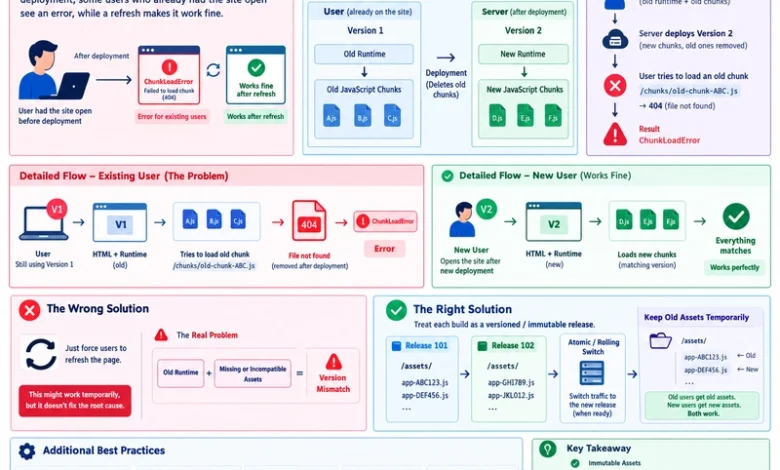
The sequence of events leading to a ChunkLoadError follows a predictable trajectory. A user opens an application instance running Version 1, and the browser caches the initial HTML and runtime scripts locally. Hours later, development teams deploy Version 2. The server updates its file directory, replacing old static outputs or clearing the previous build cache to save storage space.
When the user—still operating the Version 1 runtime—subsequently interacts with an untested feature or navigates to a new view, the local JavaScript runtime attempts to fetch its associated dependency. For example, the browser dispatches an HTTP GET request for /assets/dashboard-XYZ456.js.
Because Version 2 has replaced those files, the server responds with a 404 Not Found status. Unable to parse a missing module or execute the expected code, the JavaScript engine halts execution, yielding a ChunkLoadError or a dynamic import failure.
Crucially, the browser itself is not malfunctioning. The local runtime is simply executing instructions based on the state it downloaded initially, while the server fails to provide the specific assets required to fulfill those instructions.

The Illusion of the Page Refresh
When a user triggers a browser refresh, the situation temporarily resolves. The browser bypasses its stale runtime state, requests the latest HTML document from the server, and receives the references corresponding to Version 2. Consequently, the browser downloads the new runtime, matches the current asset hashes, and executes without error.
While this mechanism restores functionality for the individual user, relying on manual or forced page refreshes highlights an inadequate deployment strategy. Industry analyses indicate that abrupt release cycles can frustrate end users, particularly if an unintended reload occurs while inputting complex form data or executing uncommitted transactions, leading to data loss and degraded user experience.
Architectural Solutions for Production Environments
Engineering teams scaling React, Next.js, and other component-driven frameworks must adopt robust deployment methodologies to eliminate version mismatches at the infrastructure level. Rather than deploying code through destructive overwrite operations, modern production environments implement specific architectural safeguards.
1. Immutable and Versioned Assets
Production servers must treat static assets as immutable. When Version 2 is compiled, its newly hashed files should be written alongside existing assets rather than overwriting them. Because filenames incorporate content hashes, files like app-ABC123.js and app-DEF789.js can peacefully coexist within the static file directory. This ensures that a browser running an older runtime can still successfully retrieve its required dependencies.
2. Atomic and Rolling Deployments
Destructive deployment practices—such as stopping a server, deleting the old build directory, copying new files, and restarting the application—introduce availability gaps. Modern architectures favor atomic deployments, where a new release is built, uploaded, and validated in an isolated directory before traffic is dynamically shifted to it via a load balancer or reverse proxy.
Similarly, rolling deployments update server instances incrementally. By distributing traffic across multiple nodes where subsets run Version 1 while others run Version 2, organizations minimize system-wide disruption and allow active user sessions to conclude naturally.
3. Strategic Caching Configurations
Cache-Control headers must be configured intentionally based on resource types. HTML documents, which dictate the entry point and version pointers for the application, should not be cached indefinitely; they require frequent revalidation to ensure clients promptly discover newer deployments. Conversely, hashed static assets can safely leverage long-term caching headers (Cache-Control: public, max-age=31536000, immutable), because any modification to the source code inherently generates a new cryptographic hash and a distinct filename.
4. Controlled Recovery Mechanisms
While architectural controls prevent most deployment-related errors, automated error boundaries can catch residual ChunkLoadError exceptions in client code. When caught, applications can execute a controlled recovery sequence, such as verifying network connectivity or prompting the user to update. However, engineers caution against implementing infinite, unmanaged reload loops, which can trap users in continuous refresh cycles if server-side misconfigurations persist.
Industry Implications and Best Practices
The conversation surrounding ChunkLoadError transcends framework-specific debates. Whether an organization relies on Next.js, Vite-powered React, Angular, or Vue, the fundamental challenge remains a distributed systems synchronization problem between client runtimes and server assets.
Senior engineering leadership emphasizes that robust deployment pipelines must prioritize backward compatibility during release windows. By decoupling build outputs into versioned releases, preserving older static assets temporarily until active user sessions drain, and aligning CDN caching rules with application lifecycles, web teams can eliminate unexpected production crashes. Ultimately, resolving the ChunkLoadError requires viewing deployments not as instantaneous file replacements, but as coordinated transitions across a distributed client-server ecosystem.